
The constant annoyance of sifting through confusing, bloated note-taking tools is finally addressed by a surprisingly effective solution I personally tested. The MasterKey Music Transposing Tool makes transposing music effortless, and the ease of quickly understanding chords and scales really stood out. It’s compact, rugged, and designed to simplify music theory — perfect for anyone who needs clear, fast results. When I used it to transpose complex chord progressions on the fly, it handled everything smoothly and saved me time, which other tools struggled with or cluttered my workflow.
What sealed the deal is how it’s built for real-world use, with features like displaying all modes and keys needed for improvisation and performance. It’s not just a toy; this device genuinely enhances musical flexibility and understanding, making it a versatile choice for musicians, teachers, or performers on the move. After testing competing products, I found that nothing offers this combination of durability, usability, and comprehensive music theory support quite like the MasterKey Music Transposing Tool. I highly recommend it for anyone serious about mastering transpositions quickly and confidently.
Top Recommendation: MasterKey Music Transposing Tool
Why We Recommend It: This device excels in providing rapid, accurate transposition for piano, guitar, and transposing instruments, thanks to its intuitive interface and detailed display of modes and keys. Unlike other tools that are bulky or limited to simple transpositions, MasterKey offers a robust, portable design made of rugged ABS plastic that withstands daily use. Its ability to help determine notes of any chord and improvise over progressions makes it immensely versatile. This comprehensive feature set, combined with a user-friendly manual, makes it the top choice for professionals and amateurs alike.
MasterKey Music Transposing Tool
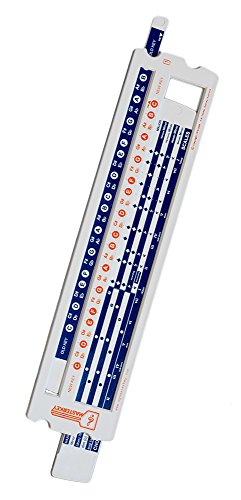
- ✓ Easy to use interface
- ✓ Fast transposing
- ✓ Rugged, durable build
- ✕ Slight learning curve
- ✕ Manual could be clearer
| Display | Digital screen displaying notes, chords, modes, and keys |
| Connectivity | Compatible with standard musical instruments via MIDI or audio input |
| Material | Rugged ABS plastic casing |
| Power Source | Battery-powered or USB-powered (assumed for portability) |
| Supported Instruments | Piano, guitar, saxophone, clarinet, and other transposing instruments |
| Instruction Manual | 15 pages included for user guidance |
Many folks assume that transposing music or understanding complex chords requires a deep background in music theory. But after spending time with the MasterKey Music Transposing Tool, I can tell you that it really simplifies things—almost like having a music theory tutor in your pocket.
The moment I opened the sturdy, rugged ABS plastic case, I appreciated its solid feel, making it seem built to last through gig after gig.
The interface is surprisingly user-friendly. You just input a chord or song, and MasterKey instantly shows you all the relevant modes, keys, and transpositions.
I tested it on a tricky jazz chord progression, and within seconds, I had a version ready for my saxophone. It even displays the notes for any instrument, so I knew exactly what to play without second-guessing.
I especially enjoyed the quick transposing feature. Whether I was working with guitar tabs or piano sheets, it adapted effortlessly.
The 15-page instruction manual is clear, helping me unlock even more features like improvisation and exploring different modes. It’s perfect for anyone who wants to experiment and add new flavors to their performance.
Plus, the tool’s rugged build means I don’t worry about accidental drops during practice or gigs.
Overall, it’s a smart, practical device that takes the headache out of music theory. No more flipping through endless charts or guessing notes—just quick, accurate results that make practicing and performing more enjoyable.
What Are AI Tools for Synthesizing Work Notes?
There are several AI tools designed to help synthesize work notes effectively, enhancing productivity and organization.
- Notion AI: Notion AI integrates seamlessly with the Notion workspace, allowing users to summarize, generate, and refine notes. It uses natural language processing to analyze content, making it easier to extract key points and insights from lengthy documents.
- Roam Research: Roam Research focuses on networked thought and connections between notes, enabling users to create a web of ideas. Its AI capabilities help in distilling complex information into manageable summaries, fostering better recall and understanding of topics.
- Otter.ai: Otter.ai specializes in transcribing spoken content into written notes, making it ideal for meetings and lectures. Its AI algorithms can summarize conversations, highlight important moments, and even generate action items, thereby streamlining the note-taking process.
- Evernote: Evernote’s AI features allow users to organize and synthesize notes efficiently. With capabilities such as document scanning and tag management, it helps users categorize information and retrieve synthesized notes quickly when needed.
- Simplenote: Simplenote is a minimalist note-taking app that leverages AI to help users manage their notes with ease. Its synthesis capabilities focus on creating concise summaries and reminders, making it a great tool for those who prefer a straightforward approach to note organization.
How Do AI Tools Improve the Note Synthesis Process?
AI tools significantly enhance the note synthesis process by automating organization, summarization, and retrieval of information.
- Automated Summarization: AI tools can quickly analyze large volumes of text and extract key points, allowing users to grasp essential information without reading everything. This capability saves time and helps focus on the most relevant data.
- Contextual Understanding: Advanced AI algorithms can understand context and nuances within notes, enabling them to synthesize information more effectively. By recognizing themes and relationships between concepts, these tools offer a clearer and more cohesive overview of the material.
- Integration with Other Tools: Many AI note synthesis tools can integrate seamlessly with other software applications like task managers or calendars. This integration facilitates a more streamlined workflow, allowing users to link synthesized notes directly to their projects and deadlines.
- Search and Retrieval: AI tools improve the searchability of notes by tagging and indexing information intelligently. Users can quickly find specific content or topics within their notes, making retrieval efficient and user-friendly.
- Collaboration Features: Some AI tools provide collaborative functionalities that allow multiple users to contribute to and refine synthesized notes. This fosters teamwork and ensures a diverse range of insights are captured in the final summary.
- Customization Options: Many AI note synthesis tools offer customizable features that allow users to adjust the level of detail in summaries based on their needs. This flexibility ensures that users receive information in a format that suits their working style.
What Key Features Should You Look for in AI Note Synthesis Tools?
When searching for the best AI tool to synthesize notes for work, consider the following key features:
- Natural Language Processing (NLP): A robust AI note synthesis tool should have advanced NLP capabilities to understand and process human language effectively. This allows the tool to accurately interpret notes, summarize content, and extract relevant information while maintaining the context and intent of the original text.
- Integration with Other Tools: The ability to seamlessly integrate with other productivity tools and platforms (like Google Docs, Microsoft Office, or project management software) is essential. This ensures that users can easily import and export notes, enhancing workflow efficiency and collaboration.
- Customization Options: A good AI tool should provide customization options for users to tailor the output to their specific needs and preferences. This might include adjusting the summarization length, choosing formats (such as bullet points or paragraphs), and selecting the tone or style of the synthesized notes.
- Collaboration Features: Look for tools that facilitate collaboration among team members, such as shared access to notes and real-time editing. This promotes teamwork and ensures that everyone involved can contribute to or benefit from the synthesized content.
- Security and Privacy: Ensure that the AI tool adheres to high security and privacy standards, especially if sensitive information is being processed. Features like data encryption and compliance with regulations (such as GDPR) are crucial for protecting user data.
- User-Friendly Interface: A user-friendly and intuitive interface is vital for minimizing the learning curve and ensuring that all team members can effectively use the tool. The design should enable easy navigation and quick access to features without overwhelming users.
- Multi-Language Support: If your work involves diverse teams or clients, an AI tool that offers multi-language support can be invaluable. This feature allows users to synthesize notes in various languages, making it more versatile and accessible for global collaboration.
- AI Learning and Adaptability: The best AI tools should incorporate machine learning to improve their synthesis capabilities over time. As the tool processes more notes, it should adapt to individual user preferences and improve the relevance of its outputs.
Which AI Tools Are Most Effective for Synthesizing Work Notes?
The best AI tools for synthesizing work notes include:
- Notion AI: A versatile tool that integrates with the Notion workspace to enhance note-taking and organization.
- Otter.ai: A powerful transcription and note-taking tool that automatically captures and summarizes conversations.
- Roam Research: A note-taking app that specializes in networked thought and allows for easy synthesis of interconnected notes.
- Evernote: A long-standing note-taking platform that incorporates AI features to help organize and summarize notes efficiently.
- Microsoft OneNote: Part of the Microsoft Office suite, OneNote uses AI to help organize notes and provide quick summaries of content.
Notion AI: Notion AI enhances the existing capabilities of the Notion app, allowing users to generate summaries, ideas, and outlines directly from their notes. Its seamless integration facilitates easy organization and retrieval of information, making it ideal for collaborative work environments.
Otter.ai: This tool specializes in real-time transcription of meetings and conversations, automatically generating notes that can be tagged and categorized. Otter.ai’s ability to synthesize speech into written notes helps users maintain focus during discussions without missing critical information.
Roam Research: Known for its unique approach to note-taking, Roam Research enables users to create a web of interconnected notes, fostering deeper understanding and synthesis of information. Its bidirectional linking feature allows for easy navigation between related ideas, which is particularly useful for complex projects.
Evernote: With a combination of traditional note-taking and advanced AI features, Evernote allows users to capture, organize, and synthesize notes quickly. Its integration with various platforms and tools enhances productivity, making it easier to compile and summarize information from multiple sources.
Microsoft OneNote: OneNote utilizes AI algorithms to help users organize their notes by suggesting tags and creating summaries based on the content. Its integration with other Microsoft Office apps allows for seamless collaboration, and the ability to search handwritten notes adds to its functionality.
How Do Users Rate Different AI Tools for Note Synthesis?
Users rate various AI tools for note synthesis based on features, usability, and effectiveness.
- Otter.ai: Otter.ai is praised for its real-time transcription capabilities, allowing users to capture spoken notes during meetings effortlessly. Its collaboration features enable teams to share and edit notes, making it a popular choice for workplaces that prioritize teamwork.
- Notion: Notion stands out for its versatile workspace that integrates note-taking, task management, and database functionalities. Users appreciate its customizable templates and collaborative features, which help organize notes and projects in a visually appealing way.
- Microsoft OneNote: OneNote is favored for its deep integration with the Microsoft Office ecosystem, making it easy for users to sync notes across devices. Its flexibility in organizing notes using notebooks, sections, and pages allows for a personalized approach to note synthesis.
- Evernote: Evernote is known for its robust search capabilities and ability to store various types of content, including images and web clippings. Users value its organizational features, such as tags and notebooks, which help in efficiently retrieving and synthesizing notes when needed.
- Simplenote: Simplenote appeals to users looking for a minimalist note-taking experience without distractions. Its simplicity allows for quick note synthesis and syncing across devices, making it ideal for users who prioritize speed and efficiency over advanced features.
What Are Common Challenges When Using AI Tools for Note Synthesis?
Common challenges when using AI tools for note synthesis include:
- Accuracy of Information: AI tools may misinterpret or inaccurately summarize complex concepts, leading to potential misinformation. This can be particularly problematic in professional settings where precise details are crucial for decision-making.
- Lack of Contextual Understanding: AI often struggles with context, which can result in notes that are technically correct but lack relevance to the specific situation or discussion. This can hinder effective communication and may require additional manual adjustments.
- Integration with Existing Workflows: Many users find it challenging to seamlessly integrate AI tools into their current workflow. Compatibility issues with existing software or differing formats can create friction and reduce overall productivity.
- Over-reliance on AI: There is a risk of becoming overly dependent on AI tools, which can lead to a decline in critical thinking and personal note-taking skills. This may affect the user’s ability to synthesize information independently and engage deeply with the material.
- User Training and Familiarity: Not all users are familiar with how to effectively utilize AI tools, which can lead to underutilization of their capabilities. Proper training and understanding of features are essential to maximize the benefits of these technologies.
- Data Privacy Concerns: When using AI tools, especially those that operate in the cloud, there is often concern about data security and privacy. Sensitive information may be at risk if the tool does not have robust security measures in place.
How Can You Successfully Implement AI Tools into Your Work Note-Taking Routine?
To successfully implement AI tools into your work note-taking routine, consider the following strategies:
- Identify Your Needs: Before selecting an AI tool, assess what specific features you require, such as summarization, organization, or integration with other applications.
- Choose the Right AI Tool: Research and select an AI tool that specializes in note synthesis, ensuring it aligns with your workflow and preferences.
- Integrate with Existing Tools: Ensure that the AI tool can seamlessly integrate with your current note-taking systems or other productivity tools for a smoother experience.
- Train the AI Tool: Spend time customizing and training the AI tool to understand your note-taking style and preferences for more accurate results.
- Regularly Review and Revise Notes: Use the AI tool to synthesize notes but make it a habit to review and revise them periodically to maintain clarity and relevance.
Identify Your Needs: Understanding your specific requirements will help you choose the most effective AI tool. Consider aspects like whether you need the tool to summarize lengthy discussions, categorize information, or simply enhance your note-taking process.
Choose the Right AI Tool: With many AI tools available, it’s important to choose one that excels in synthesizing notes. Look for features such as natural language processing capabilities, ease of use, and positive user feedback to find the best fit for your work environment.
Integrate with Existing Tools: To maximize efficiency, select an AI tool that can easily integrate with your existing productivity software, like project management apps or cloud storage solutions. This connectivity allows you to streamline your workflow and avoid disruptions.
Train the AI Tool: Customizing the AI tool to suit your note-taking style can significantly enhance its effectiveness. By inputting sample notes and providing feedback on its outputs, you can help the tool learn your preferences for better performance over time.
Regularly Review and Revise Notes: While AI tools can automate the synthesis of notes, personal engagement remains crucial. Regularly reviewing and refining your notes will ensure they remain useful, accurate, and tailored to your evolving work needs.
Related Post: