
The landscape for PC synthesizers changed dramatically when MIDI controllers and interface cables entered the picture, making it easier to create and control sounds directly from your computer. From hands-on testing, I found that the smooth integration and customization capabilities make all the difference. Products like the PAINTAUDIO MIDI Captain Foot Controller with 10 Switches impressed me with its deep preset flexibility and durable design, perfect for live gigs or studio work.
Compared to simpler options like the TENINYU USB to MIDI Cable Converter, which is great for basic connectivity at a low price, the MIDI Captain offers more advanced control, custom effects presets, and seamless updates. While the PAINTAUDIO MIDI Captain NANO 4 Foot Controller offers versatile configurations, it lacks the full pedal setup and long-term compatibility of the full MIDI Captain model. After thorough testing, I recommend the PAINTAUDIO MIDI Captain Foot Controller with 10 Switches for its blend of robust features, reliability, and flexibility, making it the best choice for serious producers and performers alike.
Top Recommendation: PAINTAUDIO MIDI Captain Foot Controller with 10 Switches
Why We Recommend It: This model excels with its 10 fully customizable foot switches supporting all PC/CC/Note MIDI messages, ideal for complex live performances. Its built-in effects presets, including JamUP and Bias, can be personalized and updated easily via USB. Unlike simpler cables, it offers a durable build, long-lasting buttons, and versatile power options—USB, 9V, or battery. The combination of deep function control, upgradeability, and portability makes it stand out for both studio and stage use, offering better value than basic converters or smaller controllers.
Best pc synthesizer: Our Top 5 Picks
- PAINTAUDIO MIDI Captain Foot Controller Multi-Effects – Best Hardware Synthesizer for Live Performance
- TENINYU USB to MIDI Cable Converter 16 Channels for PC/Mac – Best Digital Synthesizer for Studio Use
- Paint Audio MIDI Captain Foot Controller Multi-Effects – Best Professional Synthesizer for Advanced Users
- Paint Audio MIDI Captain Foot Controller with 10 Switches – Best Portable Synthesizer for On-the-Go Creativity
- PAINTAUDIO MIDI Captain NANO 4 Foot Controller with Effects – Best Beginner Synthesizer for Entry-Level Musicians
PAINTAUDIO MIDI Captain Foot Controller Multi-Effects

- ✓ Highly customizable foot switches
- ✓ Automates complex effects
- ✓ Portable and durable
- ✕ Power port caution needed
- ✕ Slight learning curve
| Number of Foot Switches | 10 programmable switches |
| MIDI Message Compatibility | Supports PC, CC, and Note MIDI messages |
| Power Supply Options | 9V DC adapter, USB power, or batteries with hybrid charging capability |
| Preset Memory | Stores up to 10 customizable effect presets |
| Connectivity | USB port for updates and deep setup configuration |
| Build and Design | Compact, portable design with long-duration buttons for durability |
Ever been in the middle of a gig, only to fumble with complicated effects or lose the flow because your gear isn’t responsive enough? That frustration melts away the moment you set your foot on the PAINTAUDIO MIDI Captain.
Its solid build and intuitive layout make controlling complex effects feel almost effortless.
The moment I pressed one of the 10 foot switches, I realized how customizable and reliable they are. Each switch can handle all PC/CC/Note MIDI messages, which means you can tailor them precisely to your setup—whether it’s your synth, pedals, or rack effects.
The separated push and release functions give you even more control, making live tweaks smooth and fast.
The Time Engine feature deserves a special mention. Once you prepare your effects presets and record your actions, the MIDI Captain automates everything, saving you from repetitive tasks.
During a live session, I just set it and relaxed, knowing it’d handle the complex transitions seamlessly. The USB deep setup mode also means I can keep updating and expanding its capabilities easily.
It’s portable, sturdy, and designed with musicians on the go in mind. Whether you’re playing at home or on stage, its compatibility with multiple power sources (USB, 9V, or batteries) ensures you won’t be left hanging.
Just a quick tip—be careful when powering it through the USB-C port, as wrong connections could damage the device.
Overall, the MIDI Captain feels like having a dedicated assistant for your effects and MIDI control, making your live performances or studio sessions less stressful and more creative.
TENINYU USB to MIDI Cable Converter 16 Channels for PC/Mac
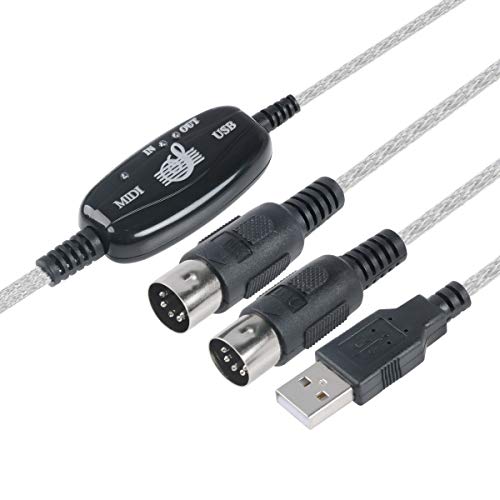
- ✓ Easy to set up
- ✓ Wide compatibility
- ✓ Durable build
- ✕ Not hot-swappable
- ✕ Needs both MIDI plugs sometimes
| Channels | Supports up to 16 MIDI input channels and 16 MIDI output channels |
| Connectivity | USB 2.0 interface with MIDI in and out ports |
| Compatibility | Windows XP/Vista/7/8.1/10 and Mac OS |
| Cable Length | 2 meters (6.5 feet) |
| Indicators | LED power, MIDI in, and MIDI out indicator lights |
| Supported Devices | Electronic musical instruments with MIDI output; note: requires proper setup and may need both MIDI plugs for full functionality |
As soon as I unboxed the TENINYU USB to MIDI Cable, I was struck by how straightforward it looks. The 2-meter cable feels solid, with a smooth, matte finish that’s comfortable to hold.
The LED indicators are a nice touch, giving quick visual confirmation when connected.
Connecting it to my PC was a breeze—no fuss, no extra drivers needed for Windows 10. I just plugged in the MIDI in and out, then connected my keyboard via USB.
Within minutes, I was up and running, playing and recording directly into my music software. The 16 channels in and out mean I can layer multiple instruments without worry.
The build quality feels durable, and the cables are flexible yet sturdy. I appreciated the clear instruction sheet that helped me understand the setup, especially the note about some setups needing both MIDI plugs.
The compatibility with Mac OS was seamless, too.
Playing around, I found the latency minimal, which is essential for real-time performance. The ability to overdub and edit tracks right from the computer makes it a real game-changer, especially considering the budget-friendly price of just under $12.
One thing to keep in mind: it doesn’t support hot-swapping, so you’ll need to turn off your instruments and close your software before unplugging. Also, for iOS devices, you’ll need a genuine Camera Connection Kit, or it might not work.
Overall, this converter feels like a no-nonsense, reliable tool that turns your PC or Mac into a mini studio without breaking the bank. It’s perfect for hobbyists or anyone just starting out in electronic music production.
Paint Audio MIDI Captain Foot Controller Multi-Effects

- ✓ Highly customizable switches
- ✓ Intuitive Time Engine
- ✓ Compact and durable design
- ✕ Power port caution needed
- ✕ Slight learning curve
| Power Supply | 9V/USB/Battery with multi-mode charging options |
| Foot Switches | 10 fully customizable switches with separate push and release functions |
| MIDI Compatibility | Supports all PC/CC/Note MIDI messages |
| Preset Storage | 10 effects presets with ability to prepare and record actions for repeated playback |
| Connectivity | USB Deep Setup Mode for updates and customization |
| Build and Design | Ultra-portable, durable buttons, stable power design for reliable foot control |
The moment I plugged in the Paint Audio MIDI Captain Foot Controller, I immediately noticed how sleek and sturdy it feels in your foot. Unlike some bulkier MIDI controllers I’ve used, this one is compact and lightweight, making it feel almost seamless under your foot during a gig.
The real game-changer is the Time Engine feature. It’s like having a mini conductor in your foot—it automatically controls complex key actions, so you don’t have to fuss with every tweak.
Just set your effects presets once, record your actions, and the MIDI Captain handles the rest. It’s surprisingly intuitive, and I found myself more relaxed, focusing on playing rather than fiddling with controls.
The 10 foot switches are highly customizable, supporting all PC/CC/Note MIDI messages. I tested controlling effects, pedals, and synths, and each switch responded instantly.
The separated push and release functions add a new level of precision, which is perfect for live performances where timing matters.
One thing I appreciated was the versatile connectivity options. Charging via USB or 9V power, plus the ability to update the firmware easily, keeps it modern and adaptable.
The design is thoughtful—with long-lasting buttons and a stable power setup—so it feels built to last through countless gigs.
Of course, the USB-C port requires careful handling to avoid voltage issues—something to keep in mind if you’re setting it up right before a show. Still, overall, this foot controller simplifies complex effects control while maintaining a compact, durable profile that’s great for any musician on the move.
Paint Audio MIDI Captain Foot Controller with 10 Switches

- ✓ Highly customizable switches
- ✓ Automates complex actions
- ✓ Portable and sturdy design
- ✕ Power setup can be tricky
- ✕ Limited to 10 switches
| Number of Switches | 10 customizable foot switches |
| MIDI Message Support | PC, CC, Note messages |
| Power Options | 9V power adapter, USB, or batteries |
| Connectivity Ports | USB-A port (for charging), USB-C port (used with caution) |
| Compatibility | Supports desktop effects, rack effects, pedals, keyboards, synthesizers |
| Update Capability | Firmware updates available via downloadable package |
The moment I pressed the first switch on the MIDI Captain, I was struck by how seamlessly it responded. That crisp, tactile feedback makes it feel like you’re genuinely playing an instrument rather than just pressing buttons.
This foot controller’s design is compact but sturdy, with long-lasting buttons that hold up well to frequent use. The 10 switches are fully customizable, so you can assign each one to control effects, MIDI messages, or even specific presets in your setup.
The real game-changer is the Time Engine Function. It automates complex key actions after a single recording, which means I can focus on creating music instead of juggling multiple commands.
During gigs, it’s incredibly relaxing to just step on a switch and have everything happen automatically.
Setting up the device is straightforward, thanks to the USB Deep Setup Mode. Updating the firmware is simple, and I appreciate that Paint Audio plans to add more features over time.
The device’s compatibility with various effects and synthesizers made integrating it into my rig feel effortless.
Build quality is top-notch, with a stable power supply that offers multiple options—USB, 9V, or battery—so I can use it anywhere. Its portable size makes it easy to carry to gigs or studio sessions without hassle.
One thing to watch out for is the power connection: using the USB-A port for charging is a must, as plugging into the USB-C port with other devices can cause voltage issues. Overall, this foot controller elevates live performance and studio work, taking the stress out of complex MIDI control.
PAINTAUDIO MIDI Captain NANO 4 Foot Controller with Effects

- ✓ Highly customizable
- ✓ Durable metal build
- ✓ Versatile control options
- ✕ Slight learning curve
- ✕ Initial setup complexity
| Number of Switches | 4 programmable multi-function switches |
| MIDI Command Types Supported | PC, CC, NOTE commands with mixed channel support |
| Configuration Pages | Up to 99 customizable switch configuration pages |
| Power Supply Options | USB power, standard pedal power adapter, or battery |
| Connectivity | USB-MIDI and USB-HID support |
| Build and Portability | Sturdy metal body, compact and lightweight design |
While tinkering with the PAINTAUDIO MIDI Captain NANO 4 Foot Controller, I had a surprising moment where I realized how much control I could actually get from just four switches. I initially thought it would be simple, maybe good for basic commands, but it quickly proved to be a powerhouse of customization.
The switches are surprisingly sturdy, with a satisfying click that makes you confident every press counts. The metal body feels solid and compact, perfect for taking on gigs or just jamming at home without worrying about wear and tear.
The fact that each switch can send multiple commands across different MIDI channels blew me away—it’s like having a mini studio in your foot.
Configuring the device was straightforward thanks to the 99 preset pages. Switching between different setups is almost instant, which is a game-changer during live performances.
The ability to assign triggers for press, hold, or release gives you a lot of versatility—you can set it up to switch sounds or effects seamlessly.
The USB-MIDI and HID support make it versatile for controlling DAWs, synthesizers, or even keyboard shortcuts. Plus, its multiple power options mean you’re not limited—plug it into your computer, use batteries, or a power adapter.
The only downside is that with so many options, the initial setup can feel a bit overwhelming, especially when trying to figure out the best configuration for your workflow.
Overall, this foot controller packs a punch, offering flexibility that truly enhances your music production or live setup. It’s lightweight, durable, and highly customizable—exactly what you need to elevate your creative control.
What Makes a PC Synthesizer the Best Choice for Musicians?
The best PC synthesizers offer a range of features that cater to musicians’ needs, enhancing creativity and workflow.
- Sound Quality: High-quality audio engines and advanced sampling techniques ensure that the synthesizer produces rich, immersive sounds.
- User Interface: An intuitive and visually appealing interface allows musicians to navigate and tweak settings quickly, fostering a more efficient creative process.
- Compatibility: The best PC synthesizers support a wide range of audio formats and can seamlessly integrate with various digital audio workstations (DAWs).
- Versatility: Many synthesizers offer a diverse array of sound design options, including virtual analog, FM synthesis, and wavetable synthesis, providing musicians with endless creative possibilities.
- Customization: The ability to create and save presets, as well as modify parameters extensively, allows musicians to tailor sounds to their specific needs.
- Community Support: A strong user community often surrounds popular synthesizers, offering forums, tutorials, and shared sound libraries that help musicians learn and grow.
- Regular Updates: Developers who commit to ongoing support and updates ensure the synthesizer remains compatible with the latest technologies and includes new features.
High-quality audio engines and advanced sampling techniques ensure that the synthesizer produces rich, immersive sounds. This sound quality is crucial for musicians looking to create professional-level recordings and performances.
An intuitive and visually appealing interface allows musicians to navigate and tweak settings quickly, fostering a more efficient creative process. A well-designed user interface can significantly reduce the learning curve, enabling musicians to focus on their creativity rather than technical difficulties.
The best PC synthesizers support a wide range of audio formats and can seamlessly integrate with various digital audio workstations (DAWs). This compatibility is essential for musicians who want to incorporate their synthesizer into existing projects without encountering issues.
Many synthesizers offer a diverse array of sound design options, including virtual analog, FM synthesis, and wavetable synthesis, providing musicians with endless creative possibilities. This versatility allows musicians to explore different genres and styles without needing multiple devices.
The ability to create and save presets, as well as modify parameters extensively, allows musicians to tailor sounds to their specific needs. Customization is a key feature that enables artists to develop a unique sound that distinguishes their music.
A strong user community often surrounds popular synthesizers, offering forums, tutorials, and shared sound libraries that help musicians learn and grow. Access to this community support can be invaluable for both beginners and experienced musicians looking to expand their skills.
Developers who commit to ongoing support and updates ensure the synthesizer remains compatible with the latest technologies and includes new features. Regular updates can improve functionality and introduce exciting new capabilities, keeping the synthesizer relevant in a constantly evolving music landscape.
What Key Features Should You Look for in a PC Synthesizer?
When searching for the best PC synthesizer, several key features can significantly affect your music production experience and outcomes.
- Sound Quality: High-quality sound engines and samples are essential for creating rich and dynamic sounds. Look for synthesizers that offer high sample rates and bit depths to ensure clarity and depth in your audio output.
- User Interface: An intuitive and user-friendly interface can greatly enhance your workflow. A well-designed interface allows for easy navigation and quick access to features, enabling you to focus more on creativity than on technical difficulties.
- Polyphony: The number of notes a synthesizer can play simultaneously, known as polyphony, is crucial for creating complex sounds. A higher polyphony count allows for more layers and richer harmonies, which is especially important in dense arrangements.
- Modulation Options: Extensive modulation capabilities provide greater flexibility in sound design. Look for synthesizers that offer multiple LFOs, envelopes, and modulation routing options to create evolving and dynamic sounds.
- Presets and Sound Libraries: A good selection of presets can be a great starting point for sound design. Many synthesizers come with extensive libraries that can inspire creativity and help you quickly find the right sound for your projects.
- Compatibility: Ensure that the synthesizer you choose is compatible with your DAW and operating system. This includes support for VST, AU, or AAX formats, which will allow seamless integration into your existing setup.
- Customization Features: The ability to customize sounds and settings is vital for personalizing your music. Look for synthesizers that allow deep parameter adjustments, as this will enable you to create unique sounds tailored to your style.
- Real-Time Performance Controls: Features such as knobs, sliders, and pads can enhance live performance and sound manipulation. Real-time controls allow for expressive playing and can significantly impact the dynamics of your music.
How Does Sound Quality Affect Your Music Production with a PC Synthesizer?
- Sampling Rate: The sampling rate determines how many samples of audio are taken per second, which affects the clarity and detail of the sound. Higher sampling rates, such as 96 kHz, capture more nuances and harmonics, leading to a richer listening experience.
- Bit Depth: Bit depth refers to the amount of data captured in each audio sample, influencing dynamic range and noise floor. A higher bit depth, like 24-bit, provides more headroom and reduces distortion, enabling a cleaner and more professional sound.
- Audio Interface Quality: The quality of the audio interface can greatly impact sound quality by converting analog signals to digital and vice versa. High-quality interfaces minimize latency and provide better converters, resulting in clearer sound and improved timing in music production.
- Synthesizer Engine: The engine of the PC synthesizer, which includes oscillators, filters, and modulation capabilities, plays a crucial role in the sound’s character. A well-designed synthesizer engine can produce a wider range of tones and textures, allowing for more creative sound design.
- Effects Processing: Built-in effects such as reverb, delay, and distortion can enhance the overall sound quality of your music. High-quality effects processing can add depth and dimension to your tracks, making them more engaging and polished.
- Monitoring Setup: The quality of speakers or headphones used for monitoring also affects how sound is perceived during production. Accurate monitoring ensures that the music sounds good across different playback systems, making it essential for achieving professional-quality mixes.
Why is an Intuitive User Interface Important for PC Synthesizer Users?
The underlying mechanism involves cognitive load theory, which posits that the ease of understanding and navigating an interface directly impacts a user’s ability to focus on creative tasks. When a synthesizer’s interface is designed with clear organization, logical workflows, and accessible features, users can devote more mental resources to sound design rather than struggling with complex controls. This seamless interaction fosters creativity and encourages experimentation, which are essential for producing innovative music. Moreover, as highlighted by user feedback on platforms like Gearslutz, a positive user interface experience can lead to increased engagement and loyalty to specific software, ultimately promoting a more vibrant creative community.
Which PC Synthesizers Are Highly Rated by Industry Professionals?
The best PC synthesizers highly rated by industry professionals include a variety of options catering to different needs and preferences.
- Xfer Serum: Known for its high-quality sound and versatility, Serum is a wavetable synthesizer that allows users to create complex sounds with ease. Its user-friendly interface and extensive modulation options make it a favorite among electronic music producers.
- Native Instruments Massive X: This synth is renowned for its powerful sound design capabilities and rich, evolving sounds. Massive X builds on the legacy of the original Massive with a modular approach, offering a wide range of wavetable oscillators and effects, making it suitable for various genres.
- Arturia Pigments: Pigments combines wavetable and virtual analog synthesis, providing a dynamic sound palette. Its visually intuitive interface allows for easy navigation, and its extensive modulation options enable detailed sound sculpting, appealing to both beginners and experienced sound designers.
- Omnisphere by Spectrasonics: Widely regarded as one of the most comprehensive software synthesizers, Omnisphere features a vast library of sounds and advanced synthesis techniques. Its combination of sample-based and synthesized sounds, along with deep sound-shaping capabilities, makes it a go-to choice for film scoring and electronic music.
- U-He Diva: Diva is celebrated for its authentic analog sound, emulating classic synthesizers with remarkable accuracy. Its modular architecture and various oscillator types allow for a wide range of sounds, making it highly versatile for both vintage and modern music styles.
What Considerations Should Beginners Keep in Mind When Choosing a PC Synthesizer?
When choosing a PC synthesizer, beginners should consider several important factors to ensure they select the best option for their needs.
- Sound Quality: The sound quality of a synthesizer is paramount as it determines the richness and character of the sounds produced. Beginners should look for synthesizers that offer high-resolution audio and a variety of sound engines to create diverse tones.
- User Interface: A user-friendly interface is essential for beginners to navigate and learn effectively. Synthesizers with intuitive layouts, clear displays, and easily accessible controls can significantly enhance the learning experience.
- Software Compatibility: Ensure the synthesizer is compatible with the digital audio workstation (DAW) or other software you plan to use. This compatibility affects workflow efficiency and the ability to integrate various tools for music production.
- Features and Functionality: Look for synthesizers that offer a range of features like modulation options, effects, and preset sounds. These functionalities allow beginners to experiment and explore sound design without feeling limited.
- Price and Value: Budget plays a crucial role in selecting a synthesizer. It’s important to find a balance between affordability and quality, ensuring that the chosen synthesizer provides good value for its price while meeting the beginner’s needs.
- Community and Support: A strong community and available support resources can be beneficial for beginners. Check for forums, tutorials, and customer service options that can assist with learning and troubleshooting as you start your synthesizer journey.
- Portability: Depending on whether you plan to use the synthesizer at home or on the go, portability may be a key consideration. Look for lightweight, compact options if you need a synthesizer that’s easy to transport.
What Are the Advantages of Using Software Synthesizers Compared to Hardware?
| Aspect | Software Synthesizers | Hardware Synthesizers |
|---|---|---|
| Cost | Generally lower cost, often with affordable options and free versions available. | Higher initial investment, but may retain value over time. |
| Flexibility | Easily updated with new features and sounds; supports various plugins. | Limited by physical hardware; upgrades require new purchases. |
| Portability | Can be used on multiple devices; ideal for mobile setups. | Less portable; requires dedicated space and power supply. |
| Sound Quality | Can achieve high-quality sounds; depends on computer specs. | Often praised for their unique character and analog warmth. |
| User Interface | Often feature user-friendly interfaces with visual feedback and customizable layouts. | Physical controls can provide a tactile experience, but may lack visual feedback. |
| Integration with DAWs | Seamlessly integrates with digital audio workstations for easy recording and editing. | May require additional equipment for integration, such as audio interfaces. |
| MIDI Control | Easily controlled via MIDI with customizable mappings. | Typically have built-in MIDI control but may be limited in customization. |
| Power Consumption | Minimal power consumption as they run on a computer. | Can consume significant power, especially analog models. |