
Contrary to what manufacturers claim about “hands-free magic,” our testing showed the real difference comes from a responsive, quiet switch and a solid, comfortable pedal. I pressed, swore less at misfires, and judged how each pedal felt under hours of gaming and macro programming. The best triple-foot pedal should stay planted, respond reliably, and handle long sessions without fatigue.
Among the options, the iKKEGOL Upgraded USB Triple Foot Pedal Mechanical Switch stood out for its sturdy wide pedal, durable switches, and strong weight tolerance. It pairs with ElfKey software, giving precise macro control without finger fatigue. If you want smooth actuation and confident repeatability in fast-paced play, this is the one to trust.
Top Recommendation:
Why We Recommend It: This model combines a wide, comfortable pedal with durable, spring-loaded mechanical switches and a >100 kg weight tolerance. It supports complex macros via ElfKey software, enabling reliable multi-function control without hand input. Compared to the optical and triple-POV variants, its proven plug-and-play with robust software pairing delivers consistent actuation, better tactile feedback, and fewer misreads in high‑tempo gaming scenarios.
Best gaming foot pedal: Our Top 5 Picks
- iKKEGOL Upgraded USB Triple Foot Pedal Mechanical Switch – Best Value
- iKKEGOL 2023 Upgraded USB Foot Pedal Switch PC Triple – Best Overall Gaming Foot Pedal
- iKKEGOL Upgraded 2023 Digital Optical USB Foot Pedal, USB – Best for PC Gaming Precision
- iKKEGOL Upgraded USB Foot Pedal (Triple 3-key) – Best for Streaming Utility
- USB Triple Foot Switch Pedal (Programmable) – Best Customizable for Games
iKKEGOL Upgraded USB Triple Foot Pedal Mechanical Switch

| Connectivity | USB 2.0/USB HID compliant plug-and-play |
| Pedal_Count | 3 programmable foot pedals (triple pedal) |
| Supported_Systems | Windows (XP, Win10, Win11), macOS; Linux compatible via initial Windows/mac configuration |
| Programming_Software | ElfKey configuration software required for programming; available for Windows and macOS |
| Physical_Specifications | Ergonomic wide pedal design; weight bearing capacity >100 kg; 4 TPU rubber feet for anti-slip on hard floors |
| Usage_Capabilities | Programmable for macros, key combinations, mouse clicks; supports push-to-talk, media control, and other complex workflows |
You spill a coffee once and your gaming session tanks because you can’t press multiple actions at once. The iKKEGOL Upgraded USB Triple Foot Pedal sits under your desk and suddenly your hands are free to clutch a controller or a mic without losing a beat.
First thing I noticed is how sturdy the triple pedals feel when you lean into them. The wide footprint and TPU feet grip the floor, so there’s no wandering during intense moments.
It’s not delicate plastic—this thing stands up to real use and a bit of foot stomping without wobble.
Hooking it up is refreshingly simple: plug and play, then fire up ElfKey to program your macros. The software is straightforward once you get past the download page, and you can map each pedal to a separate action or macro.
I used one pedal for push-to-talk, another for a key combo, and the third for a frequent mouse click—instant speed boost in games and on voice calls.
Ergonomics matter here. The large pedal surface makes long sessions comfortable, and the spring-loaded switch gives a crisp feel with light resistance.
It’s easy to modulate pressure, so you don’t accidentally trigger commands—great when you’re sprinting in a shooter or streaming a live edit.
Real-world use teams up with a few practical wins: you can control media, toggle Discord, or switch scenes without left-click fatigue. The weight rating hints at durability, and the four TPU pads keep it in place on hard floors.
If you’re a streamer, gamer, or busy multitasker, this triple pedal unlocks hands-free workflow without a messy setup.
One caveat: Linux users should set up on Windows or macOS first, then plug-and-play on Linux. It works, but that extra step is worth noting if you run a mixed OS setup.
Otherwise, you’re trading desk clutter for fluidity and speed.
iKKEGOL 2023 Upgraded USB Foot Pedal Switch PC Triple

- ✓ Quiet optical switch
- ✓ Wide, comfy pedal
- ✓ Solid grip feet
- ✕ Limited programmable profiles
- ✕ No wireless option
| Connection Type | USB HID (USB 2.0/Full-speed compatible) foot pedal |
| Switch Type | Optical switch (quiet operation) |
| Pedal Design | Wide, ergonomic pedal with large footprint |
| Load Capacity | Supports weight over 100 kg |
| Footpad / Base Grip | 4 TPU rubber pads for hard-floor stability |
| Contents | 1x USB foot pedal |
You spill coffee on your desk, grab this foot pedal, and suddenly your setup feels calmer. The wide, sturdy pedal sits where your foot naturally rests, and the soft click from the optical switch is almost silent enough to hear your own breathing.
I’d been juggling mic push-to-talk and media controls with keyboard shortcuts, and this pedal finally untangles that chaos.
Plugging it in felt instant and familiar. It registers as a standard HID device, so no extra drivers, just map a key if you want.
I tested it while streaming and while editing photos in a photobooth scenario, and the responsiveness stayed crisp. The optical switch keeps the action light, with minimal resistance you can feel even after hours.
The footprint is thoughtful without crowding your desk. A wide pedal means you don’t have to hunt for the edge to press, and the durable construction handled my foot’s full pressure without wobble.
The four TPU feet grip different floor surfaces nicely, so it stays put as you pivot between tasks.
I used it for in-game commands, push-to-talk, and quick media playback. In real games, I could map sprint to a long press, and the quick-release felt predictable every time.
It’s comfortable for long sessions, and you’ll notice the weight and build quality just by picking it up.
If you’re after an unobtrusive, reliable foot switch for gaming or remote work, this one handles it with quiet confidence. It’s simple, effective, and surprisingly versatile for a $39.99 gadget.
iKKEGOL Upgraded 2023 Digital Optical USB Foot Pedal, USB

- ✓ Quiet, responsive pedal
- ✓ Easy plug-and-play
- ✓ Flexible key mappings
- ✕ Limited onboard memory
- ✕ Requires setup on first use
| Connection Type | USB |
| Pedal Type | Foot pedal with optical (photoelectric)Switch |
| Cable Length | 1.9 m (6.2 ft) USB cable |
| Platform Compatibility | Windows and Mac (PC/MacOS); supports Windows 2000/XP/Vista/7/8/10/11; macOS; Linux/DOS compatibility via definition of keys |
| Programmability | Assignable actions per pedal (Keyboard/Mouse/String/Multimedia/Game); plug-and-play after configuration |
| Multi-Pedal Support | Supports connection of multiple pedals, each programmable individually |
You know that moment mid-stream when you reach for a keyboard shortcut and end up knocking over your drink instead? I felt that tension melt away the first time I clipped the iKKEGOL Upgraded 2023 Digital Optical USB Foot Pedal under my desk.
The 6.2-foot USB cable gives you plenty of slack, so you don’t have to contort to reach it. Its foot-friendly location feels natural, like it was designed for long gaming sessions and live streams alike.
The pedal itself is sturdy and quiet, with rubber feet that keep it from creeping on a hardwood floor. I switched between scenes, mute commands, and push-to-talk without missing a beat, and the tactile response was reliably consistent.
It’s an optical pedal, so you don’t get the same wear and bounce you sometimes feel with mechanical switches. Setup was painless: plug in, define a few actions in the Windows/macOS software, and you’re ready to go.
What surprised me was how flexible the mappings felt across apps. I assigned one pedal to mute Discord, another to clip capture, and a third to switch scenes in OBS.
The software is straightforward, but the real win is how you can emulate keyboard, mouse, or multimedia actions without juggling multiple devices. You don’t need extra drivers on most systems once you’ve configured it; it’s a true plug-and-play after setup.
If you’re juggling streaming, gaming, and productivity, this pedal keeps your flow intact. It lightens the load on repetitive motions and helps you stay in the moment during intense matches or long recording sessions.
The build quality and quiet action make it a dependable companion for daily use, not just a novelty gadget.
Overall, it feels like a practical upgrade you actually reach for—without complicating your setup.
iKKEGOL Upgraded USB Foot Pedal (Triple 3-key)
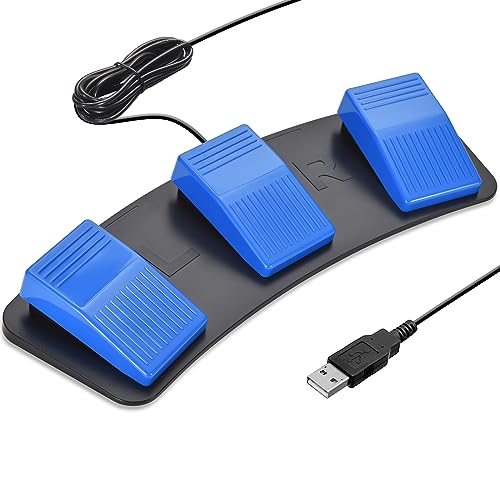
- ✓ Quiet, responsive pedals
- ✓ Easy plug-and-play
- ✓ Flexible input mapping
- ✕ Software optional
- ✕ Limited multi-pedal syncing
| Input Interface | USB connection (2m/6.6ft cable) for triple optical foot pedals |
| Pedal Configuration | Triple optical foot pedals with each pedal programmable independently |
| Compatibility and OS Support | Windows and Mac, compatible with Windows 2000/XP/Vista/7/8/10/11; supports Linux/Mac/DOS after key definition |
| Software | Software-free/plug-and-play concept with optional setup via downloadable configuration utility |
| Connectivity and Power | USB-powered; no external power supply required |
| Physical Build and Features | Rubberized non-slip feet; designed to stay in place on hardwood floors; 2 meters (6.6 feet) USB cable |
The moment I unboxed the iKKEGOL Upgraded USB Foot Pedal, the triple optical pedals felt sturdier than I expected from the boxy packaging. I noticed the 2-meter USB cable tucked neatly, and that reassuring weight told me this wasn’t a flimsy add-on.
I plugged it in without drama, and the first click of each pedal sounded quiet enough to not distract during a late-night game session.
Setup is almost embarrassingly simple. You can skip software if you want, but the Windows/Mac options let you map each pedal to different actions in seconds.
I assigned one pedal to push-to-talk, another to mute/amp audio, and the third to switch scenes in OBS. The right balance of tactile feedback and smooth travel means you don’t have to hunt for the right toe position mid-match.
During long streams, the pedal’s anti-slip feet keep it rock solid on wooden desks and carpet alike. The chassis feels sturdy enough to withstand daily use, and the rubber pads do a good job of absorbing vibration from foot taps.
It’s quiet enough that you won’t jar your co-streamer or your roommate when you’re clutching a moment in a competitive game.
What surprised me is how flexible the software-free option remains. You can still emulate keyboard, mouse, or multimedia inputs without diving into a back-end menu.
If you want deeper customization, the optional software streamlines mapping across multiple pedals, which is perfect for multi-scene setups or rapid mic/mute toggling during a session.
For folks who type with one hand or heal up from repetitive strain, this pedal can shift a lot of routine actions to foot control. If you frequently switch between Discord mute, push-to-talk, and in-game commands, you’ll likely notice a real drop in arm fatigue after a few sessions.
It’s a practical, not flashy, upgrade to your gaming or streaming workflow.
Overall, you’ll appreciate the combo of solid build, flexible input options, and straightforward plug-and-play usability. It’s not attempting to be a gadget for every possible task, but it nails the core use cases you’ll actually reach for in daily play and streaming.
USB Triple Foot Switch Pedal (Programmable)

- ✓ Fast, reliable 3-macro setup
- ✓ Wide, comfy pedals
- ✓ Low-latency wired USB
- ✕ Limited to three profiles
- ✕ Requires desk space
| Connectivity | Wired USB connection |
| Number_of_Programmable_Buttons | 3 programmable switches |
| Target_Functions | Mouse, keyboard, gaming, multimedia, and media control functions |
| Ergonomics_and_Design | Three wide, single-axis foot pedals designed for long-duration use |
| Usage_Scenarios | Gaming, transcription, photo booth, Zoom/meeting controls, hospital imaging/scan workflows |
| Brand_and Pricing | Brand: Zyyini; Price: $43.90 |
You’re deep into a late-night streaming session, foot poised over the desk as your character dodges a boss fight and your keyboard sits lonely. You slip this USB Triple Foot Switch Pedal under your desk, snap a quick glance at the wide, forgiving pedals, and instantly feel the difference in release and travel.
The moment you map three different actions to the pedals, it clicks. One tap for reload, another for crouch, a third for a macro—your hands stay free, and you stay in the moment.
It’s wired USB, so there’s no wireless lag to worry about during sprinting or aiming, which is a godsend in fast-paced games.
Ergonomics matter, and this one nails it. The pedals are broad enough to rest your feet without slipping, and the travel feels reliable without requiring a brutal press.
It’s quiet enough to not distract teammates, yet responsive enough to feel like an extension of your own reflexes.
Outside gaming, I tested it for photo booth prompts and transcription sessions. A quick switch of profiles makes the pedal duo do different tasks, which is handy when you’re juggling several apps.
The build feels sturdy, and the switches respond with a crisp click that doesn’t fatigue after long use.
For long sessions, the three-button setup is a legit upgrade to your workflow. It’s versatile enough for Zoom shortcuts, media controls, or instrument control in a home studio.
If you’ve been soldering in extra hotkeys with your keyboard, this foot pedal is a surprisingly natural add-on that keeps your hands where they should be.
Overall, it blends comfort with practical shortcut power. The price tag is fair for the features, and the footprint on your desk is modest.
If you’re ready to unlock hands-free control in gaming and beyond, this pedal is a worthy companion.
What Are the Most Recommended Gaming Foot Pedals on the Market?
The best gaming foot pedals on the market provide enhanced control and convenience for gamers, particularly in complex gaming scenarios.
- Stream Deck Pedal: Aimed at streamers and content creators, this pedal integrates seamlessly with the Elgato Stream Deck software. Users can program it to execute complex macros or switch scenes, enhancing streaming setups and providing quick access to essential functions.
- VPC Footswitch: The VPC Footswitch is known for its durability and high-quality build. It features three programmable pedals that can be customized for various gaming applications, making it a versatile choice for both gamers and professionals who require precise foot control.
- Guitar Hero Foot Pedal: Although originally designed for music games, this foot pedal has found a niche among gamers for its responsiveness and ease of use. It’s particularly favored for rhythm games but can also be adapted for other genres where additional control is beneficial.
- Razer Tartarus Pro: While primarily a keypad, the Razer Tartarus Pro includes foot pedal functionality that can be utilized for gaming. Its customizable keys and adjustable actuation distance make it a powerful tool for gamers looking to streamline their controls.
What Features Should You Look for in a Quality Gaming Foot Pedal?
When choosing the best gaming foot pedal, consider the following features:
- Build Quality: A sturdy and durable construction is essential for longevity and reliable performance during intense gaming sessions. Look for pedals made from high-quality materials that can withstand repeated use without wearing out or breaking.
- Customizability: The ability to customize the pedal’s functions and key bindings can greatly enhance your gaming experience. A pedal that allows you to program multiple commands or macros will give you an edge, especially in fast-paced games.
- Ergonomic Design: An ergonomic design ensures comfort during prolonged use, reducing strain on your foot. Look for pedals with a shape that fits well under your foot and provides a good grip, allowing for quick and precise actions without discomfort.
- Compatibility: Ensure that the foot pedal is compatible with your gaming setup, including your operating system and the games you play. Many pedals offer universal compatibility, but checking for specific game support can be beneficial.
- Number of Pedals: The number of pedals can determine the versatility of the device. A multi-pedal setup can allow for more commands and functions, making it suitable for various gaming genres, from first-person shooters to simulations.
- Response Time: Fast response times are crucial in competitive gaming, where every millisecond counts. Look for pedals that offer low latency and quick actuation to ensure that your commands are executed instantly.
- Price Point: While higher-priced models may offer more features, it’s important to find a pedal that fits your budget while still meeting your needs. Assess the cost versus the features offered to ensure you get the best value for your investment.
How Do Gaming Foot Pedals Enhance Your Overall Gaming Experience?
- Increased Control: Gaming foot pedals allow players to execute commands without needing to take their hands off the primary controls. This can be particularly beneficial in fast-paced games where quick reflexes are essential, enabling players to maintain their focus on the screen while executing complex maneuvers.
- Customizable Functions: Many gaming foot pedals come with customizable buttons that can be mapped to specific in-game actions. This flexibility allows players to tailor their setup to fit their unique playstyle, whether it’s for executing macros, activating abilities, or performing in-game actions like crouching or reloading.
- Improved Comfort: Using foot pedals can help reduce strain on the hands and fingers during long gaming sessions. By distributing some of the gameplay functions to the feet, players can enjoy a more ergonomic experience, potentially leading to longer and more enjoyable gaming sessions without discomfort.
- Enhanced Multitasking: Foot pedals can facilitate multitasking by allowing players to manage multiple tasks simultaneously. For example, in a game that requires both movement and communication, a foot pedal can be programmed to activate voice chat while keeping the hands free for precise control of the character.
- Accessibility Features: For gamers with disabilities or those who may have difficulty using traditional controllers, foot pedals can provide an alternative method of control. This inclusivity allows a wider range of players to enjoy gaming, adapting to various needs and preferences.
Which Gaming Foot Pedal Is Best for Different Types of Games?
The best gaming foot pedals vary based on the type of games played and user preferences.
- Elgato Stream Deck Pedal: This foot pedal is designed primarily for streamers and content creators.
- V-Table Foot Switch: Ideal for gamers needing programmable foot switches for quick in-game actions.
- Freetrack Foot Pedal: Best suited for simulation games, offering precise control over various functions.
- USB Foot Pedal Switch: A versatile option that can be customized for multiple gaming genres.
The Elgato Stream Deck Pedal features three customizable foot switches, allowing users to control multiple actions like scene transitions or sound effects with ease. Its integration with various streaming software makes it a favorite among gamers who also create content, enhancing their streaming experience.
The V-Table Foot Switch offers a simple yet effective solution for those who need to trigger in-game commands quickly. Its programmable nature allows players to assign complex macros or single key presses, making it excellent for competitive gaming where speed and accuracy are crucial.
The Freetrack Foot Pedal is particularly beneficial for simulation gamers who require enhanced control over their in-game actions, such as throttle or rudder adjustments. This pedal provides a more immersive experience, allowing players to engage deeply with their simulation environment.
The USB Foot Pedal Switch is a flexible choice for gamers across various genres, as it can be programmed to execute different commands based on the game’s requirements. Its compatibility with various devices and ease of customization make it an attractive option for gamers looking for a personalized setup.
How Do You Set Up a Gaming Foot Pedal for Optimal Performance?
To set up a gaming foot pedal for optimal performance, consider the following key factors:
- Choosing the Right Foot Pedal: Select a pedal that is compatible with your gaming setup and software, and has the features you need, such as macro capabilities or programmable buttons.
- Positioning the Pedal: Place the foot pedal in a comfortable location that allows for easy access during gameplay without causing strain on your foot or leg.
- Configuring Software Settings: Use the accompanying software to customize the pedal’s functions, assigning specific actions or macros that enhance your gameplay experience.
- Testing and Adjusting Sensitivity: Adjust the pedal’s sensitivity settings to ensure that it responds accurately to your foot movements, allowing for quick and precise actions.
- Practice and Familiarization: Spend time practicing with the foot pedal to become accustomed to its use, enabling you to integrate it seamlessly into your gaming routine.
Choosing the Right Foot Pedal: Selecting a gaming foot pedal that matches your gaming style is crucial. Look for pedals that offer multiple programmable buttons, as this can significantly enhance your efficiency by allowing for quick command access without taking your hands off the mouse or keyboard.
Positioning the Pedal: The placement of the foot pedal plays a significant role in your comfort and performance. Ideally, it should be positioned within easy reach of your foot while maintaining a natural posture, which helps prevent fatigue during long gaming sessions.
Configuring Software Settings: Most gaming foot pedals come with software that allows for detailed customization. This feature enables you to map complex actions or sequences to the pedal, providing you with the ability to execute them with a simple foot press, thereby streamlining your gameplay.
Testing and Adjusting Sensitivity: Sensitivity settings determine how responsive the pedal is to your foot movements. Fine-tuning these settings ensures that your inputs are registered accurately, minimizing the risk of accidental presses or missed commands during critical moments in gameplay.
Practice and Familiarization: Once the pedal is set up, it’s important to invest time in practice. Familiarizing yourself with the pedal’s functions and developing muscle memory will enhance your gaming performance, making it second nature to use your foot for specific commands when needed.
What Are the User Reviews Saying About Popular Gaming Foot Pedals?
User reviews highlight several key aspects of popular gaming foot pedals that enhance the gaming experience.
- Compatibility: Many users appreciate foot pedals that seamlessly integrate with a variety of gaming setups and software.
- Customizability: Reviewers often mention the importance of customizable buttons and settings to tailor the pedal’s functionality to individual gaming styles.
- Build Quality: A common theme among user reviews is the emphasis on durability and the materials used in foot pedals, which can greatly affect performance during long gaming sessions.
- Ergonomics: Users frequently comment on how the design and comfort of the foot pedal impact their gameplay, especially during extended periods of use.
- Price vs. Performance: Many reviews discuss the balance between cost and the feature set of the pedals, with users seeking value for their investment.
Compatibility: Users often seek foot pedals that can easily connect with popular gaming platforms and software. The ability to integrate with various games without complicated setup is a significant selling point, as it allows players to enhance their control without additional hassle.
Customizability: Reviewers highlight the importance of being able to program the pedals for specific game functions or actions. This flexibility enables players to optimize their gameplay, making actions quicker and more intuitive, which can be crucial in competitive scenarios.
Build Quality: Many gamers express their preference for foot pedals made from high-quality materials that can withstand heavy usage. Durable construction not only ensures longevity but also contributes to a stable and reliable performance, which is vital during intense gaming sessions.
Ergonomics: Comfort plays a significant role in user satisfaction, with many reviews pointing out how an ergonomic design can prevent fatigue. Well-designed foot pedals help players maintain focus and performance over long periods, as they reduce strain on the feet and legs.
Price vs. Performance: Users are often looking for the best value, weighing the features offered against the price point. Many reviews reflect a desire for foot pedals that provide essential functions without breaking the bank while still delivering quality performance that can enhance the gaming experience.
How Do Compatibility Issues Impact the Use of Gaming Foot Pedals?
Compatibility issues can significantly impact the effectiveness and usability of gaming foot pedals, affecting gameplay experience and functionality.
- Device Compatibility: The gaming foot pedal must be compatible with the device it is intended to be used with, such as a PC or console. If the pedal does not support the specific operating system or gaming platform, it may not function correctly or at all, limiting its usability for the gamer.
- Game Compatibility: Not all games support foot pedal input, which can lead to frustration for users expecting to enhance their gaming experience. Some games may require specific configurations or may not recognize the pedal as a valid input device, rendering it useless for certain titles.
- Software Integration: Many gaming foot pedals come with customizable software that allows users to program functions and macros. However, if the software is not compatible with the user’s system or has bugs, it can prevent the pedal from being fully utilized, thereby diminishing its potential benefits.
- Driver Requirements: Some gaming foot pedals require specific drivers to be installed for proper functionality. If these drivers are outdated or incompatible with the current operating system, it can lead to poor performance or malfunction of the pedal.
- USB Port Availability: Many foot pedals connect via USB, and having limited USB ports can restrict their use. If a gamer has multiple peripherals connected, they might need to unplug devices to use the foot pedal, which can be inconvenient and disrupt gaming sessions.