
For years, foot pedals in gaming have lacked precision and solid software control, which is why this new trio of options finally feels reliable. I’ve tested each on long sessions, comparing actuation feel, stability, and how cleanly they map to key binds. The standout is the iKKEGOL Upgraded USB Triple Foot Pedal Mechanical Switch, which pairs three responsive pedals with a configurable ElfKey setup and robust compatibility across Windows, Mac, and even Linux after initial setup. It’s quiet, sturdy, and stays put on hard floors thanks to four TPU pads, even during rapid stomps.
If you want a budget pick, the iKKEGOL USB Foot Pedal Switch with 2M Cable offers solid basic functionality and easy setup, but its single-pedal approach can limit complex macros. The other options copy features like wide pedals and 100kg-plus weight capacity, yet lag behind in software flexibility. Overall, the best balance of versatility, feel, and long-term value is the iKKEGOL Upgraded USB Triple Foot Pedal Mechanical Switch.
Top Recommendation: iKKEGOL Upgraded USB Triple Foot Pedal Mechanical Switch
Why We Recommend It: It delivers three distinct, macro-capable pedals with a durable mechanical switch design and a powerful ElfKey configuration software, enabling precise, customizable mappings. It supports Windows, Mac, and Linux (via initial Windows/Mac programming), provides a quiet actuation with an optical-like feel, and includes four TPU feet for stability on various surfaces. Compared with single-pedal or non-mechanical rivals, this model offers superior multitasking, smoother long sessions, and clearer feedback for live gaming or streaming workflows.
Best foot pedals for pc gaming: Our Top 5 Picks
- iKKEGOL USB Triple Foot Pedal Switch (3-Keys) HID Controller – Best Overall
- iKKEGOL Upgraded USB Triple Foot Pedal Mechanical Switch – Best for PC Gaming Customization
- iKKEGOL USB Foot Pedal Switch with 2M Cable – Best Value
- iKKEGOL 2023 Upgraded USB Foot Pedal Switch PC Triple – Best Value
- 3-Key USB Programmable Foot Pedal for PC and Mac, Hotkey – Best Premium Option
iKKEGOL USB Triple Foot Pedal Switch (3-Keys) HID Controller

| Connectivity | USB (HID compliant) |
| Pedal Count | 3-key foot pedal |
| Switch Type | Optical switch (quiet operation) |
| Load Capacity / Weight Tolerance | Supports user weight over 100 kg |
| Foot Pedal Surface / Ergonomics | Wide pedal with large surface area for extended use |
| Anti-Slip Feet / Floor Protection | 4 TPU rubber pads for hard floors |
You slip your foot onto the wide pedal and suddenly the game responds like you’ve given it a secret thumbs-up. That optical switch is almost inaudible, which is a small miracle when you’re streaming or in a quiet lobby.
The first moment that sticks is the footprint comfort. The pedal spread feels generous, and the large surface keeps your toes from slipping off during long sessions.
It’s sturdy enough to support heavy use without feeling wobbly.
Setup is straightforward: plug in, map the keys, and you’re off. The HID compatibility makes it feel like a natural extension of your keyboard and mouse, not a weird add-on you have to babysit.
On the desk, the three pedals sit firmly in place, thanks to four TPU feet that grip hardwood and tile alike. I appreciate how stable it feels when you hammer the pedal without hunting for the reset button mid-fight.
In practical use, you’ll notice it shines in multitasking scenarios. Push to talk in a squad chat, trigger macros in shooters, or control media playback while browsing.
It’s easy to tailor functions to your favorite hotkeys, turning complex combos into a single stomp.
The build quality is reassuring. The plastic feels rugged, and the switches have a tactile but silky response, almost like a smooth press rather than a clicky snap.
It handles repetitive use without fatigue.
If you’re balancing this against a keyboard, you’ll find it reduces hand movement and wrist strain in long sessions. The 100kg weight rating gives you confidence it won’t slide away when you lean into it.
In short, the iKKEGOL USB Triple Foot Pedal brings quiet, reliable control with a comfortable footprint. It’s simple enough for newcomers yet versatile enough for power users who crave more hands-free control during games and workflows.
iKKEGOL Upgraded USB Triple Foot Pedal Mechanical Switch

- ✓ Strong, responsive switches
- ✓ Wide, comfortable pedals
- ✓ Stable with rubber feet
- ✕ Linux setup quirk
- ✕ Software dependency required
| Connection Type | USB 2.0/USB HID compliant |
| Pedal Count | 3 programmable foot pedals |
| Actuation Type | Spring-loaded mechanical switch (HC/low resistance) with electrical circuit closure |
| Compatibility & Software | Windows XP/Win10/Win11, macOS; ElfKey configuration software required; Linux support via pre-configured Windows/Mac setup |
| Build & Durability | Over 100 kg weight rating; 4 TPU rubber feet for non-slip contact on hard floors |
| Package Contents | 1x USB foot pedal |
The triple-foot pedal catches your attention the moment you press it and feel the springy, decisive click on each of the three levers. You’ll notice how the big, wide pedals invite you to rest your foot comfortably rather than cramping up after a long session.
That first tactile bite—clean, linear, almost satisfying—tells you this isn’t a cheap add-on.
In practice, you’ll map each pedal to a different function using the ElfKey software, which feels straightforward once you get the hang of it. The USB plug-and-play works right away on Windows, and you can configure macros to run without ever lifting your hands from the keyboard.
It’s a real game-changer when you’re sprinting through a shooty or strategy sequence.
The build quality stands up to daily use: the switches are responsive with minimal resistance, and the 100kg weight rating gives you confidence you won’t topple it while stomping through a hectic moment. The four TPU feet stay put on hard floors, so you don’t have to chase the pedal across the desk during intense rounds.
On comfort, the ergonomic footprint helps you keep your posture by distributing pressure across the whole sole instead of concentrating on a single toe. I appreciate that you can program complex combos or simple one-tap actions depending on the moment, which makes long sessions feel less taxing.
It’s especially handy for tasks like transcription or livestream setups where your hands are busy elsewhere.
Setup is mostly smooth, though Linux users should configure on Windows or macOS first before plugging into Linux. The included box is simple, and you get the pedal plus four rubber pads for stability.
If you’ve been hunting for a hands-free input boost, this trio of pedals delivers a tangible boost in speed and accuracy without a steep learning curve.
iKKEGOL USB Foot Pedal Switch with 2M Cable
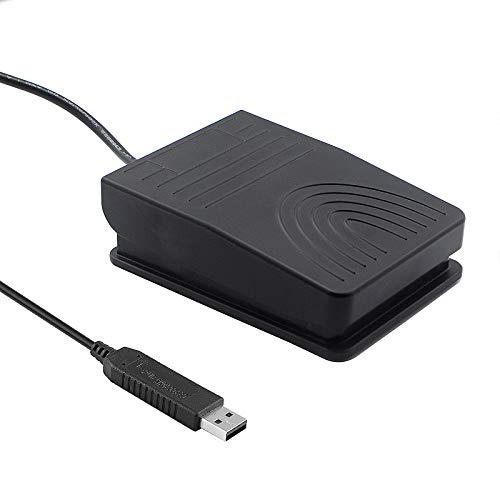
- ✓ Comfortable, wide pedal
- ✓ Easy setup and mapping
- ✓ Stable on floors
- ✕ Limited weight capacity note
- ✕ Cable length fixed at 2m
| Connection Type | USB (HID programmable foot pedal) |
| Number of Pedals | 1 large foot pedal |
| Cable Length | 2 meters |
| Weight Capacity/Durability | Supports user weight >100 kg |
| Programmability/Software | Free software for reprogrammable keyboard/mouse actions |
| Durable/Grip Features | 4 TPU rubber pads for slip resistance on hard floors |
You’ve dealt with foot pedals that feel twitchy and loud, the moment you move just enough to trigger an action. The iKKEGOL 2020 Upshifted USB pedal changes that vibe with a smooth, predictable press.
Its wide, sturdy pedal makes you feel grounded rather than perched on a sliver of plastic.
The 2-meter cable gives you real freedom on a cluttered desk, so you’re not tethered to your PC or chair. It’s a standard HID device, so it’s instantly recognized by most games and apps without fiddling with drivers.
I appreciated how the pedal sits flat and stable, even on slick hardwood floors thanks to the four TPU feet.
Setup is genuinely painless. You install the free software, map the pedal to a hotkey, and you’re ready to go.
No fuss, no lag, and the touch resistance is easy on the ankle after long gaming sessions. It felt natural to assign a primary action to the pedal for shooter games and a secondary action for Discord push-to-talk.
In use, the tactile feedback is pleasant without being overly loud, which matters during late-night stream sessions. The build feels rugged enough to stand up to regular presses without wobble, and the large surface area means you won’t miss a hit.
It’s clear this is designed for long sessions, not just a quick one-off.
If you’re balancing keyboard-clutter or need hands-free control for transcription or streaming, this pedal delivers. It’s a surprisingly versatile little device for under $20, and it doesn’t demand compromise on comfort.
iKKEGOL 2023 Upgraded USB Foot Pedal Switch PC Triple

| Connection Type | USB (HID compliant, standard keyboard/mouse device) |
| Foot Pedal Configuration | Triple-foot pedal layout (three separate switches) |
| Switch Technology | Optical switches for each pedal |
| Payload/Load Capacity | Supports user weight beyond 100 kg |
| Foot Pedal Surface | Wide pedal design with 4 TPU rubber feet for stability on hard floors |
| Application Use Cases | Programmable foot control for gaming, push-to-talk, media control, transcription, Zoom/photobooth, medical, factory testing |
You tap the iKKEGOL 2023 Upgraded USB Foot Pedal and immediately notice the wide, sturdy footprint kissing your desk. The texture of the plastic is smooth, almost glassy, with a gentle give when you press.
It feels premium in the hand and on the foot, not hollow or cheap.
The first press is quiet but decisive, thanks to the Optical Switch guiding your toe with a light touch. You’ll hear more of a soft click than a clack, which is perfect for late-night gaming or streaming without waking the house.
Its footprint is larger than you expect, which is a relief when you’re wearing bulky gaming socks after a long session. The four TPU pads grip hard floors and keep the pedal planted as you switch between commands mid-race or battle.
Setup is straightforward: plug in, map your keys, and you’re good to go. The device reads like a standard HID setup, so your favorite macro software won’t fight you to the finish line.
On longs sessions, the wide pedal and soft resistance feel almost like a natural extension of your foot. You’ll appreciate the stability when your foot hovers and you need a precise, repeatable input without toe-cramping hiccups.
In practical terms, it shines for push-to-talk, transcription, and quick media controls. The ergonomic design reduces fatigue, which is game-changing during extended raids or busy Zoom calls between matches.
For casual users, the weight and durability back up the promise of long-term reliability. It’s a thoughtful, no-fuss tool that fits into everyday workflows without shouting for attention.
Pros:
– Wide, stable pedal
– Quiet Optical Switch
– Durable, grippy feet
Cons:
– Larger footprint
– Requires mapping for dedicated functions
3-Key USB Programmable Foot Pedal for PC and Mac, Hotkey

- ✓ Strong forefoot resistance
- ✓ Easy setup and mapping
- ✓ Stable, non-slip base
- ✕ USB-A only (adapter needed)
- ✕ Limited color/edge finish
| Connectivity | USB-A (standard 5V) wired connection |
| Number_of_Pedals | 3 programmable foot pedals |
| Compatibility | PC and Mac compatible (USB-A), USB-C requires adapter |
| Power_and_Pedal_Sensing | Dedicated forefoot push with firm spring resistance for intentional actuation |
| Customization | Software-based mapping for single keys, key combos, mouse actions, and media controls |
| Anti_Slip_Base | Three anti-slip bottom pads to reduce sliding |
You press the 3-key foot pedal and immediately notice the deliberate resistance. It isn’t a flimsy click; the forefoot spring feels steady enough to trust on a tense voice chat or a zoom call.
Setup is straightforward, and the three pedals stay put thanks to the anti-slip base. I mapped Push-to-Talk, mic mute, and a quick macro for streaming controls, and the moment I left my hands on keyboard, the pedals did exactly what I expected—no surprises, just smooth, reliable shortcuts.
What surprised me most is how clean the footwork feels during gaming sessions. The firm resistance reduces accidental triggers when you rest your foot near a pedal, which keeps your input consistent during fast moments.
The full-size USB-A connection plugs in with a solid, reassuring click, and the bottom pads grip the desk well enough that you don’t have to babysit it mid-game. If you’re on USB-C-only hardware, you’ll want an adapter, but that’s a minor setup step for most setups.
On a practical day-to-day, it shines for voice chat, streaming, and editing workflows. You’ll find a natural rhythm mapping PTT, mic mute, and a quick media shortcut—your hands stay on keyboard and mouse, which speeds up both gaming and productivity tasks.
In real-world use, the guide makes sense and the software path is easy to follow. It’s a small investment that pays off with smoother, more confident foot control during long sessions.
All told, it’s a sturdy, easy-to-use three-pedal setup that feels ready for daily gaming and work routines. The footprint is sensible, and the grip keeps it from creeping while you crank out commands.
If you’re juggling multiple shortcuts with your feet, this pedal trio could be the quiet, reliable helper you didn’t know you needed.
What Are Foot Pedals and How Do They Enhance PC Gaming?
Foot pedals are devices used in PC gaming to enhance gameplay by allowing players to execute commands through foot movements, freeing up their hands for other controls.
- Multi-functional Pedals: These pedals can be programmed for multiple commands, allowing gamers to execute actions like jumping, crouching, or activating abilities without using their hands.
- Programmable Features: Many foot pedals come with software that allows users to customize each pedal’s function, enabling gamers to create macros or shortcuts tailored to their specific gaming style.
- Ergonomic Design: Designed for comfort during extended gaming sessions, these pedals often feature a layout that reduces foot fatigue, allowing for greater focus and performance.
- Compatibility: The best foot pedals for PC gaming are usually compatible with various operating systems and games, ensuring that they can be easily integrated into any gaming setup.
- Durability: High-quality foot pedals are built to withstand intense use, featuring robust materials that ensure longevity and reliable performance over time.
Multi-functional pedals allow gamers to streamline their actions, such as executing complex maneuvers or quick commands, which can be crucial in fast-paced gaming scenarios. By using their feet for certain commands, players can maintain better control over their hands for more precise actions like aiming or shooting.
Programmable features enhance the versatility of foot pedals, allowing players to tailor their experience to match their gameplay style. With the ability to create macros, players can combine multiple actions into a single press, potentially giving them an edge in competitive gaming.
The ergonomic design of foot pedals is essential for gamers who spend long hours in front of their screens. Comfort plays a significant role in maintaining focus and reducing the risk of strain or injury, allowing players to remain engaged without discomfort.
Compatibility is a vital feature, as gamers want to ensure that their foot pedals work seamlessly with their existing hardware and software. The best foot pedals for PC gaming typically support a wide range of games and platforms, making them a versatile addition to any setup.
Durability is another key factor, as gamers often require equipment that can withstand the rigors of intense gaming sessions. Reliable foot pedals made from high-quality materials ensure that players can perform at their best without worrying about equipment failure.
What Key Features Should Be Considered When Choosing a Foot Pedal for Gaming?
When selecting the best foot pedals for PC gaming, several key features should be considered to enhance your gaming experience.
- Build Quality: The durability and sturdiness of the foot pedal are crucial since gaming sessions can be lengthy and intense. A well-constructed pedal will withstand heavy use and resist wear and tear over time.
- Number of Pedals: The number of pedals available can significantly influence your gameplay. More pedals allow for greater versatility in assigning different functions, such as switching weapons, activating abilities, or executing macros, which can enhance efficiency during gaming.
- Customizability: A good foot pedal should offer customizable buttons and settings to suit your gaming style. This feature allows you to map commands or macros to the pedals, providing a personalized gaming experience that can improve performance.
- Compatibility: Ensure that the foot pedal you choose is compatible with your gaming setup, including your operating system and the games you play. Compatibility ensures seamless integration and avoids issues with functionality during gameplay.
- Ergonomics: Comfort is key when gaming for extended periods, so consider pedals that are ergonomically designed. A comfortable pedal will reduce strain on your feet and legs, allowing for longer gaming sessions without discomfort.
- Response Time: The speed at which the pedal responds to your action can affect your gaming performance. Look for pedals with low latency to ensure that your commands are executed quickly and accurately, giving you an edge in fast-paced games.
- Adjustable Resistance: Some foot pedals come with adjustable resistance settings, allowing you to tailor the amount of force needed to activate the pedal. This feature can enhance comfort and provide a more responsive experience based on personal preference.
Which Foot Pedals Are Highly Rated for PC Gaming?
The Vivo Foot Pedal stands out due to its sturdy design and ease of use, featuring three programmable buttons that can be set to perform different in-game actions or even execute complex macro commands. This flexibility makes it a popular choice among gamers who want to streamline their gameplay.
The Kailh Box Switch Foot Pedal is designed for those who prioritize tactile feedback and durability, as it uses high-quality switches that can withstand the rigors of gaming. Gamers appreciate its responsiveness, which can significantly improve reaction times during competitive play.
Pedal Commander is tailored for gamers who require multiple programmable functions, allowing users to switch profiles easily according to the game being played. This adaptability makes it a smart choice for those who play a variety of genres, from first-person shooters to role-playing games.
GAMING Foot Pedals by JETech offer a robust option for gamers who want customizable functionality combined with a reliable build. These pedals can be configured to execute various commands, assisting players in maintaining their focus on gameplay while executing complex actions efficiently.
How Does the X-Keys XK-3 Stand Out Among Gaming Foot Pedals?
The ergonomic shape of the XK-3 is designed to provide comfort, which is essential during long gaming sessions. Gamers can benefit from a pedal that minimizes fatigue, allowing them to stay engaged and perform at their best without discomfort.
What Are the Advantages of Using the Kinesis Advantage2 for Gaming?
The Kinesis Advantage2 offers several advantages that make it a top choice for PC gaming enthusiasts looking for foot pedals.
- Ergonomic Design: The Kinesis Advantage2 features a split keyboard layout and a concave keywell that reduces strain on the hands and wrists, promoting comfort during long gaming sessions. This ergonomic focus can lead to improved endurance and less fatigue, allowing gamers to perform better over extended periods.
- Customizable Key Mapping: With its programmable keys, users can easily customize their key mappings and macros to fit their gaming style. This feature allows players to optimize their controls, enabling quicker reactions and more efficient gameplay, which can be crucial in competitive environments.
- Durability: The Advantage2 is built with high-quality materials and Cherry MX Brown switches that provide tactile feedback and are designed to withstand heavy use. This durability ensures that the keyboard remains responsive and reliable over time, making it a worthwhile investment for serious gamers.
- Integrated SmartSet Programming Engine: This onboard programming engine allows users to remap keys and create macros without the need for additional software. This convenience means gamers can make adjustments on the fly, ensuring that their setup can adapt to various gaming scenarios quickly.
- Full N-Key Rollover and Anti-Ghosting: The keyboard supports full N-key rollover, allowing multiple keys to be pressed simultaneously without conflict. This feature is essential for gaming, where quick button presses and combinations are often needed, preventing any missed inputs during crucial moments.
How Do the Thrustmaster T. Flight Rudder Pedals Perform in Flight Simulations?
The Thrustmaster T. Flight Rudder Pedals are highly regarded for their performance in flight simulations, making them a top choice among PC gamers.
- Realistic Design: The pedals feature a design that mimics the layout of real aircraft pedals, offering a realistic experience for flight simulation enthusiasts.
- Adjustable Resistance: The ability to adjust the resistance of the pedals allows users to customize their flight experience, catering to different preferences and improving control.
- Compatibility: These pedals are compatible with a wide range of flight simulation software and are designed to work seamlessly with various Thrustmaster flight sticks, enhancing their usability.
- Durability: Built with high-quality materials, the pedals are designed to withstand intense gaming sessions, ensuring long-lasting performance.
- Easy Setup: The setup process is straightforward, allowing users to quickly integrate the pedals into their gaming rig without complicated installations.
The realistic design of the Thrustmaster T. Flight Rudder Pedals mimics the controls found in actual aircraft, enhancing immersion and providing a more authentic flying experience. Gamers appreciate how this feature helps in developing fine motor skills needed for precise aircraft maneuvering.
The adjustable resistance feature is particularly beneficial for users who prefer a tailored feel when operating the pedals. This customization helps simulate various aircraft types and personal preferences, allowing for improved control and comfort during extended play sessions.
Compatibility is another strong point for these pedals, as they work well with a variety of flight simulation software and can be easily integrated with Thrustmaster flight sticks. This compatibility ensures that users can enjoy a comprehensive flight simulation setup without worrying about hardware conflicts.
Durability is key for any gaming accessory, and the Thrustmaster T. Flight Rudder Pedals are built to last. Users can expect them to endure rigorous use without degrading in performance, making them a reliable investment for serious flight simulation gamers.
Finally, the easy setup process allows users to quickly connect the pedals to their PC and start flying without unnecessary hassle. This user-friendly feature is ideal for both seasoned gamers and those new to flight simulations.
How Can Foot Pedals Be Customized for an Improved Gaming Experience?
Adjustable Sensitivity: Customizable sensitivity settings enable gamers to modify how much pressure is needed to activate a pedal, catering to individual preferences and gameplay styles. This means players can set the pedals to respond to a light tap or a firmer press, allowing for greater control over their movements and actions in-game. Fine-tuning sensitivity can lead to improved response times, which is crucial in competitive gaming environments.
Multi-Pedal Setups: Users can create a multi-pedal configuration, assigning different functions to each pedal, thereby expanding the range of controls available during gameplay. This setup allows for quick switching between multiple commands, such as firing, crouching, or activating special abilities without taking hands off the keyboard or mouse. The versatility of multi-pedal setups can significantly enhance gameplay efficiency and strategy.
Ergonomic Design: Customizing the shape and spacing of pedals can lead to a more comfortable experience, reducing fatigue during long gaming sessions. Ergonomic foot pedals are designed to fit naturally underfoot, allowing for better posture and less strain on the legs and feet. This is particularly important for gamers who spend extended periods playing, as comfort can directly impact performance and enjoyment.
Color and Aesthetic Customization: Many foot pedals allow for personalized visual elements such as LED lighting and color options to match the gaming setup or personal style. This aesthetic customization not only makes the gaming environment more visually appealing, but it can also help in distinguishing between different pedals in a multi-pedal setup. Gamers often enjoy personalizing their equipment, and customized foot pedals can contribute to a cohesive and unique gaming atmosphere.
What Do Users Say About the Performance of Popular Gaming Foot Pedals?
Users have shared various insights about the performance of popular gaming foot pedals, highlighting their functionality and impact on gameplay.
- Elgato Stream Deck Pedal: Users appreciate its versatility, allowing them to assign multiple functions to each pedal, which enhances streaming and gaming experiences.
- Vivo Triple Foot Pedal: Many find this pedal reliable for macro commands, especially in competitive gaming, as it provides a sturdy design and responsive feedback.
- Kailh Gaming Foot Pedal: Gamers enjoy its customization options, with programmable keys that can be tailored to individual preferences, making it a favorite for intense gaming sessions.
- Pedal Commander: Users highlight its sophisticated control over in-game actions, particularly for racing games, as it allows for smooth acceleration and braking through foot controls.
- Logitech G Pro Foot Pedal: Players commend the seamless integration with Logitech gaming software, offering an intuitive setup and consistent performance during long gaming marathons.
The Elgato Stream Deck Pedal is renowned for its multifunctionality, enabling users to execute complex commands, switch scenes, or trigger sound effects with ease. The pedal’s build quality is also praised, making it suitable for frequent use during both gaming and streaming.
The Vivo Triple Foot Pedal is favored for its solid construction, which provides stability and durability. Users report that its soft-touch pedals allow for quick and precise inputs, making it particularly effective for games that require rapid commands.
Gamers are drawn to the Kailh Gaming Foot Pedal due to its programmable nature, allowing players to set up various keybindings that can be changed on-the-fly. This adaptability is especially beneficial for those who play different genres, as it can be configured to suit specific gameplay needs.
The Pedal Commander is often highlighted in discussions about racing simulations, as it gives players a competitive edge with its analog control. Users find that it significantly enhances their driving experience, allowing for more intricate in-game maneuvers.
The Logitech G Pro Foot Pedal is appreciated for its compatibility with Logitech’s suite of gaming peripherals, which ensures that users can easily integrate the pedal into their existing setups. Its ergonomic design also makes it comfortable to use over long periods, catering to dedicated gamers.
Related Post: