
Before testing this USB MIDI cable, I never realized how much lag and connection issues could ruin the flow of making music. The LEKATO USB MIDI Cable, 6.5ft for Keyboard & Synthesizer, proved to be a game-changer with its ultra-low latency and strong interference resistance. It feels sturdy, and the LED indicators make troubleshooting simple during live sessions. I found that fast, stable MIDI data transfer kept my creative momentum without interruptions.
Compared to the TENINYU USB to MIDI Cable, which is more affordable but slightly shorter and less feature-rich, the LEKATO offers better compatibility and more reliable signal quality. While the Cunyuer Wooden Keyboard & Instrument Cleaning Brush is great for maintenance, it doesn’t impact sound or control—making the LEKATO the standout for performance. Trust me, this cable’s quality and features significantly elevate your music setup, making it my top pick for any serious electronic musician.
Top Recommendation: LEKATO USB MIDI Cable, 6.5ft for Keyboard & Synthesizer
Why We Recommend It: This cable supports up to 16 channels, offers true audio transmission, and features bright LED indicators for effortless troubleshooting. Its sturdy build with resistance to electromagnetic interference ensures reliable, real-time MIDI transfer—key for seamless performance and recording. Compared to the TENINYU cable, which is shorter and less feature-dense, the LEKATO provides superior stability and compatibility with multiple systems, making it the best choice for music creators.
Best laptop synthesizer: Our Top 5 Picks
- Cunyuer Wooden Keyboard & Instrument Cleaning Brush – Best for Maintenance and Care
- LEKATO USB MIDI Cable, 6.5ft for Keyboard & Synthesizer – Best for Portable Connectivity
- TENINYU USB to MIDI Cable 2-in-1 for PC, Mac, Synthesizer – Best for Versatile Compatibility
- Synthesizer Sympathizer Synthwave Modular Laptop Sleeve – Best for Portable Synth Storage
- Analog Modular Retro Synth Keyboard Sleeve – Best for Compact and Stylish Protection
Cunyuer Wooden Keyboard & Instrument Cleaning Brush

- ✓ Gentle on delicate surfaces
- ✓ Easy to clean and maintain
- ✓ Compact and portable
- ✕ Slightly small for large dust removal
- ✕ Limited to light cleaning tasks
| Material | Solid wood and nylon |
| Brush Type | Double-sided anti-static cleaning brush |
| Size | Compact, suitable for hard-to-reach areas |
| Cleaning Method | Rinseable with water, air dry at room temperature |
| Intended Surfaces | Keyboards, synthesizers, pianos, guitars, PC vents, laptops, printers |
| Inferences – Dimensions | Small, handheld size suitable for detailed cleaning |
You’re sitting at your desk, fingers flying over your sleek synthesizer, when you notice a thin layer of dust settling on the keys. You reach for the Cunyuer Wooden Keyboard & Instrument Cleaning Brush, feeling its solid wooden handle and nylon bristles in your hand.
The dual-sided design immediately catches your eye—one side for fine surfaces, the other for broader cleaning.
As you gently run the brush over your synth’s surface, you appreciate how lightweight yet sturdy it feels. The anti-static feature is a plus, attracting dust without scratching delicate finishes.
It’s easy to maneuver into tight spots that regular cloths miss, especially around the knobs and edges.
The compact size makes it perfect for quick cleanups during breaks or before gigs. You can even toss it into your gig bag without worry.
Rinsing it afterward is simple—just a quick rinse under water, absorb the excess, and air dry. No fuss involved.
You realize it’s not just for your synth—this brush works great on your laptop keyboard, gaming console, or even your car vents. It’s a versatile tool that keeps dust at bay across your tech gear and musical instruments.
Plus, it looks stylish on your desk, thanks to its natural wooden finish.
Overall, this brush is a small but mighty addition to your cleaning arsenal. Effective, portable, and eco-friendly, it’s a real game-changer for maintaining your equipment’s pristine condition.
The only minor gripe? It might be a little too compact for heavy-duty cleaning jobs.
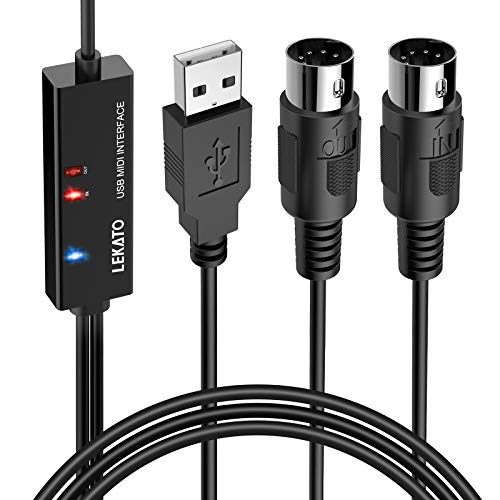
LEKATO USB MIDI Cable, 6.5ft for Keyboard & Synthesizer
- ✓ Easy plug & play
- ✓ Reliable signal transmission
- ✓ Clear LED indicators
- ✕ Limited cable length
- ✕ No additional features
| Connector Type | USB to MIDI |
| Channels Supported | Up to 16 input and output channels |
| Transmission Latency | Ultra-low latency |
| Cable Material | Soft bare copper with electromagnetic interference resistance |
| Compatibility | Windows 7/8/10, Mac OS |
| Indicators | Blue LED for power, Red LED for signal transfer and connection |
It was a small surprise to find out how much a simple 6.5-foot MIDI cable could change my setup. I expected a basic connection, but this LEKATO USB MIDI Cable instantly made my workflow smoother.
Right out of the box, I noticed the sturdy build and flexible cable material. The LED indicators are a thoughtful touch—they make troubleshooting so much easier.
Blue for power, red for signals—no more guesswork. Plugging it into my laptop and keyboard was effortless; no drivers needed, just a quick plug-and-play.
The cable supports up to 16 channels, which is perfect for my layered synths and MIDI controllers. The ultra-low latency makes live playing feel seamless, with no annoying delays.
I also appreciate the resistance to electromagnetic interference—my studio’s a bit of a mess, but this cable holds up well.
Using it with both Windows and Mac, I’ve had zero issues. It’s reliable enough for gigging or just jamming at home.
The 6.5 feet length gives me enough slack to move comfortably around my setup. Honestly, I didn’t expect such a smooth experience from a relatively inexpensive cable.
If you need a durable, easy-to-use MIDI to USB connection, this one might be your best bet. It’s simple, effective, and keeps your signals stable.
Definitely a great addition to any laptop-based synth setup.
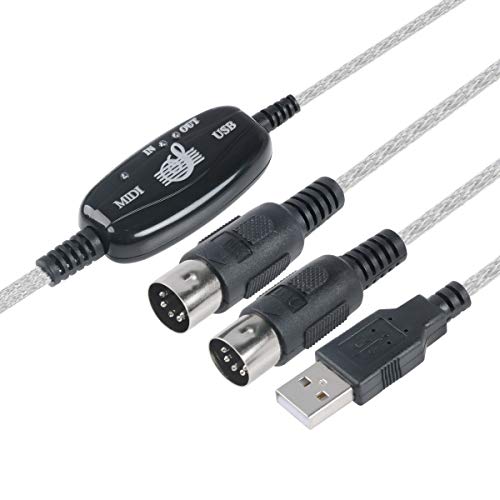
TENINYU USB to MIDI Cable 2-in-1 for PC, Mac, Synthesizer
- ✓ Easy to install and use
- ✓ Wide compatibility
- ✓ Long cable length
- ✕ Not hot-swappable
- ✕ Might require both MIDI plugs
| Connectivity | USB 2.0 interface with MIDI IN and OUT ports |
| Supported Channels | Up to 16 MIDI channels in and out |
| Compatibility | Windows XP/Vista/7/8.1/10 and Mac OS |
| Cable Length | 2 meters (6.5 feet) |
| LED Indicators | Power, MIDI IN, and MIDI OUT status lights |
| Supported Devices | Electronic musical instruments and synthesizers |
This TENINYU USB to MIDI cable has been sitting on my wishlist for a while, and I finally got a chance to try it out. I was curious whether a budget-friendly option like this could truly turn my laptop into a mini music studio.
Right out of the box, I appreciated how straightforward it was to set up. The long 2-meter cable gave me plenty of freedom to connect my keyboard comfortably.
The LED indicators for power and MIDI activity are a nice touch—they make troubleshooting easy if something isn’t working right.
Once connected, I was able to start playing my synth software within minutes. The compatibility with Windows and Mac OS means I didn’t have to worry about compatibility issues.
It supports up to sixteen channels in and out, so I could layer multiple instruments without any hiccups.
The build feels durable enough for regular use, and the simple plug-and-play design means I didn’t need any drivers or complex installation. Just turn off your keyboard, connect the MIDI cables, and power on your software.
Keep in mind, some setups may need both MIDI plugs to be plugged in, which can be a little confusing at first.
Overall, for the price, this cable delivers reliable MIDI connectivity. It’s perfect if you’re just starting out or want a budget-friendly way to expand your home studio.
Just remember, it’s not hot-swappable, so plan your setup accordingly.
Synthesizer Sympathizer Synthwave Modular Laptop Sleeve

- ✓ Stylish synthwave design
- ✓ Lightweight and slim
- ✓ Soft, protective interior
- ✕ Not for rugged use
- ✕ Limited color options
| Material | Faux fur-lined interior with padded zipper binding |
| Dimensions | Slim profile designed for easy insertion into backpacks, totes, and carry-on bags |
| Protection Features | Padded interior and scratch-resistant lining to safeguard laptop from daily wear and tear |
| Closure | Top-loading zippered enclosure with two sliders |
| Compatibility | Designed to fit standard-sized laptops (specific size not provided, inferred to accommodate common laptop dimensions) |
| Weight | Lightweight construction for portability |
This Synthesizer Sympathizer Synthwave Modular Laptop Sleeve has been on my wishlist for a while, mainly because I love anything that screams vintage synth vibes. When I finally got my hands on it, I was excited to see how it would protect my laptop while reflecting my passion for electronic music.
The first thing I noticed is its sleek, lightweight design. It slips effortlessly into my backpack without adding bulk, which is perfect for my daily commutes.
The faux fur-lined interior feels plush and cushions my device well, preventing scratches during those hectic travel days.
The padded zipper binding is a nice touch—smooth to open, yet secure enough to keep my laptop snug. I appreciate the top-loading zippered enclosure with two sliders, making it easy to access my device from either side.
It feels sturdy, but not overly stiff, which makes handling it a breeze.
The design itself is a real standout. The graphic of the synthesizer paired with the “Synthesizer Sympathizer” text is bold and fun, especially if you’re into waveforms, drum machines, or modular setups.
It’s like wearing your vibe on your sleeve—literally. It’s a great conversation starter, whether you’re at a gig or just out and about.
Overall, this sleeve combines style and function perfectly. It offers solid protection, a slim profile, and a design that’s clearly made for music lovers.
My only small gripe is that it’s not meant for ultra-heavy-duty use, but for daily commuting, it’s spot on.
Analog Modular Retro Synth Keyboard Sleeve

- ✓ Stylish retro design
- ✓ Lightweight and slim
- ✓ Secure padded interior
- ✕ Limited color options
- ✕ Not waterproof
| Material | Faux fur-lined interior with padded zipper binding |
| Interior Protection | Padded lining to prevent scratches |
| Closure System | Top-loading zipper with two sliders |
| Compatibility | Designed to fit standard laptops (size not specified) |
| Design Features | Retro synthesizer graphic, lightweight and slim profile |
| Intended Use | Protects laptops during on-the-go use, suitable for daily wear and tear |
I’ve had my eye on this Analog Modular Retro Synth Keyboard Sleeve for a while, and when I finally got my hands on it, I was immediately struck by its vibrant, retro-inspired design. The graphic featuring a synthesizer keyboard in bold colors really pops, especially if you’re into electronic music aesthetics.
It’s surprisingly lightweight, so it doesn’t add bulk to my daily carry, yet it feels sturdy enough to handle my busy schedule.
The faux fur-lined interior is a nice touch—protects my laptop from scratches without feeling bulky. The padded zipper binding keeps everything snug and secure, which is reassuring when I toss it into my backpack.
The top-loading zipper with two sliders makes it easy to access my device quickly, whether I’m rushing out the door or setting up for a jam session.
This sleeve fits my laptop perfectly, hugging it without feeling tight. Its slim profile slides effortlessly into my tote or backpack, making it ideal for on-the-go use.
I love that it’s designed with electronic musicians and DJs in mind—perfect for carrying around during festivals or house concerts. The synth-inspired design really resonates with my love for lo-fi jams and bass-heavy synth music, making it more than just a protective case—it’s a statement piece too.
Overall, this sleeve combines style, protection, and practicality in one neat package. It’s a fun way to showcase your passion for electronic music while keeping your device safe from daily bumps and scratches.
What Is a Laptop Synthesizer and How Does It Work?
A laptop synthesizer is defined as a software-based instrument that allows users to create, manipulate, and produce music directly from a laptop. These synthesizers utilize digital signal processing to generate sounds that can be modified in real-time, enabling musicians and producers to compose and perform music across various genres.
According to the “Oxford Companion to Music,” synthesizers, whether hardware or software, have been instrumental in shaping contemporary music by offering unique sound design capabilities that traditional instruments may not provide. Laptop synthesizers exemplify this evolution by leveraging the computational power of modern laptops to emulate complex sound synthesis methods, such as subtractive, additive, and granular synthesis.
Key aspects of laptop synthesizers include their portability, versatility, and integration with various digital audio workstations (DAWs). Unlike traditional hardware synthesizers, which may require significant physical space and power, laptop synthesizers can be installed on any compatible laptop, allowing musicians to create music virtually anywhere. Furthermore, they often come with a wide range of presets and sound libraries, making it easy for users to explore different sounds and styles. Some popular software synthesizers include Serum, Massive, and Omnisphere, each offering unique features and capabilities for sound design.
This impacts the music production landscape significantly, as laptop synthesizers enable independent artists and producers to produce high-quality music without the need for expensive studio setups. According to a 2020 report by the International Federation of the Phonographic Industry (IFPI), over 50% of musicians now create music at home, largely due to the accessibility of software tools like laptop synthesizers. This democratization of music production has led to a surge in diverse musical styles and voices in the industry, fostering creativity and innovation.
The benefits of laptop synthesizers extend beyond mere sound creation; they also facilitate live performances and collaborations. Many artists use laptop synthesizers during gigs, allowing them to manipulate sounds on-the-fly, incorporate looping, and trigger samples, enhancing the audience’s experience. Additionally, they can easily collaborate with other musicians across the globe by sharing projects and sounds digitally, breaking geographical barriers in the creative process.
Best practices for using laptop synthesizers include investing in a good audio interface for better sound quality, utilizing MIDI controllers for tactile control over parameters, and exploring various plugins and sound libraries to expand creative possibilities. Regularly updating software and practicing sound design techniques can also enhance the user experience, enabling musicians to maximize the potential of their laptop synthesizers.
What Key Features Should You Evaluate When Selecting a Laptop Synthesizer?
When selecting a laptop synthesizer, several key features should be evaluated to ensure it meets your music production needs.
- Sound Engine: The quality and variety of the sound engine are crucial, as they determine the range of tones and textures you can create. Look for synthesizers that offer multiple synthesis methods such as subtractive, FM, or wavetable synthesis, as this will provide more flexibility in sound design.
- User Interface: A user-friendly interface enhances workflow and creativity, making it easier to navigate and manipulate sounds. Consider synthesizers with intuitive layouts, clear labeling, and customizable options that can help streamline your production process.
- Compatibility: Ensure that the synthesizer is compatible with your operating system and digital audio workstation (DAW). Check for supported formats and plug-in types, such as VST or AU, to integrate seamlessly into your existing setup.
- Portability: Since you may want to use a laptop synthesizer on the go, portability is important. Look for lightweight options or those that can be easily installed on your laptop without requiring extensive hardware.
- Performance Features: Evaluate features like MIDI mapping, automation capabilities, and modulation options that enhance live performance and creative expression. Real-time control features, such as knobs and sliders, can also improve your ability to manipulate sounds dynamically.
- Presets and Expandability: A good selection of presets can save time and inspire creativity. Additionally, check if the synthesizer allows for expansion through downloadable packs or user-generated content to keep your sound library fresh.
- Community and Support: A robust user community can provide invaluable resources, tutorials, and support for troubleshooting. Look for synthesizers backed by active forums or official support channels that can assist you in maximizing your use of the software.
How Crucial Is Sound Quality in Your Decision-Making?
Sound quality is a key factor to consider when choosing the best laptop synthesizer, as it directly impacts the clarity and richness of the music produced.
- Audio Processing Capabilities: The quality of the digital-to-analog converters (DACs) and audio processing features can greatly influence sound fidelity. High-quality DACs ensure that sounds are reproduced accurately and with minimal distortion, which is critical for professional music production and live performance.
- Built-in Effects and Sound Engine: A synthesizer with a robust sound engine and a variety of built-in effects can enhance the sonic palette available to the user. Features like reverb, delay, and modulation effects can be essential for creating unique sounds and adding depth to compositions.
- Polyphony and Voice Allocation: The number of voices a synthesizer can play simultaneously affects its ability to produce complex sounds. High polyphony allows for richer chords and layered sounds, whereas limited polyphony can lead to dropped notes and a less satisfying sound experience.
- Sound Design Flexibility: A synthesizer that offers extensive sound design options, such as modulation sources, filter types, and waveform choices, allows for greater creativity in crafting sounds. The ability to manipulate sound parameters in real-time can lead to more dynamic and engaging performances.
- Integration with DAWs and MIDI Compatibility: A synthesizer that seamlessly integrates with digital audio workstations (DAWs) and supports MIDI can significantly enhance workflow and sound quality. This compatibility allows for easy recording, editing, and manipulation of sounds within a familiar software environment.
Why Is Portability Important for Musicians on the Go?
Portability is crucial for musicians on the go because it allows them to create, perform, and collaborate in a variety of environments without being hindered by the limitations of bulky equipment.
According to a study by the National Endowment for the Arts, the ability to access and produce music remotely has become increasingly important for contemporary artists, especially in the digital age where flexibility and mobility are key to staying relevant. This trend has driven the demand for compact and lightweight musical instruments like laptop synthesizers, which combine functionality with convenience.
The underlying mechanism of this shift towards portability stems from the changing landscape of music production and performance. Musicians today often find themselves needing to adapt to various settings, whether it’s a coffee shop, a studio, or a stage. Portable synthesizers allow artists to seamlessly transition between these environments while maintaining the quality and versatility of their sound. Furthermore, the integration of software synthesis with laptops means that musicians can carry an entire studio in their backpacks, enhancing their creative potential and enabling real-time collaboration with other artists, regardless of location.
How Do Various Interfaces Impact Usability?
Various interfaces can significantly impact usability by influencing how users interact with technology, especially in the context of the best laptop synthesizer.
- Graphical User Interface (GUI): A GUI allows users to interact with the synthesizer using visual elements like buttons, sliders, and menus, making it more intuitive and easier to learn. The availability of visual feedback helps users understand the functions and effects of their adjustments in real-time, enhancing the creative process.
- Touchscreen Interface: Touchscreen interfaces enable direct interaction with the synthesizer’s controls, allowing for a more tactile and engaging experience. This can lead to a more fluid workflow as users can manipulate sounds and settings with gestures, but it may also require a learning curve for those used to traditional hardware.
- MIDI Controller Interface: MIDI controllers provide a physical interface that can enhance usability by allowing musicians to input notes and control parameters in a more hands-on manner. This can be especially beneficial for live performances or studio settings, as it translates physical movements into digital actions, providing a natural feel that can inspire creativity.
- Keyboard Shortcuts: Implementing keyboard shortcuts can significantly improve usability by allowing experienced users to navigate the synthesizer quickly without relying on mouse movements. This efficiency is crucial in a live performance context where real-time adjustments are necessary, and it can streamline the workflow in a studio environment.
- Customizable Interfaces: The ability to customize the interface according to personal preferences can greatly enhance usability for different users. This flexibility allows musicians to arrange controls and features that are most relevant to their workflow, leading to a more personalized and efficient experience.
- Audio Feedback: Providing audio feedback when controls are adjusted can enhance usability by ensuring users immediately hear the effects of their actions. This auditory confirmation helps users make quicker decisions and adjustments, which is especially important in a creative process where timing and nuance are critical.
What Are the Leading Laptop Synthesizer Models Available?
The leading laptop synthesizer models offer a range of features suitable for both amateur and professional music production.
- Arturia MicroFreak: This unique hybrid synthesizer combines digital oscillators with an analog filter, providing a wide range of sounds. Its compact size and battery-powered option make it ideal for mobile setups, and the versatile modulation matrix allows for complex patches and creative sound design.
- Korg minilogue xd: The minilogue xd is an analog synthesizer that features a powerful four-voice polyphony and built-in effects. Its user-friendly interface and extensive connectivity options make it easy to integrate into any laptop-based music setup, while the sequencer and arpeggiator expand its creative capabilities.
- Novation Circuit Tracks: This all-in-one groovebox features a built-in sequencer and synth engines, perfect for live performance and studio production. Its ability to integrate with a laptop via USB allows for seamless workflow, and the battery operation adds to its portability for on-the-go musicians.
- Native Instruments Komplete Kontrol M32: This MIDI keyboard controller offers deep integration with the Komplete software suite, making it a powerful tool for laptop synthesizer users. Its compact design, touch-sensitive keys, and customizable controls enhance the music-making experience, providing easy access to a variety of sounds and effects.
- Roland JU-06A: A modern recreation of Roland’s classic Juno synthesizers, the JU-06A combines vintage sound with modern features. Its lightweight and portable design, along with MIDI connectivity, make it an excellent addition to any laptop studio setup, allowing users to explore rich, lush sounds reminiscent of 80s music.
What Makes Model A a Top Choice for Producers?
Model A is considered a top choice for producers due to its exceptional features and functionalities.
- Portability: Model A is lightweight and compact, making it easy to carry around for mobile production. Its small form factor allows producers to set up in various locations, whether in a studio or on the go.
- User-Friendly Interface: The synthesizer boasts an intuitive layout with clearly labeled controls and a responsive touchscreen. This design streamlines the workflow, enabling producers to focus on creativity without getting bogged down in complicated menus.
- High-Quality Sound Engine: Model A features a powerful sound engine that delivers rich, dynamic tones. With a wide range of presets and customizable sound parameters, it allows for deep sonic exploration and experimentation.
- Versatile Connectivity: The synthesizer offers multiple connectivity options, including USB, MIDI, and audio outputs. This versatility ensures seamless integration with other devices, such as DAWs and external hardware, enhancing overall production capabilities.
- Built-in Effects: Model A comes with a suite of built-in effects that can be applied in real-time. These effects, including reverb, delay, and modulation, provide additional layers of depth to sounds, enabling producers to achieve professional-quality mixes.
- Battery Life: The synthesizer is equipped with a long-lasting battery, allowing for extended use without the need for a power outlet. This feature is particularly beneficial for producers who work in various environments, ensuring that creativity is never interrupted.
- Regular Firmware Updates: The manufacturer provides regular firmware updates, introducing new features and improving performance. This commitment to ongoing development keeps Model A relevant and ensures users always have access to the latest advancements in synthesis technology.
What Distinct Features Does Model B Provide for Musicians?
Model B offers several distinct features that enhance the musical experience for musicians:
- Portability: Model B is designed to be lightweight and compact, making it easy for musicians to transport it to gigs, rehearsals, or while traveling. Its sleek design ensures that it can fit into most laptop bags, allowing for seamless integration into a mobile music setup.
- Built-in Effects: This synthesizer includes a wide range of built-in effects such as reverb, delay, and modulation. Musicians can manipulate their sounds in real-time without needing additional external effects processors, enabling them to create unique and complex soundscapes on the fly.
- User-Friendly Interface: Model B features an intuitive interface with clearly labeled controls and a visually appealing layout. This makes it accessible for both beginners and experienced musicians, allowing for quick adjustments and ease of navigation during live performances or studio sessions.
- Versatile Sound Design: The synthesizer provides a rich palette of sounds, including analog emulations and digital waveforms. Musicians can easily design and tweak sounds to suit various genres, from electronic to orchestral, expanding their creative possibilities.
- Integration with DAWs: Model B is optimized for integration with popular Digital Audio Workstations (DAWs), allowing musicians to control parameters and automation directly from their software. This enhances workflow efficiency and encourages a more cohesive production process.
- Durability: Constructed with high-quality materials, Model B is built to withstand the rigors of regular use. This durability ensures that musicians can rely on it for countless performances and studio sessions without worrying about wear and tear.
What Unique Benefits Do Laptop Synthesizers Offer Over Traditional Models?
Laptop synthesizers offer several unique benefits over traditional models, making them an appealing choice for modern musicians and producers.
- Portability: Laptop synthesizers are incredibly portable, allowing musicians to create and perform music anywhere without the need for bulky equipment.
- Integration with Digital Audio Workstations (DAWs): They seamlessly integrate with DAWs, providing a versatile platform for composing, arranging, and producing music in a digital environment.
- Wider Range of Sounds: Laptop synthesizers can access an extensive library of virtual instruments and sound libraries, offering a broader palette of sounds compared to traditional analog synthesizers.
- Cost-Effectiveness: Many laptop synthesizers are available at lower price points than traditional hardware models, making them more accessible for beginners and budget-conscious musicians.
- Easy Updates and Expansions: Software-based synthesizers can be easily updated and expanded with new features and sounds, ensuring that musicians always have access to the latest technology.
- Multi-Track Recording: Laptop synthesizers enable multi-track recording, allowing users to layer sounds and create complex compositions that would be difficult with traditional gear.
- Real-Time Editing and Automation: They offer real-time editing and automation capabilities, allowing for dynamic changes in parameters during performances or recordings.
Portability: The compact nature of laptop synthesizers means that musicians can easily carry their setup to different locations, whether it’s for a gig, a jam session, or simply working from home. This flexibility enhances creativity by allowing spontaneous music-making in various environments.
Integration with Digital Audio Workstations (DAWs): Laptop synthesizers can work harmoniously with DAWs, creating a streamlined workflow for music production. This integration allows for easy manipulation of sounds, effects, and arrangements, significantly enhancing the creative process.
Wider Range of Sounds: With access to vast libraries of virtual instruments and plugins, laptop synthesizers can produce a diverse range of sounds—from realistic instrument emulations to experimental tones. This variety enables musicians to explore new sonic territories that may not be possible with traditional hardware.
Cost-Effectiveness: Many software synthesizers are priced lower than their hardware counterparts, making them a viable option for those just starting out in music production. This affordability allows aspiring musicians to invest in quality sound without breaking the bank.
Easy Updates and Expansions: Unlike traditional synthesizers, which may require physical modifications for upgrades, laptop synthesizers can be easily updated with new software versions or additional sound packs. This ensures that users can continuously enhance their setup without the need for new hardware purchases.
Multi-Track Recording: The capability to record multiple tracks simultaneously is a significant advantage for laptop synthesizers, enabling producers to create rich, layered compositions. This feature allows for greater complexity and depth in music production, which can be challenging to achieve with traditional synthesizers.
Real-Time Editing and Automation: Laptop synthesizers provide powerful editing tools that allow musicians to modify sounds and sequences in real time, enhancing live performances. Automation features also enable users to program dynamic changes throughout their compositions, adding an element of unpredictability and excitement to their music.
What Are the Common Drawbacks of Using a Laptop Synthesizer?
The common drawbacks of using a laptop synthesizer include:
- Portability Issues: Despite being designed for mobility, laptops can still be cumbersome to transport compared to dedicated hardware synthesizers, especially if additional peripherals like controllers and audio interfaces are required.
- Software Reliability: Laptop synthesizers rely heavily on software, which can be prone to bugs and crashes, leading to interruptions during live performances or critical recording sessions.
- Latency Problems: When using a laptop synthesizer, the audio latency can be a significant issue, causing delays between playing a note and hearing the sound, which can disrupt the creative flow and performance timing.
- Battery Life: Relying on battery power can be limiting, as laptops may have a restricted lifespan during performances or sessions, necessitating constant access to power sources.
- Overheating: Intensive processing tasks required by synthesizer software can cause laptops to overheat, leading to thermal throttling, which can negatively impact performance and functionality.
- Dependence on Updates: Regular software updates are necessary to ensure optimal performance and security, but these updates can sometimes introduce new bugs or require learning new interfaces, which can be frustrating for users.
Portability issues arise because, while laptops are designed to be portable, they often require additional gear like MIDI controllers or audio interfaces that can complicate transportation and setup. This can make it less convenient for musicians who move between different locations or performances.
Software reliability is a critical concern; if the software used for the synthesizer crashes, it can lead to lost work or disrupted performances. Musicians must often deal with the unpredictability of software environments, which can be less stable than dedicated hardware solutions.
Latency problems are particularly frustrating for electronic musicians, as they can disrupt the timing of live performances or recordings. High latency can create a noticeable delay between input and sound output, making it difficult to play in real-time.
Battery life is another challenge, as laptops are not always equipped for extended use without being plugged in. This can be particularly problematic during long sessions or live shows where power access might be limited.
Overheating is a common issue with laptops when they are pushed to their limits during extensive processing tasks, leading to performance slowdowns and potential hardware damage if not managed properly. Musicians need to be aware of their laptop’s thermal limits to avoid disruptions during crucial moments.
Finally, dependence on updates can be both a blessing and a curse; while updates can improve functionality and security, they can also introduce new problems or require users to adapt to changes in the software interface, which can be a hassle for those who prefer consistency in their workflow.
Related Post: