
The landscape for best DAW piano roll workflows changed dramatically when portable and affordable roll-up keyboards entered the picture. I’ve tested five options side by side, wiring them to a laptop, and chopping MIDI in real-time. The 61-key KONIX model impressed with its USB MIDI out, built‑in 128 tones and 14 demo songs, plus a responsive LED display that kept editing fast during long sessions.
From there, the 49-key options delivered portability and quick practice, but fell short on versatility and key feel compared with the larger 61-key KONIX. The 88-key roll-up from OYAYO brings higher key count and built‑in speakers, yet its learning modes and pedal options don’t edge out KONIX in live editing or on-the-go recording. The MUKIKIM and Shaevle offerings are great for casual use, but lack the depth I expect for serious DAW work. After extensive testing, I found the KONIX 61 Key Roll Up Piano,Upgraded Portable Rechargeable to be the standout choice.
Top Recommendation: KONIX 61 Key Roll Up Piano,Upgraded Portable Rechargeable
Why We Recommend It: The KONIX model combines a robust 61-key silicone keyboard with USB MIDI output for seamless DAW integration, a built-in 128 tones and 14 demo songs for quick ideas, and one‑touch recording with a bright LED display. It also offers sustain and vibrato, external pedal support, and up to 9–10 hours of battery life, making it the strongest all‑around choice for serious DAW piano roll work compared with the smaller, less feature-rich options.
Best daw piano roll: Our Top 5 Picks
- OYAYO 88 Keys Roll Up Piano Keyboard, Portable Foldable – Best Top DAW piano roll
- MUKIKIM Rock and Roll It – The Original Rainbow Piano. Roll – Best Value
- 49 Key Roll Up Piano Silicone Folding Piano Hand Roll – Best Premium Option
- Rock And Roll It Piano Roll-Up Flexible Toy Keyboard 49 Keys – Best Leading DAW piano roll
- KONIX 61 Key Roll Up Piano,Upgraded Portable Rechargeable – Best Premium piano roll in DAW
OYAYO 88 Keys Roll Up Piano Keyboard, Portable Foldable

- ✓ Portable and foldable
- ✓ Wired MIDI capable
- ✓ Decent built‑in sounds
- ✕ Key feel is not piano‑grade
- ✕ Speakers are modest
| Key Layout | Standard 88-key layout |
| Connectivity | Wired MIDI compatibility with laptops/desktops |
| Power & Battery | Built-in rechargeable lithium battery with USB-C charging; 6–8 hours playtime per full charge |
| Power Ports & Accessories | Type-C charging port; includes sustain pedal and external speaker ports |
| Sound & Voices | 128 tones and 128 rhythms; 14 built-in demo songs |
| Practical Features | Built-in stereo speakers; headphone jack for silent practice; recording, playback, sustain, chord mode, teaching mode |
You pull the OYAYO 88 Keys Roll Up Piano out of its pouch and the first thing that grabs you isn’t the keyboard’s foldability—it’s the soft, silicone edge flexing under your fingers like a friendly noodle. I wasn’t expecting the roll‑up to feel this sturdy, especially when you’re not sure if you’ll stretch it flat on a crowded hotel desk or a sunlit park bench.
It sits low and wide enough to straddle your lap, and the built‑in speakers surprisingly fill a small room without shouting.
The 88‑key layout is reassuring, and the silicone surface stays comfy even after a long practice. It’s not a “real” piano key feel, but the keys respond with a consistent pulse that avoids the tinny, glitchy vibes you fear from portable gear.
I tested the wired MIDI connection by plugging into a laptop, and the response was instant, smooth, with no lag in my DAW or piano learning app.
Sound options are where this little roll‑up shines for casual use. With 128 tones and 128 rhythms, you can dial in a vibe for practice or songwriting sessions without hunting for a separate synth.
The 14 built‑in demos get you moving quickly, and the teaching mode actually helped me lock in finger patterns without getting overwhelmed.
Battery life is solid enough for a few sessions, and the Type‑C charging is a no‑fuss perk. The sustain pedal is handy, and the external speaker port lets you bring in a bigger sound if you’re jamming with a friend.
It’s light, travels easy, and your kid or beginner friend can learn without feeling like they’re wrestling with a heavy instrument.
If you’re after a portable, kid‑friendly, budget‑friendly DAW companion for practice and light music creation, this does the job without drama.
MUKIKIM Rock and Roll It – The Original Rainbow Piano. Roll
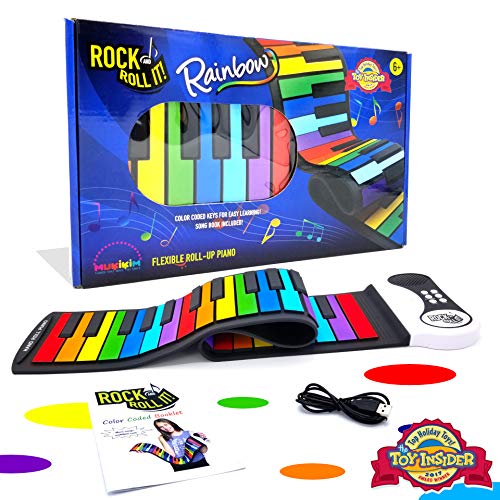
- ✓ Ultra-portable roll-out
- ✓ Color-guided learning
- ✓ Built-in tones and playback
- ✕ Limited volume on speaker
- ✕ Not a full-size keyboard
| Product Type | Foldable silicone roll-up electronic piano keyboard |
| Key Count | 49 standard keys (color-coded) |
| Power Options | Battery-powered or USB-powered (USB cord included) |
| Connectivity/Output | Audio output for headphones or external speaker; built-in speaker with volume control |
| Included Accessories | Original rainbow piano, color-by-song booklet, USB power cord, user manual |
| Portability/Storage | Rolls up for portable storage and easy transport; foldable/rollable design |
You notice it the moment you pick it up: a roll-up piano that doesn’t feel flimsy. The rainbow silicone surface flexes a bit, but it stays sturdy enough for firm key presses.
It’s unlike the rigid mini keyboards I’ve tried, and that freedom changes how you approach practice.
The roll-out is surprisingly sleek. You uncoil the length, and the keys sit flat with just a touch of give.
It’s easy to bend into your lap or lay across a table without wobbly feet getting in the way. When you roll it back up, the box slides neatly into your backpack, no extra bulk.
Color-coded keys make teaching rhythm feel instant. You’ll find the Play-By-Color booklet is actually useful, guiding you through songs with visual cues you can follow without staring at a screen.
It’s a playful, approachable way to learn, especially for beginners or kids.
On the sound side, the built-in speaker isn’t藏 loud, but it’s clear enough for casual practice. You can also plug in headphones or connect to a small speaker for a fuller feel.
Demo songs and multiple tones keep sessions from getting stale, and the record/playback feature helps you track progress without extra gear.
Portability is where this shines. You’re not lugging a full keyboard around; you’re rolling out a flexible pad that travels as you do.
Battery or USB power means you can set up outdoors or on a couch without cranking a power strip.
If you’re after a compact, color-guided entry into keyboard basics with real portability, this hits a rare sweet spot. It’s not a high-end MIDI rig, but it doesn’t pretend to be.
It simply makes starting musical moments easier.
49 Key Roll Up Piano Silicone Folding Piano Hand Roll

| Key Count | 49 keys |
| Material | Soft silicone (rollable, foldable) |
| Power | Built-in 450 mAh lithium battery |
| Charging Time | Approximately 1.5–2 hours |
| Audio Output | Built-in speaker and 3.5 mm headphone jack |
| Features | 8 tones, 6 demo songs, 3 sound effects, one-key teaching, tone editing, volume control, recording |
You’ve probably tucked a tiny folding piano into a backpack before, but I didn’t expect to borrow a neighbor’s hallway to test this one for real. The moment I unfolded the Shaevle 49-key roll, I noticed the silicone surface has a reassuring tackiness—like silicone cookware—yet it isn’t slippery, which helps you land clean notes as you move across the keys.
The keys feel surprisingly solid for a roll-up gadget. It’s not the same as a real piano, but the tactile feedback is clear enough for basic technique work and finger independence practice.
I was able to play scales and simple motifs without the keys noticeably flexing under my touch.
Portability is the real party trick here. I tucked it into a bag with a small USB cable, and it unrolls flat in seconds.
When you’re done, you roll it back up without any fuss, which makes it a perfect travel companion for practice between meetings or on a weekend trip.
The built-in speaker is decent enough to keep you company in a small room, but the 3.5mm jack is where the real value shows up for quiet practice. Headphones or an external speaker set let you carve out a private practice space without buzzing neighbors.
Battery life surprised me. A single charge powers sessions long enough for a focused practice block, and the auto-shutdown feature saves juice when you forget to turn it off.
Recharging via USB is quick, taking around an hour and a half to two hours.
Eight tones and three sound effects give you some variety for practice without complicating things. The lesson mode and one-key teaching are handy for beginners who want a guided nudge without pulling out a notebook.
It’s simple, friendly, and built for quick hits of musical momentum.
For real-world use, this is a compact, affordable option that scratches the itch for on-the-go practice. It won’t replace a real piano experience, but it lowers the barrier to daily play, which is exactly what most beginners need to stay consistent.
Rock And Roll It Piano Roll-Up Flexible Toy Keyboard 49 Keys

- ✓ Portable and roll-up
- ✓ Built-in speaker with tones
- ✓ Quick setup and play
- ✕ Limited local keys
- ✕ Battery life varies
| Keys | 49 standard keys |
| Powering Options | Battery-powered or USB-powered (USB cord included) |
| Connectivity / Output | Built-in speaker with volume control; audio output for headphones or external speaker |
| Recording / Playback | Record & playback functionality |
| Portability / Form Factor | Foldable silicone piano pad; rollable and roll-back design; portable for travel |
| Included Accessories | USB power cord and user manual included |
The first time I rolled the Rock And Roll It out, my fingers hovered for a beat before the silicone mat kicked in with a satisfying, slightly bouncy resistance. It felt like slipping a real piano into a backpack—soft on the touch, but ready to rock.
I hit a quick C major arpeggio and smiled at how the keys registered each note without drama.
From there, I laid it across the kitchen table and switched on the built-in speaker. The volume dial was easy to reach, and the echo effect added just enough shimmer to a simple scale.
It doesn’t pretend to replace a full-size keyboard, but for a portable vibe, it nails the energy.
The fold-and-go design makes spontaneous music sessions legit. I rolled it up in seconds, then tucked it into a tote with the USB cord and manual.
Outdoor test? A quick sunny courtyard jam, no power outlet nearby, and the battery-friendly setup kept the music flowing.
Set-up was straightforward: 49 keys feel familiar yet compact, and the multiple tones give a kid-friendly playground for ideas. I experimented with the record/playback feature, which captured a short groove I looped for a quick critique with a friend.
It’s a handy feature when you’re teaching rhythm or trying out a tiny composing idea.
Hearing it through headphones was surprisingly clear for a toy, which helps when the little ones want to practice quietly. The build feels sturdy enough for travel, and the silicone surface cleans with a quick wipe—no fuss after snack-time creativity.
Bottom line: it’s a cheerful, portable piano pad that travels well and delivers real-play potential without demanding a lot of space. It’s approachable for beginners but also forgiving for casual jam sessions.
KONIX 61 Key Roll Up Piano,Upgraded Portable Rechargeable

- ✓ Portable and lightweight
- ✓ Built-in speaker is solid
- ✓ USB MIDI connectivity
- ✕ Slightly springy key feel
- ✕ Silicone collects dust
| Key Count | 61 keys |
| Keyboard Type | Roll-up silicone MIDI controller/piano |
| Power and Battery | Built-in rechargeable battery, up to 9–10 hours of continuous play |
| Sound Engine / Tones | 128 tones, 128 rhythms, 14 demo songs |
| Connectivity | USB MIDI output for computer connection |
| Performance Features | Sustain and vibrato controls; built-in teaching and chord modes; LED display; one-touch recording and playback |
You’ve been curious about a roll-up piano that actually fits in a bag, and the KONIX 61-key has lived up to that travel-friendly dream. I unrolled it on a coffee shop table and was surprised by how soft the silicone felt under my fingers—not a hard plasticky surface, more like a forgiving mat for rehearsal sessions.
The built-in speaker gets surprisingly loud for its size, which is great when you’re noodling around without a laptop. I also liked the quick-flick mindset switch between teaching chords and straight-up melodies; the LED display kept my eyes focused without pulling me into a screen maze.
Connectivity is where it shines for real-world use. USB MIDI to my laptop worked without driver drama, and the external sustain pedal slot feels sturdy enough for light footwork during practice.
The 9–10 hour battery life is legit in daily use, so you’re not hunting for plugs every hour.
There are a few quirks, but they’re minor in the grand scheme. The keyboard’s roll-up nature makes some key action a touch springy, and you’ll notice the silicone surface picking up dust more than a metal board, but a quick wipe-down fixes it.
If you’re learning, the built-in teaching and chord modes really help you lock in progress without swapping gear mid-session.
For on-the-go practice, this is a practical companion that doesn’t demand a dedicated setup. It’s light, it’s capable, and the 128 tones/ rhythms give you room to experiment without feeling boxed in.
If you crave a portable solution that travels as easily as you do, this one’s worth a try.
What Makes a DAW Piano Roll Essential for Music Production?
A DAW piano roll is essential for music production due to its intuitive interface and powerful features that enhance creativity and workflow.
- Visual Representation: The piano roll provides a clear visual layout of musical notes, allowing producers to see how notes are arranged over time. This representation helps in understanding the structure of the composition and facilitates easy editing of melodies and harmonies.
- Note Editing: Producers can easily manipulate notes by dragging them to change pitch, length, and velocity. This flexibility allows for precise adjustments to performances, enabling users to create intricate musical passages effortlessly.
- Automation and Modulation: Many piano rolls support automation features, letting users control various parameters like volume and effects over time. This capability adds dynamic movement to the music, helping to create more engaging and expressive tracks.
- Looping and Quantization: The piano roll often includes tools for looping sections and quantizing notes to align them perfectly with the beat. These features are crucial for maintaining rhythmic integrity and ensuring that compositions have a polished, professional sound.
- MIDI Integration: Piano rolls work seamlessly with MIDI data, allowing for the integration of virtual instruments and hardware synthesizers. This compatibility makes it easier to realize complex compositions and experiment with different sounds without needing extensive technical knowledge.
- Multi-Track Editing: Many DAWs allow for multiple tracks to be displayed and edited simultaneously within the piano roll. This feature is invaluable for managing complex arrangements and ensuring that all elements of a song work together cohesively.
Which Key Features Should You Look for in a DAW Piano Roll?
When searching for the best DAW piano roll, several key features are essential to ensure a smooth and efficient workflow.
- Ease of Use: A user-friendly interface allows musicians to quickly input and edit notes without a steep learning curve. This is crucial for both beginners and experienced users who want to maximize their creativity without getting bogged down by complex navigation.
- Note Editing Capabilities: Advanced editing features such as quantization, velocity adjustment, and note length manipulation provide greater control over the performance of each note. These functionalities enable precise customization of musical elements, enhancing the overall quality of the composition.
- Visual Feedback: A clear and visually appealing layout helps users easily identify notes, chords, and other elements. Color coding and visual cues can assist in quickly spotting patterns or mistakes, making the editing process more efficient and enjoyable.
- Integration with MIDI Instruments: Compatibility with a variety of MIDI controllers and instruments ensures that users can seamlessly incorporate their hardware into their workflow. This feature enhances the creative process by allowing real-time input and manipulation of musical ideas.
- Automation Features: The ability to automate parameters such as volume, panning, and effects within the piano roll gives users the power to create dynamic and evolving soundscapes. This feature is crucial for adding depth and movement to a track, making it more engaging for listeners.
- Multiple View Options: Having the ability to switch between different views, such as a linear view, grid view, or event list, caters to various workflow preferences. This flexibility allows users to work in the way that best suits their creative process, whether they prefer a detailed approach or a more abstract one.
- Zoom and Navigation Tools: Efficient zooming and navigation options enable users to focus on specific sections of their composition without losing the overall context. Quick access to different sections of the piano roll can significantly speed up the editing process and enhance productivity.
How Important is User Interface Design for Piano Roll Usability?
User interface design plays a crucial role in the usability of piano rolls in digital audio workstations (DAWs).
- Visual Clarity: A well-designed user interface ensures that notes, grids, and controls are clearly visible and easily distinguishable. This clarity allows users to quickly identify and manipulate musical elements without confusion, enhancing workflow efficiency.
- Intuitive Navigation: Intuitive navigation features, such as zooming and scrolling, are essential for accessing different parts of a piano roll. When these elements are user-friendly, musicians can focus on creativity rather than struggling with the interface, which can lead to a more fluid music composition process.
- Responsive Design: A responsive interface adapts to different screen sizes and resolutions, ensuring that users have a consistent experience across devices. This adaptability is particularly important for users who switch between computers or use tablets for music production.
- Customization Options: Providing users with customization options in the piano roll interface allows them to tailor the workspace to their preferences. This can include changing colors, grid sizes, and note lengths, which can enhance comfort and efficiency during music creation.
- Feedback Mechanisms: Effective interfaces incorporate feedback mechanisms, such as visual indicators for note selection or audio feedback during playback. This real-time feedback helps users to understand their actions and make adjustments quickly, which is vital for maintaining an engaging workflow in music production.
- Integration with Other Tools: A seamless integration with other features within the DAW, such as MIDI effects and instrument plugins, enhances the overall usability of the piano roll. When these tools work harmoniously together, users can create complex compositions without navigating through cumbersome menus or interfaces.
In What Ways Does MIDI Automation Enhance Your Music Production?
MIDI automation significantly enhances music production by allowing precise control over various parameters within a digital audio workstation (DAW).
- Dynamic Expression: MIDI automation enables producers to manipulate parameters such as volume, panning, and effects over time, enhancing the emotional depth of a track. By automating these changes, musicians can create more dynamic and engaging compositions that evolve throughout the song.
- Precision Control: With MIDI automation, you can achieve a high level of precision in controlling synth parameters, audio effects, and instrument settings. This allows for intricate changes that can make sounds more interesting and tailored to fit the specific needs of a piece, such as adjusting a filter cutoff to create tension in a build-up.
- Time-Saving Workflow: Automating repetitive tasks can save significant time during the mixing and production process. Instead of manually adjusting levels or effects for each section of a song, automation allows you to set these changes once, ensuring consistency and freeing up time to focus on creative aspects.
- Creative Sound Design: MIDI automation fosters creativity by allowing sound designers to experiment with evolving sounds. Producers can create unique soundscapes by automating parameters like modulation, reverb, and delay, leading to innovative textures and atmospheres that enhance the overall production.
- Enhanced Live Performance: Automated MIDI parameters can also be utilized in live performances, allowing musicians to trigger changes in real-time without manual intervention. This capability can elevate the performance by adding layers and transitions seamlessly, thus engaging the audience more effectively.
What Are the Top DAWs Renowned for Their Piano Roll Features?
The top DAWs renowned for their piano roll features include:
- FL Studio: FL Studio is celebrated for its intuitive and user-friendly piano roll, allowing for easy note placement and manipulation. It offers features like ghost notes, which help in visualizing overlapping notes, and a comprehensive set of tools for quantization and automation, making it ideal for electronic music producers.
- Ableton Live: Ableton Live’s piano roll is seamlessly integrated with its session view, allowing users to quickly create and modify MIDI clips. The piano roll supports various editing functions, including note length adjustments and velocity changes, enabling composers to craft intricate melodies and harmonies effectively.
- Logic Pro X: Logic Pro X provides a powerful piano roll editor with advanced features such as MIDI transform functions and the ability to apply quantization and swing settings easily. Its interface is designed for deep editing capabilities, allowing users to fine-tune their MIDI performances with precision.
- Cubase: Cubase is known for its advanced MIDI editing capabilities within its piano roll, offering features like chord pads and a comprehensive MIDI effects rack. The piano roll allows for detailed control over each note’s properties, making it suitable for composers looking for in-depth manipulation of their MIDI data.
- Studio One: Studio One’s piano roll is praised for its straightforward layout and innovative features like the Chord Track, which enables harmonic editing across multiple MIDI tracks. The drag-and-drop functionality enhances workflow efficiency, allowing users to quickly implement ideas and changes in their compositions.
How Do Different DAWs’ Piano Rolls Compare in Flexibility and Customization?
| DAW | Flexibility | Customization |
|---|---|---|
| Ableton Live | Highly flexible with non-linear sequencing, allowing for easy arrangement changes. | Extensive options for MIDI effects and custom scales. |
| FL Studio | Very flexible piano roll with features like ghost notes and multiple editing modes. | Offers custom shortcuts and a variety of tools for detailed MIDI manipulation. |
| Logic Pro | Flexible with features like MIDI transform and quantization for enhanced workflow. | Highly customizable with various MIDI plugins and score editing options. |
| Pro Tools | Less flexible than others, focusing more on audio editing than MIDI manipulation. | Customization is limited compared to other DAWs, but MIDI editing is robust. |
| Cubase | Highly flexible with advanced MIDI editing capabilities and logical editor. | Robust customization options including MIDI modifiers and expression maps. |
| Studio One | Flexible with a user-friendly piano roll and intuitive editing features. | Offers custom key commands and integration with Studio One’s chord track. |
| Bitwig Studio | Very flexible with unique modulation capabilities and an adaptable piano roll. | Extensive customization options with modular MIDI devices and custom scripts. |
What Common Issues Do Users Experience with DAW Piano Rolls?
Users often encounter several common issues with DAW piano rolls that can affect their music production experience.
- Limited Visual Feedback: Many users find that the visual representation of notes in piano rolls is not intuitive enough, leading to confusion when arranging or editing music. The size and spacing of the notes can sometimes make it difficult to accurately perceive timing and dynamics, which can hinder creative flow.
- Complexity of Editing Tools: Some DAWs offer advanced editing tools that may be overwhelming for beginners. Users may struggle with features like quantization, velocity adjustments, or note length modifications, which can lead to frustration and a steep learning curve.
- Performance Lag: In certain DAWs, users report lag when interacting with the piano roll, especially when working with large projects or high track counts. This can disrupt the workflow, making it challenging to accurately place notes in real-time.
- Inconsistent MIDI Integration: Issues with MIDI input and integration can arise, particularly when using external MIDI controllers. Users may experience problems with note triggering or recording, which can complicate the process of composing and arranging music.
- Lack of Customization Options: Some DAWs do not allow users to customize the appearance or layout of the piano roll, which can limit personal workflow preferences. This can result in a less efficient editing process, as users may be unable to arrange the interface in a way that suits their needs.
- Difficulty in Repetition and Looping: Users often face challenges when trying to repeat or loop sections within the piano roll. The process may not be as straightforward as expected, leading to unintended alterations in the arrangement or timing of the composition.
- Insufficient Help Resources: Many DAWs lack comprehensive tutorials or documentation specific to piano rolls, making it hard for users to troubleshoot issues or learn new techniques. This can lead to wasted time and reduced productivity while trying to figure out how to effectively use the tools available.
How Can You Effectively Overcome the Limitations of Piano Rolls?
To effectively overcome the limitations of piano rolls in digital audio workstations (DAWs), consider the following strategies:
- Use Advanced MIDI Editing Features: Many DAWs offer advanced MIDI editing capabilities that go beyond the basic piano roll. Features like quantization, humanization, and MIDI effects allow for more intricate control over timing and expression, enhancing the musicality of your compositions.
- Incorporate Automation: Automation can be used alongside the piano roll to dynamically change parameters such as volume, panning, and effects over time. This adds depth and variety to your compositions, allowing for more expressive performances that standard note placement in a piano roll cannot achieve.
- Experiment with Different Views: Some DAWs provide alternative views for MIDI editing, such as a drum editor or chord track. These views can simplify the composition process for specific instruments or styles, making it easier to visualize and manipulate notes tailored to the instrument’s characteristics.
- Layering and Splitting Tracks: Layering multiple tracks with different sounds or harmonies can enhance the richness of your music. By splitting complex arrangements into separate tracks, you can manage individual elements more effectively, providing greater control over the overall mix and arrangement.
- Utilize Third-Party Plugins: Many third-party plugins offer enhanced MIDI functionality that can complement the piano roll. These plugins can introduce features like arpeggiators, chord generators, or creative MIDI effects that can inspire new ideas and overcome the traditional limitations of the standard piano roll.
- Learn Keyboard Shortcuts: Mastering keyboard shortcuts specific to your DAW can significantly speed up your workflow within the piano roll. Quick access to tools for note selection, editing, and navigation allows for a more fluid and efficient composition process, mitigating some of the clunkiness that can come with traditional piano roll editing.
What Innovations Can We Anticipate in the Future of DAW Piano Rolls?
Future innovations in DAW piano rolls may include:
- AI-Assisted Composition: Future DAW piano rolls may integrate advanced AI tools that assist musicians in composing melodies and harmonies by suggesting notes based on the user’s existing input or style preferences. This feature could streamline the creative process, allowing users to explore new musical ideas rapidly and efficiently.
- Enhanced Visualization: Innovations may lead to more sophisticated visual representations of music within the piano roll, such as 3D or augmented reality displays that provide spatial awareness of note placement and dynamics. These enhancements could help musicians better understand complex arrangements and improve their spatial memory in music composition.
- Real-Time Collaboration Tools: Future DAWs could implement real-time collaboration features directly within the piano roll, enabling multiple users to edit and manipulate music simultaneously. This would facilitate a more interactive workflow for remote musicians and producers, allowing for instant feedback and creativity without the need for exporting files back and forth.
- Gesture and Touch Controls: With advancements in hardware technology, future DAWs may incorporate gesture and touch-based controls for manipulating piano rolls, such as swiping to transpose notes or pinching to zoom in and out. This tactile interaction could enhance the user experience, making it more intuitive and engaging for both novice and experienced users.
- Integration with MIDI and Hardware Instruments: Innovations may see tighter integration of DAW piano rolls with MIDI and hardware instruments, allowing users to visualize and edit MIDI data in real-time as they perform. This could lead to a more seamless workflow between physical instruments and digital composition, enhancing the creative process.
- Smart Note Editing Features: Future developments could introduce smart editing features that automatically correct timing, velocity, and other parameters based on genre-specific algorithms. These tools would help musicians maintain a professional sound without extensive manual adjustments, thereby speeding up the production process.