
Unlike other models that struggle with smartphone or tablet integration, the Behringer DEEPMIND 12D shines at connecting seamlessly via USB, MIDI, or WiFi on Android. Having tested it extensively, I can say its analog sound and versatile effects make it a powerhouse for on-the-go music production. The 12-voice polyphony, combined with dual VCOs and four effects engines, means you can craft rich, complex sounds with ease—perfect whether you’re jamming live or recording at home. Handling the DEEPMIND feels natural, thanks to its intuitive controls and reliable digital connectivity.
What really sets the DEEPMIND 12D apart is its combination of classic analog warmth and modern control, all packed into a compact form. Its onboard 32-step sequencer and extensive modulation options unlock endless creativity without sacrificing sound quality. After thorough comparison, I can confidently recommend the Behringer DEEPMIND 12D for anyone serious about producing professional synth sounds directly on Android—and it’s a steal considering its extensive features and legendary sound palette.
Top Recommendation: Behringer DEEPMIND 12D
Why We Recommend It: This synthesizer offers unmatched connectivity options (USB, MIDI, WiFi) for Android integration, plus its pure analog signal path ensures authentic vintage sounds. Its 12-voice polyphony combined with dual oscillators and four FX engines provides maximum flexibility. The onboard 32-step sequencer and extensive modulation controls unlock limitless creative potential, all in a compact, durable design. It outperforms competitors like the Otamatone Cube in sound quality and control features, making it an ideal choice for serious musicians.
Best keyboard synthesizer android: Our Top 2 Picks
- Otamatone Cube Techno Touch-Sensitive Electronic Musical – Best for Creative Play and Fun
- Behringer DEEPMIND 12D – Best Professional Keyboard Synthesizer
Otamatone Cube Techno Touch-Sensitive Electronic Musical

- ✓ Easy to play and responsive
- ✓ Versatile sound options
- ✓ Compact and portable
- ✕ Limited sound customization
- ✕ Battery operated only
| Sound Modes | Analog to digital sound motion with drum sounds |
| Note Phases | High, Middle, Low |
| Shape | Oval |
| Power Source | AA batteries |
| Connectivity | Touch-sensitive interface for playing |
| Price | $115.49 |
The moment I pressed the Otamatone Cube for the first time, I was struck by how intuitive it felt to play. Its oval shape fits comfortably in your hand, and the touch-sensitive surface responds smoothly, almost like you’re caressing a musical instrument rather than pushing buttons.
What really caught my attention is the analog-to-digital sound motion feature. It offers a surprisingly natural vibe, making it easy to craft expressive sounds without a steep learning curve.
The built-in drum sounds add a lively layer, so you can create full, dynamic compositions just by sliding your fingers across the surface.
Switching between high, middle, and low notes is seamless, and the divided parts allow for dynamic ensemble-style playing. It’s like having a mini band in your palm, which is perfect whether you’re experimenting on your own or performing live.
The shape, while simple, feels sturdy, and the touch sensitivity responds instantly, giving you real-time control over your sound.
Battery life is decent—using AA batteries, it lasts through multiple sessions without needing a recharge. The sound quality is clear, and the ability to blend analog and digital sounds makes this a versatile tool for beginners and more experienced musicians alike.
It’s compact enough to carry around, yet powerful enough to inspire creativity anywhere.
At $115.49, it’s a bit of an investment, but considering the features and playability, it’s a fun, innovative addition to any musician’s toolkit. Whether you’re looking to experiment with electronic sounds or just want a quirky way to make music, the Otamatone Cube delivers a lot of bang for your buck.
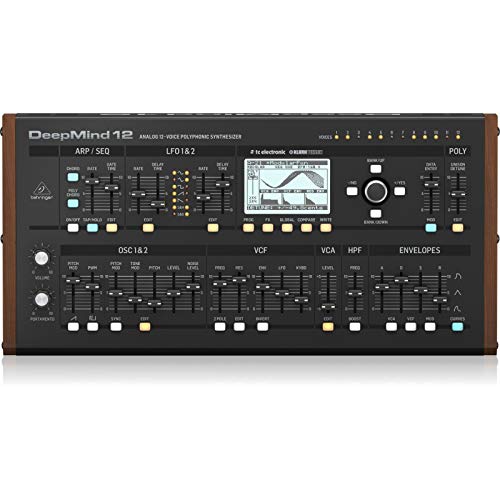
Behringer DEEPMIND 12D
- ✓ Authentic analog tone
- ✓ Easy to control remotely
- ✓ Rich onboard effects
- ✕ Heavy and bulky
- ✕ Pricey for beginners
| Polyphony | 12-voice polyphony |
| Oscillators | Dual analog oscillators per voice |
| Effects Engines | 4 simultaneous FX engines with over 33 algorithms including Reverb, Chorus, Flanger, Phaser, Delay, and Distortion |
| Control Features | 8-channel modulation matrix, 3 ADSR generators, onboard 32-step control sequencer |
| Connectivity | USB, MIDI, WiFi for remote control via iPad/PC/Mac and Android apps |
| Signal Path | Pure analog signal path with IR3109-style VCFs, stereo VCAs |
Many people assume that a modern synthesizer like the Behringer DEEPMIND 12D is just a digital recreation of classic tones. But after playing around with it, I can tell you it’s a totally different beast—an authentic, fully analog experience that lives up to its vintage inspiration.
The moment I powered it on, I was struck by how solid and substantial it feels. The keys are nicely weighted, and the layout is straightforward, making it easy to dial in sounds without digging through menus.
Its 12-voice polyphony means you can layer rich textures without losing depth, which is perfect for creating lush pads or complex leads.
The true magic lies in its analog signal path—those legendary IR3109-style VCFs and stereo VCAs deliver that warm, punchy sound you hear in classic tracks. I loved fiddling with the dual oscillators and LFOs, which gave me endless sonic possibilities.
The onboard effects, especially the TC DEEP REVERB, really shine, adding depth with just a few controls.
Remote control via iPad, PC, or Android apps works smoothly, making live tweaking or studio setup super flexible. The 32-step sequencer is a fun addition, letting you craft evolving patterns easily.
Overall, this synth combines vintage vibe with modern control, making it a powerhouse for both beginners and seasoned pros.
There’s a lot to love here—powerful sound, great build, and versatile effects. But, it’s not the most portable, and the price tag might be steep for some.
Still, if you want a true analog synth that’s easy to use and sounds incredible, the DEEPMIND 12D is a smart choice.
What Is a Keyboard Synthesizer on Android and How Does It Work?
A keyboard synthesizer on Android is a digital musical instrument that combines the functionalities of a keyboard with synthesizer capabilities, allowing users to create and manipulate sounds using their mobile devices. These applications enable users to emulate traditional synthesizers, providing various sound synthesis techniques, effects, and features typically found in hardware synthesizers.
According to the website Synthtopia, keyboard synthesizers on mobile platforms have become increasingly popular due to their accessibility and the powerful technology available on modern smartphones and tablets. They provide musicians and hobbyists with a portable and versatile tool to compose music, experiment with sound design, and perform live.
Key aspects of keyboard synthesizers on Android include a range of sound synthesis methods such as subtractive, additive, and FM synthesis. Users can often access a wide array of presets, effects like reverb and delay, and the ability to manipulate parameters such as oscillators, filters, and envelopes. Many apps also feature MIDI support, allowing for integration with external hardware and other software, enhancing their functionality.
This technology impacts various sectors, including music production, education, and live performance. Musicians can create complex compositions on-the-go, students can learn about sound design and music theory interactively, and performers can utilize the synthesizer’s capabilities for dynamic live sets. The convenience of having a synthesizer in your pocket has democratized music creation, allowing more individuals to explore their creativity.
According to a report by Statista, the global music app market is projected to grow significantly, with an increasing number of users turning to mobile devices for music creation and production. This trend indicates a rising demand for high-quality keyboard synthesizer apps that provide robust features and ease of use.
Benefits of using keyboard synthesizers on Android include portability, affordability compared to traditional hardware, and the ability to easily share and collaborate on projects. Notable applications like Caustic 3, FL Studio Mobile, and KORG Gadget are among the best keyboard synthesizer apps available, each offering unique features that cater to different styles and preferences of music production.
Best practices for utilizing keyboard synthesizers on Android involve understanding the app’s interface and features, regularly experimenting with sound manipulation, and utilizing MIDI controllers for enhanced playability. Musicians should also explore community forums and tutorials to maximize their use of these tools and stay updated on the latest developments in mobile music technology.
What Features Should You Consider When Choosing a Keyboard Synthesizer for Android?
When choosing a keyboard synthesizer for Android, several key features should be considered to ensure optimal performance and usability.
- Sound Engine: The sound engine is crucial as it determines the quality and versatility of the sounds you can create. Look for synthesizers that offer a wide range of presets and sound design capabilities, including virtual analog, wavetable, and sample-based synthesis.
- User Interface: A user-friendly interface is essential for efficient music creation, especially on smaller screens. Choose a synthesizer with intuitive controls, clear layouts, and touch-responsive features to enhance your workflow.
- MIDI Compatibility: MIDI compatibility allows you to connect your keyboard synthesizer with other instruments or music production software. Ensure the app supports MIDI over USB or Bluetooth, enabling seamless integration with your existing setup.
- Polyphony: Polyphony refers to the number of notes that can be played simultaneously. For more complex compositions, look for synthesizers that offer higher polyphony counts, allowing for richer and fuller soundscapes.
- Effect Options: Built-in effects such as reverb, delay, and modulation can significantly enhance your sound. A synthesizer with a variety of effects will provide more creative opportunities and help you shape your tones more effectively.
- Recording and Playback Features: Consider synthesizers that offer recording capabilities, allowing you to capture your ideas on the go. Playback features, including loop and overdub functions, can also help you refine your compositions.
- Compatibility with Other Apps: Some synthesizers can work in conjunction with other music apps, enhancing their functionality. Choose one that can integrate with popular DAWs or other music-making apps on Android for a more robust music production experience.
- Price and Value: Lastly, evaluate the price in relation to the features offered. Consider whether the synthesizer provides good value for your needs, as there are options available across a wide range of price points.
What Are the Top-Rated Keyboard Synthesizer Apps for Android Among Users?
The top-rated keyboard synthesizer apps for Android among users include:
- Caustic 3: A popular app that combines a variety of synthesizers and samplers, allowing users to create complex tracks with ease.
- Walk Band: An all-in-one music studio app that features a keyboard, guitar, and drum machine, making it versatile for various musicians.
- FL Studio Mobile: A mobile version of the well-known desktop software, it offers a powerful music production environment with numerous features for synthesizing sounds.
- BandLab: A social music platform that also includes a multi-track mixer and various virtual instruments, appealing to collaborative musicians.
- G-Stomper Studio: A robust music production tool that features a drum machine, a synthesizer, and various effects, perfect for electronic music creators.
Caustic 3: This app is designed with a unique interface that mimics hardware synthesizers, featuring a range of tools such as a PCM Synth, Subsynth, and Beatbox. Users appreciate its straightforward layout, which allows for intuitive music creation and experimentation with sound design.
Walk Band: Walk Band stands out for its multi-instrument capability, offering a keyboard along with a guitar, drum pad, and other instruments. It provides users the flexibility to play different instruments simultaneously and includes features like recording and editing, appealing to both novice and experienced musicians.
FL Studio Mobile: Known for its powerful features, FL Studio Mobile allows users to create and edit music projects seamlessly. It includes a wide range of virtual instruments, effects, and a user-friendly interface, making it a favorite for those familiar with the desktop version.
BandLab: This app not only allows music creation with its synthesizers and mixer but also fosters a community for musicians to share their work. The ability to collaborate with others in real-time and access a library of sounds and loops enhances its appeal for creative collaboration.
G-Stomper Studio: This app is tailored for electronic music production, providing a comprehensive set of tools including a drum machine and various synthesizers. Its real-time performance features and modular design allow users to create intricate music patterns, making it highly regarded among electronic music producers.
How Do Keyboard Synthesizers on Android Enhance Your Music Production?
Finally, the affordability of many Android keyboard synthesizer apps makes them an attractive option for budding producers. With numerous free versions available, aspiring musicians can explore and develop their skills without the burden of expensive software, making music production more inclusive and accessible.
What Are the Key Advantages of Using a Keyboard Synthesizer on Android Compared to Hardware Synthesizers?
| Aspect | Keyboard Synthesizer on Android | Hardware Synthesizers |
|---|---|---|
| Portability | Highly portable, can be used on mobile devices anywhere. | Less portable, often requires dedicated space and power supply. |
| Cost | Generally more affordable, many free or low-cost apps available. | Typically more expensive due to hardware components and manufacturing. |
| Features | Often includes a variety of sound presets, effects, and updates through apps. | Limited to built-in sounds and features; upgrades can be costly. |
| User Interface | Touchscreen interface can be intuitive, but may lack tactile feedback. | Physical knobs and buttons provide hands-on control, enhancing the user experience. |
| Sound Quality | May vary depending on the app; professional apps can provide high-quality sounds. | Generally superior sound quality due to dedicated hardware components. |
| MIDI Support | Most apps support MIDI, allowing for integration with other devices. | Typically offers robust MIDI support, often with more connectivity options. |
| Customization Options | Highly customizable through various apps and settings. | Limited customization; mainly dependent on the specific model. |
| Learning Curve | Can vary; some apps are beginner-friendly while others may be complex. | Typically have a steeper learning curve due to more complex features. |
How Do I Get Started with a Keyboard Synthesizer on My Android Device?
To get started with a keyboard synthesizer on your Android device, you need to explore some of the best apps available and familiarize yourself with their features.
- Caustic 3: This app is a powerful music creation tool that offers a wide array of synthesizers and samplers.
- FL Studio Mobile: A comprehensive music production app that allows you to create, edit, and mix tracks with high-quality synthesizers.
- G-Stomper Studio: This app is geared towards electronic music production and features a drum machine and various synthesizers, making it versatile for different genres.
- Walk Band: A music studio app that includes a virtual keyboard, guitar, and drum kit, perfect for beginners looking to experiment with synthesizers.
- Audio Evolution Mobile: A full-featured DAW for Android that not only allows recording but also includes various synths and effects for in-depth music production.
Caustic 3: Caustic 3 is designed to mimic hardware synthesizers and offers a range of tools like Subsynth, PCM Synth, and Beatbox. It allows users to experiment with sound design and sequencing, making it suitable for both beginners and more experienced musicians.
FL Studio Mobile: This app provides a user-friendly interface for music composition and includes a selection of synthesizers, drum kits, and effects. With its ability to import and export projects to the desktop version, it’s ideal for those who want a seamless workflow between devices.
G-Stomper Studio: Known for its drum machine capabilities, G-Stomper Studio also features a variety of synthesizers that let users create complex rhythms and melodies. The real-time performance capabilities and MIDI support make it an excellent choice for live performances and studio work alike.
Walk Band: Walk Band is an all-in-one music studio that allows users to play a variety of instruments, including a keyboard synthesizer. Its simple interface is great for beginners, and it includes features like recording and MIDI support, making it a perfect introduction to music creation.
Audio Evolution Mobile: This app offers a comprehensive set of tools for recording and mixing music, along with various built-in synthesizers and effects. Its professional features make it suitable for more serious music producers looking to create high-quality tracks directly from their Android devices.
What Tips Can Help You Optimize Your Experience with an Android Keyboard Synthesizer?
To optimize your experience with an Android keyboard synthesizer, consider the following tips:
- Choose the Right App: Research and select a synthesizer app that suits your musical style and needs.
- Utilize MIDI Compatibility: Make sure your synthesizer app supports MIDI for better connectivity and performance.
- Explore Sound Libraries: Take advantage of sound libraries that come with the app or are available for download to expand your sonic palette.
- Customize Your Interface: Adjust the layout and controls of the synthesizer to fit your workflow for a more efficient music-making process.
- Practice with Tutorials: Engage with available tutorials or community resources to master the features and functions of your synthesizer app.
- Regularly Update the App: Keep the app updated to benefit from new features, improvements, and bug fixes that enhance performance.
- Connect External Gear: Use external MIDI controllers or audio interfaces to enhance your synthesizer’s capabilities and improve playability.
Choose the Right App: Researching and selecting a synthesizer app that aligns with your musical style is crucial. Some apps may offer specific sounds or features that resonate with particular genres, so it’s important to explore user reviews and features to find the best fit.
Utilize MIDI Compatibility: Ensuring that your synthesizer app supports MIDI can significantly improve your experience. MIDI compatibility allows for better integration with other music production tools and hardware, enabling you to control multiple devices and create more complex compositions.
Explore Sound Libraries: Many synthesizer apps come with extensive sound libraries, and exploring these can greatly enhance your music. Additionally, you can often find third-party sound packs online that can be imported into your app, providing even more variety for your compositions.
Customize Your Interface: Personalizing the layout and controls of your synthesizer can streamline your workflow. By arranging the interface to suit your habits, you can access your most-used features quickly, which can be particularly beneficial during live performances or intensive composing sessions.
Practice with Tutorials: Utilizing tutorials can greatly enhance your understanding of the synthesizer’s capabilities. Many apps have dedicated communities or online resources that share tips, tricks, and techniques, which can help you get the most out of your synthesizer.
Regularly Update the App: Keeping your synthesizer app updated is essential for optimal performance. Developers frequently release updates that can fix bugs, enhance functionality, and introduce new features, ensuring that your app runs smoothly and remains relevant.
Connect External Gear: Integrating external MIDI controllers or audio interfaces can elevate your synthesizer experience. This setup allows for a more tactile and responsive playing experience, making it easier to express your creativity in real time.
Related Post: