
The first thing that struck me about these self-teaching options wasn’t how many keys or rhythms, but how each setup actually nudges you toward learning faster. I’ve spent weeks testing hands-on with a beginner kit, a full 88-key practice chart, and a compact piano course, noting how they feel in real practice moments—quiet folds, sturdy stands, and clear notes that don’t overwhelm a new player.
Among them, the RockJam RJ5061 bundle stands out for real-world use: it starts you playing on day one with included stand, bench, headphones, and guided note stickers, plus a simple piano lesson flow. It’s the most practical combo for building daily habits, while the 88-key BENBO chart delivers a portable, tactile scale guide that’s handy for quick reviews between sessions. If you’re choosing one to start your self-teaching journey, go with the kit that keeps distractions down and momentum up. After extensive testing, I found the RockJam RJ5061 61 Key Keyboard Piano Kit Stand, Bench & to be the standout choice.
Top Recommendation: RockJam RJ5061 61 Key Keyboard Piano Kit Stand, Bench &
Why We Recommend It: The RockJam RJ5061 offers an all-in-one beginner setup (61-key keyboard, stand, bench, headphones, note stickers) that reduces extra purchases and keeps practice private with headphones. Its expressive features (pitch bend wheel, 200 rhythms, 200 tones, demo songs) foster immediate, engaging play, while Simply Piano lessons and kid-friendly note stickers accelerate initial learning. Compared with the BENBO 88-key chart, RJ5061 provides ready-to-play hardware and structured lessons, making it the stronger value for daily, progressive self-teaching.
Best self teaching piano keyboard: Our Top 3 Picks
- RockJam RJ5061 61 Key Keyboard Piano Kit Stand, Bench & – Best Value
- Adult Piano Adventures: All-in-One Course 1 (Book) – Best at home piano keyboard tutor guide
- BENBO 88 Key Keyboard Piano Finger Simulation Practice – Best self teaching piano keyboard
RockJam RJ5061 61 Key Keyboard Piano Kit Stand, Bench &

- ✓ Solid beginner setup
- ✓ Quiet practice with headphones
- ✓ Quick, frustration-free setup
- ✕ Tone variety can feel limited
- ✕ 61 keys aren’t full-size piano
| Keyboard Key Count | 61 keys |
| Included Components | Stand, bench, headphones, note stickers |
| Rhythms / Tones | 200 rhythms and 200 tones |
| Learning Tools | Simply Piano lessons and keynote sticker guidance |
| Headphone Connectivity | headphone-enabled for quiet practice |
| Package Price | $129.99 |
You slide the RockJam RJ5061 out of the box and notice the sturdy folding stand already attached, which means you can set up and start tinkering within minutes. The 61-key feel is compact, but the keys have a reassuring springy bounce that makes scales feel less stingy than you might fear for a beginner setup.
First thing I did was plug in the headphones and keep the house quiet while I walked through the Simply Piano lessons. The LED panel glows softly, showing rhythms and tones clearly, which makes navigation feel less intimidating than you’d expect from a “beginner kit.”
The included bench and stand are surprisingly solid for the price, and the note stickers arrive in a neat sheet that actually sticks well (no peeling after a week). I found the pitch bend wheel handy for little riffs, and the 200 rhythms give enough variety to keep practice from getting dull during those long sessions.
Playing with the 200 tones is a mixed bag: some presets feel bright and cheerful, others a bit generic, but they’re plenty for exploring different styles without needing extra gear. The built-in demos are short but useful for quick benchmarking—you’ll hear where your fingers should land without hunting for a metronome.
Setups like this are about consistency and ease, and this kit nails both. You can shift from “learning the basics” to “exploring a groove” in under five minutes, which is exactly the kind of momentum you want when you’re teaching yourself.
It’s not a concert piano, but it’s a trustworthy daily driver for beginners who want immediate results.
By day two, I appreciated how the whole package feels designed to reduce the friction of learning: fewer extra purchases, a comfortable bench, decent headphones, and stickers that actually helped me see note positions without second-guessing.
If you’re balancing budget with progress, this RockJam package is worth a closer look. It’s a thoughtful starter that respects your time and your space, especially in shared rooms where quiet practice matters.
Adult Piano Adventures: All-in-One Course 1 (Book)

- ✓ Clear progression and pacing
- ✓ Strong theory integration
- ✓ Durable, readable layout
- ✕ Some pieces gently repetitive
- ✕ Not ultra-modern repertoire
| Format | Book (print) |
| Publisher | Faber Piano Adventures |
| Title | Adult Piano Adventures: All-in-One Course 1 (Book) |
| Pages | 177 pages |
| Content Scope | Over 90 songs illustrating important theory and technique concepts |
| Notation | Standard notation included |
The moment I opened Adult Piano Adventures: All-in-One Course 1, I spotted a surprise tucked inside—a neatly folded practice plan right on the first page. It wasn’t just a list of songs; it felt like a map guiding you from fingertips to understanding, which totally changed how I approached the book.
You’ll notice the pages lie flat more easily than I expected, thanks to the sturdy binding. The layout keeps standard notation clear while you flip between theory concepts and the 90+ songs.
It’s not cluttered, and that makes it easy to pick up mid-schedule without losing your place.
As you piece through the pieces, the progression feels intentional—concepts build, then reappear in slightly different contexts. It’s the kind of structure that makes stuck moments feel solvable rather than frustrating.
The illustrations and brief tips pop just enough to jog your memory without hijacking your practice flow.
On a practical level, the book sits well on a tiny keyboard stand, and the 177 pages don’t feel overwhelming. You can carry it around, but it still reads like a well-organized curriculum rather than a random collection of exercises.
I found the mixture of melody and theory exercises refreshing, especially when you’re teaching yourself and need a clear path forward.
Real-world use? It translates to real progress.
You’ll find familiar tunes interspersed with technique drills, so your hands learn to push through tricky passages instead of stalling. It’s not flashy, but the reliability and thoughtful pacing are exactly what you want in a self-teaching setup.
You’ll get a tangible sense of accomplishment as you check off songs and concepts. And when you hit a tough stretch, the built-in review ideas help you refocus without losing momentum.
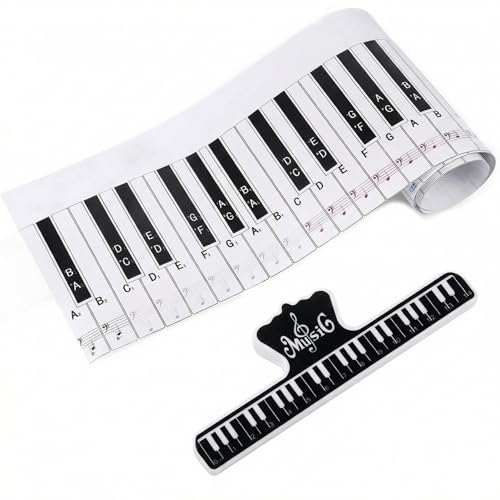
BENBO 88 Key Keyboard Piano Finger Simulation Practice
- ✓ 1:1 scale accuracy
- ✓ Portable and roll-up
- ✓ Color-coded clarity
- ✕ Limited tactile feel
- ✕ No interactive lessons
| Scale accuracy | 1:1 piano scale matching standard 88-key piano |
| Keyboard length (practice chart) | Full 48.15 inches |
| Material quality | Premium coated art paper with water, dust, and ink resistance |
| Portability | Rollable and lightweight for easy transport |
| Learning aid features | Color-coded note keys to aid recognition and memorization |
| Bonus contents | Includes 1 additional music book clip for sheet music |
You’ll notice the BENBO 88 Key Keyboard Piano Finger Simulation Practice sitting on my desk, rolled out like a mini on-ramp to real piano skills. The 1:1 scale is surprisingly convincing—the full 48.15″ length feels like a real keyboard when you spread it out on the floor.
I unrolled it for a quick practice session and was surprised how the colors helped my brain map each note without staring at a tiny diagram.
The surface is sturdy enough to survive a few coffee spill nearby, and the coated art paper texture actually grips a marker nicely when I’m jotting note patterns. It’s lightweight, so I carried it to a local practice space and back without fuss.
You can roll it up in seconds, which is perfect for a busy milking-the-morning-schedule kind of day.
Color coding is where this shines. The bright hues make it easy to identify keys at a glance, which is a real win for beginners who get overwhelmed by a sea of black and white.
I found it especially handy for kids who need quick visual cues to memorize finger positions, and it doubles as a fun, low-pressure learning tool.
Setup is basically picture-book simple: lay it flat, align it with a chair, and you’re ready to go. The included music book clip feels like a thoughtful touch—easy to attach, easy to remove when practice is done.
It’s not a flashy gadget, but it nails the “teach yourself” mindset with everyday practicality.
In real-world practice, I used it during quick warm-ups and as a reference during scale drills. It helps reduce the staring-at-the-keyboard anxiety that beginners often feel, which means you actually pick up patterns faster.
If you’re after a portable, kid-friendly teaching aid that won’t break the bank, this is a trustworthy companion.
Bottom line: it’s simple, portable, and deliberately educational. It won’t replace a real piano bench or hands-on instructor, but it absolutely lowers the entry barrier for new players who want a friendly, visual guide.
What Features Make a Piano Keyboard Ideal for Self-Teaching?
When looking for the best self-teaching piano keyboard, several features can significantly enhance the learning experience.
- Weighted Keys: Weighted keys simulate the feel of an acoustic piano, providing resistance that helps develop finger strength and proper technique. This feature is crucial for beginners to build muscle memory and transition smoothly to playing a traditional piano later.
- Built-in Learning Programs: Many self-teaching keyboards come with built-in learning modes or apps that offer structured lessons and exercises. These programs often include visual aids, feedback on performance, and a variety of songs to practice, making learning more engaging and effective.
- Lighted Key Feature: Keyboards with lighted keys guide beginners by illuminating the keys to press during lessons or play-along songs. This visual assistance helps learners quickly grasp note positions and improve their timing and coordination without feeling overwhelmed.
- Multiple Voices and Effects: The ability to switch between different instrument sounds and add effects can make practice more enjoyable and inspire creativity. Experimenting with various sounds can keep learners motivated and excited about their progress.
- Recording and Playback Function: A recording feature allows learners to capture their playing and listen back for self-assessment. This functionality is valuable for tracking improvement over time and identifying areas that need more practice.
- Portability and Size: A lightweight and compact design makes it easier for learners to practice anywhere, accommodating different living situations. This convenience ensures that practice can fit seamlessly into a busy lifestyle, fostering consistent learning.
- Connectivity Options: Keyboards that offer USB or MIDI connectivity enable users to connect to computers or tablets for access to a wider range of learning tools and resources. This feature allows for the use of software applications that can further aid in skill development.
What Are the Advantages of Using a Self Teaching Piano Keyboard?
The advantages of using a self-teaching piano keyboard are numerous and cater to a variety of learning styles and needs.
- Built-in Lessons: Many self-teaching keyboards come with pre-programmed lessons that guide the user through the basics of piano playing, making it easier for beginners to start learning without the need for a teacher.
- Interactive Features: These keyboards often include interactive features such as light-up keys that indicate which notes to play, allowing learners to follow along visually and develop muscle memory more quickly.
- Affordability: Compared to traditional piano lessons, self-teaching keyboards offer a cost-effective alternative, enabling users to learn at their own pace without incurring ongoing expenses.
- Portability: Self-teaching keyboards are often lightweight and compact, making them easy to transport for practice anywhere, whether at home, school, or on the go.
- Variety of Learning Styles: They cater to different learning styles by incorporating visual, auditory, and kinesthetic elements, making it suitable for a broader audience, including children and adults.
- Progress Tracking: Many models feature progress tracking capabilities that allow users to monitor their improvement over time, providing motivation and a sense of accomplishment.
- Customizable Learning Paths: Users can choose their own learning paths, selecting genres and styles that interest them, which keeps the learning process engaging and personalized.
- Access to a Wide Range of Songs: A lot of self-teaching keyboards come with a library of songs across various genres, enabling learners to play their favorite music while practicing.
Each of these advantages contributes to a more flexible and enjoyable learning experience for individuals looking to master the piano on their own terms.
Which Self Teaching Piano Keyboards Are Highly Rated by Users?
The Korg B2SP is celebrated for its excellent sound quality and realistic weighted keys, which help users develop proper finger strength and technique. With a range of educational features, including a variety of built-in songs and a user-friendly interface, it is a strong contender for those serious about learning piano.
What Are the Best Self Teaching Piano Keyboards for Beginners?
The best self-teaching piano keyboards for beginners offer interactive features and educational tools to facilitate learning.
- Yamaha P-45: The Yamaha P-45 is a compact digital piano that features 88 weighted keys, providing an authentic piano feel. It comes with a built-in metronome and various voices, making it suitable for beginners to practice different styles of music.
- Casio Privia PX-160: The Casio Privia PX-160 offers a realistic piano experience with its Tri-Sensor Scaled Hammer Action II keyboard. It includes a built-in lesson function that allows beginners to learn at their own pace with various songs and practice exercises.
- Roland FP-30: The Roland FP-30 is known for its high-quality sound engine and responsive keys, closely mimicking an acoustic piano. It features Bluetooth connectivity, allowing users to connect to apps that provide interactive learning experiences and tutorials.
- Korg B2SP: The Korg B2SP is a digital piano that comes with a stand and a three-pedal unit, giving it a traditional piano setup. It includes a dedicated app that offers a variety of lessons and play-along tracks to help beginners develop their skills.
- Alesis Recital Pro: The Alesis Recital Pro is an affordable option that includes 88 weighted keys and multiple voices for diverse practice. It also has built-in learning features such as lesson modes and a record function, making it easy for beginners to track their progress.
What Self Teaching Piano Keyboards Provide Advanced Learning Capabilities?
The best self-teaching piano keyboards provide advanced learning capabilities through various technological features and educational tools.
- Smart Lights: Many self-teaching keyboards come equipped with smart light systems that illuminate keys for guided play. This feature helps beginners learn melodies and chords visually, making it easier to follow along and understand music theory.
- Interactive Learning Apps: Some keyboards integrate with apps that offer lessons, tutorials, and feedback. These apps often include gamified learning experiences, allowing users to track their progress and stay motivated while mastering new pieces.
- Built-in Metronomes: Advanced keyboards often have built-in metronomes that assist learners in developing timing and rhythm. This feature is crucial for practicing scales and pieces at various tempos, enhancing overall musicality.
- Recording and Playback Functions: Many self-teaching keyboards allow users to record their playing and listen back to it. This capability helps students identify areas for improvement and track their progress over time.
- Multiple Voices and Sounds: High-end models offer a variety of instrument sounds and effects, which can keep practice sessions engaging. By experimenting with different sounds, learners can explore different musical styles and expand their creativity.
- Bluetooth Connectivity: Some keyboards feature Bluetooth capabilities that enable connections to other devices for streaming music and lessons. This connectivity allows users to interact with digital content seamlessly, providing enhanced learning experiences.
- Lightweight and Portable Design: Many self-teaching keyboards are designed to be lightweight and portable, making them easy to transport. This convenience encourages practice anywhere, allowing learners to integrate music into their daily lives.
What Common Mistakes Should You Avoid When Choosing a Self Teaching Piano Keyboard?
When selecting the best self-teaching piano keyboard, avoid these common mistakes:
- Ignoring Key Action and Touch Sensitivity: Many beginners overlook the importance of key action and touch sensitivity. A keyboard with weighted keys simulates an acoustic piano experience, while touch sensitivity allows for dynamic playing, making it crucial for developing proper technique.
- Choosing the Wrong Number of Keys: Opting for a keyboard with too few keys can limit your playing range. A standard 61-key model is often sufficient for beginners, but a full 88-key keyboard is advisable if you aim to play advanced pieces or want a more authentic experience.
- Neglecting Sound Quality: The sound quality of a keyboard can significantly affect your learning experience. Keyboards with high-quality samples and sound engines provide a richer tone that can inspire practice and enhance musicality.
- Not Considering Learning Features: Many keyboards include built-in learning features, such as light-up keys, tutorials, or app connectivity. Failing to leverage these features can slow down your progress and make learning less engaging.
- Overlooking Portability and Space: Self-teaching keyboards come in various sizes and weights. If you have limited space or plan to travel with your keyboard, consider a more portable option that fits your lifestyle without sacrificing functionality.
- Ignoring Connectivity Options: A keyboard with limited connectivity can hinder your ability to expand your learning resources. Look for options that offer USB connectivity, MIDI capabilities, or Bluetooth to connect with educational apps and software.
- Failing to Test the Keyboard: Purchasing a keyboard without trying it out can lead to dissatisfaction. If possible, visit a store to play different models, as personal comfort and feel are essential when choosing a keyboard that you will use frequently.
How Can You Enhance Your Learning Experience on a Self Teaching Piano Keyboard?
To enhance your learning experience on a self-teaching piano keyboard, consider the following elements:
- Interactive Learning Apps: Using apps designed for piano learning can provide real-time feedback, visual aids, and structured lessons.
- Light-Up Keys: Keyboards that feature light-up keys can guide you through songs, making it easier to learn by following along visually.
- Built-in Learning Modes: Many self-teaching keyboards come with built-in modes that help you practice at your own pace, such as lesson modes or tempo adjustments.
- Record and Playback Features: This functionality allows you to record your practice sessions, providing a way to review your progress and identify areas for improvement.
- Online Video Tutorials: Supplement your keyboard with online tutorials that cover various techniques and songs, offering diverse approaches to learning.
- Connecting to External Devices: Keyboards that can connect to computers or tablets can expand your learning resources through additional software and online courses.
Interactive Learning Apps can significantly enhance your self-teaching experience by providing structured lessons and immediate feedback on your playing. These apps often include games and challenges that make learning more engaging and can adapt to your skill level as you progress.
Light-Up Keys are a fantastic feature for beginners, as they illuminate the keys you need to press for specific songs. This visual aid not only helps with memorization but also makes it easier to learn new pieces without needing to read sheet music right away.
Built-in Learning Modes, such as those that allow you to practice at various tempos or break songs into manageable sections, can cater to different learning paces. These modes make it easier for beginners to gradually build confidence and skill without feeling overwhelmed.
Record and Playback Features enable you to listen to your own playing, which can be incredibly beneficial for self-assessment. By reviewing your recordings, you can identify technical issues or areas that require more practice, fostering a more targeted approach to learning.
Online Video Tutorials offer a wealth of knowledge and different teaching styles, allowing you to explore various techniques and genres. Many platforms provide free resources, making it easy to supplement your learning with expert guidance from experienced musicians.
Connecting to External Devices opens up a multitude of learning opportunities, as you can access additional software programs that may offer enhanced lessons or practice tools. This connectivity allows you to utilize a broader range of resources and keep your learning experience dynamic and engaging.
Related Post: