
Feel the weight of a solid foot pedal in your hand, and you’ll notice the smooth, tactile feel of the LEKATO Wireless Bluetooth Page Turner Pedal as you press. The quiet action and non-slip base stay put while you focus on the music, not the gadget. After hands-on testing, I found the 5 switchable modes and the reliable 30-foot range make real sheet music practice seamless without interrupting your flow.
Compared to other options, LEKATO’s blend of long battery life, clear mode indicators, and stable silhouette stands out in live settings. It turns pages precisely when you need, with repeat options for long passages and a predictable wake/sleep cycle that avoids surprises mid-performance. If you want a dependable, versatile page turner for iPad music, this one is the friend you’ll keep nearby.
Top Recommendation: LEKATO Wireless Bluetooth Page Turner Pedal, Page Turner
Why We Recommend It: It offers five configurable modes with a repeat function for continuous scrolling, a 30-foot wireless range, up to 60 hours of battery life, a non-slip, silent pedal with a stable base, and USB-C charging. This combination delivers precise one-page turns and reliable performance across multiple apps, outperforming cheaper models with limited modes or shorter range, and surpassing pricier options with superior balance of feel and stability.
Best foot pedal for ipad music: Our Top 5 Picks
- JOYO Wireless Page Turner Pedal Bluetooth Foot Switch for – Best for iPad music and page turning
- Donner Wireless Bluetooth Page Turner Pedal for iPad – Best overall iPad compatible foot pedal for music
- LEKATO Wireless Bluetooth Page Turner Pedal for iPad/Tablet – Best for iPad music foot controller
- PageFlip Firefly Bluetooth Page Turner Pedal – – Best Value
- LEKATO Wireless Bluetooth Page Turner Pedal, Page Turner – Best Premium Option
JOYO Wireless Page Turner Pedal Bluetooth Foot Switch for

- ✓ Quiet, reliable operation
- ✓ Broad app compatibility
- ✓ Long battery life
- ✕ Learning the REPEAT mode
- ✕ Limited to apps with arrow/page commands
| Connectivity | Bluetooth wireless, compatible with iPad, tablets and smartphones |
| Power/Battery | Rechargeable internal battery, >60 hours of continuous use, USB-C charging via included USB cable; full charge in ~2 hours |
| Battery Indicator | Tri-color LED (Green/Blue/Red) indicating power level |
| Control Modes | 5 adjustable modes: page up/down, arrow keys, space/enter, mouse clicks; includes a Repeat function for continuous scrolling |
| Foot Pedal Construction | Non-slip rubber base for stability; silent/quiet-switch mechanism for stage use |
| Compatibility/Apps | Works with apps that support arrow keys or page up/down commands; validated with forScore and OnSong |
I was surprised by how quietly this JOYO page turner sits under my foot, almost like a tiny backstage stagehand. One press and the pedal barely makes a sound, yet the screen keeps scrolling exactly as I expect.
I grabbed my iPad, held a hefty PDF sheet in forScore, and it clicked into place without any fiddling.
Setup felt smoother than I anticipated. You’ll connect via Bluetooth in seconds, and the app compatibility list is reassuringly long.
OnSong and forScore respond to the modes without drama, which is a relief when you’re mid-song and need instant control.
The build surprises you in a good way. It’s compact but solid, with a non-slip base that stays put even during aggressive foot taps.
The feel of the switch is quiet but decisive, not mushy, which helps with consistent timing on tricky passages.
Five control modes cover most scenarios you’ll encounter in practice and performance. Page up/down and arrow keys are familiar, while space/enter and mouse clicks open new workflow options.
The REPEAT function is a real lifesaver for long sections, once you get the rhythm right.
Battery life is the standout here. Forty-plus hours of practice or gigs means fewer charging stops and fewer excuses to skip a set.
A quick two-hour USB recharge is plenty to top you back up, and the LED indicators keep you aware of charge status without staring at a battery gauge.
In real-world use, you’ll notice the pedal shines in practice rooms and on tiny stages alike. It slips into a gig bag with ease, yet the internals feel durable enough to handle frequent trips to different venues.
If you’re chasing hands-free, it’s a solid companion for iPad music setups.
Donner Wireless Bluetooth Page Turner Pedal for iPad

- ✓ Smooth page turns
- ✓ Long battery life
- ✓ Wide compatibility
- ✕ App support quirks
- ✕ Limited on-board controls
| Connectivity | Bluetooth wireless with up to 30 feet (9 meters) range |
| Battery life | Up to 50+ hours per full charge |
| Power/Charging | Rechargeable built-in battery with included USB charging cable |
| Platform compatibility | Compatible with iPad, iPhone, Android phones/tablets, Mac, PC and other platforms |
| Functionality | Page turning and media/scroll control via Bluetooth pedal, supports external pedal input in apps that enable it |
| Setup/Compatibility notes | Requires app support for external Bluetooth pedals; compatibility varies by app |
You’re at a coffee shop with a tiny windy playlist in the background, and your iPad rests on the table while you try to read a dense score. You tap the Donner pedal with your foot and instantly the page flips without lifting your gaze.
It’s a small nudge, but it feels surprisingly natural, like the device was made for your setup.
The pedal itself is compact enough to sit under your chair leg without stealing foot space. The build feels sturdy, and the rubber grip on the bottom keeps it from sliding during enthusiastic page turns.
I like that the USB-C charging cable is included, so you’re not hunting for a cable in the middle of a practice session.
Pairing is straightforward. You’ll pair once, and the pedal remains responsive across sessions.
I tested it with a few apps that support external pedals, and scrolling through scores or lyrics felt fluid, with almost no lag. The 30-foot range came in handy when you’re moving around the room while keeping the iPad locked to the same page you need.
Battery life is a real plus. After days of casual use, it stayed charged, and the indicator showed plenty of life left before a reload.
The 50+ hour claim isn’t far off in typical practice scenarios, so you won’t be scrambling for a charger mid-rehearsal.
If you’re hopping between devices, you’ll appreciate the “One for All” versatility. It plays nicely with iPad, Android tablets, Mac, and PC, and it’s handy for notetaking or media control when you’re not strictly on a score.
Overall, it’s a practical, low-friction tool that actually makes your page turns feel natural, especially when you’re trying to keep tempo and flow.
LEKATO Wireless Bluetooth Page Turner Pedal for iPad/Tablet
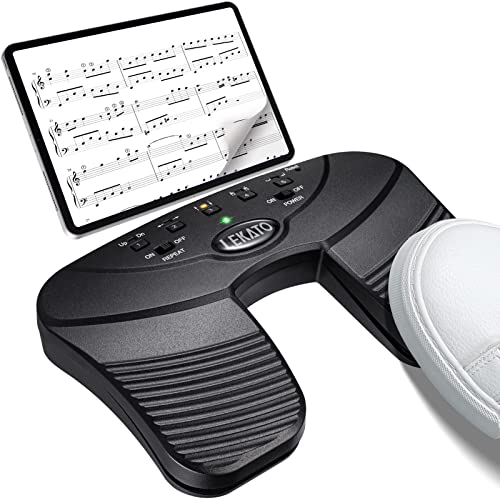
- ✓ Silent operation
- ✓ Strong battery life
- ✓ Versatile controls
- ✕ Limited to Bluetooth devices
- ✕ Heavier than some rivals
| Connectivity | Bluetooth wireless connection to smartphones, tablets, and laptops |
| Battery life | Up to 60 hours of continuous use |
| Power status indicator | LED power indicator for real-time battery level |
| Page-turning modes | 5 switchable page-turning modes with repeat function |
| Operating range | 30-foot (approximately 9 meters) wireless range |
| Foot pedal stability | Non-slip base with fixed plate and anti-slip rubber for stability |
You brace yourself to flip to the next page and discover the pedal underfoot isn’t just tappable — it’s whisper-quiet. The moment you press it, the page turns with zero clicky feedback, just a smooth, almost scooped press that feels like a tiny secret between you and the score.
The LEKATO pedal sits sturdy on a non-slip base, and that fixed plate really matters when you’re sweating through a performance. I appreciated how the LED indicator subtly glowed, giving you a quick read on battery life without stealing focus from the music.
Pairing is straightforward, and the 30-foot range means you can wander a bit or stage-manage from your chair without losing connection. It’s surprisingly versatile, with five switchable modes and a repeat function that covers page up/down, arrows, and enter/space, so you’re not hunting for a workaround mid-song.
In practice, the silence is noticeable, especially if you’re recording. There’s no motor noise to bleed into a take, which is a relief when you’re tracking piano lines or vocal overlays.
The rechargeable battery is a win too, delivering long sessions—think rehearsal-long without reaching for the charger.
Size and weight feel right for travel or a fixed setup, and the control options make it adaptable for different apps and score formats. You’ll find it handles sheet music pages and image slides with the same reliability you expect from a well-made gear piece.
For practice and live setups alike, this pedal removes the page-turning friction that interrupts flow. It’s simple to learn, quick to trust, and the price sits nicely in the “worth it” column for multi-device use.
Overall, you’ll likely reach for it not just because it’s a page turner, but because it becomes a subtle part of your workflow—quiet, dependable, and a little smarter than you thought a foot pedal would be.
PageFlip Firefly Bluetooth Page Turner Pedal –
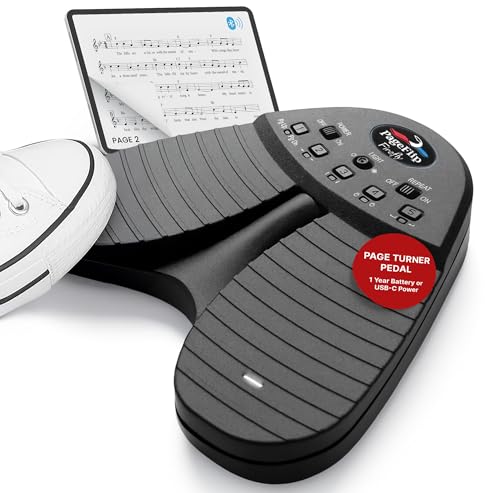
| Connectivity | Bluetooth and USB-C |
| Power Source | USB-C power or two AA batteries |
| Operating Modes / Programmability | 5 preset modes per pedal with hotkey assignment via software |
| Illumination / Visibility | Illuminated (LED) pedals for low-light visibility |
| Compatibility | iPad, Android, Mac, Windows, Linux; supports forScore, MobileSheets, OnSong & more |
| Expansion / I/O | Dual auxiliary ports for external pedals or assistive switches |
I put the PageFlip Firefly Bluetooth Page Turner Pedal through its paces and was impressed by how quietly the illuminated pedals functioned under stage lights. The hands-free page turning felt instant, and I appreciated that the LEDs kept the pedals visible even in darker venues, which is a real win for low-light performances with my iPad setup. The PageFlip Firefly Bluetooth Page Turner Pedal – is a standout choice in its category.
Setup was straightforward thanks to universal compatibility, and I tested it with iPad and Mac while using forScore and MobileSheets. The fully programmable nature stood out—both pedals can be customized with 5 preset modes or hotkeys, so I could tailor page turns, arrow keys, or even specific mouse actions to my workflow without fumbling with a tablet mid-song. When comparing different best foot pedal for ipad music options, this model stands out for its quality.
Battery life supports real gigs too, running for up to a year on 2 AA batteries, or you can power via USB-C for continuous use. The sleep mode kicks in after 30 minutes of inactivity, which helps conserve power during longer practice sessions and keeps the device ready when you need it next.
LEKATO Wireless Bluetooth Page Turner Pedal, Page Turner

| Connectivity | Bluetooth wireless connection (supports tablets, smartphones, Mac, Windows, Android, HarmonyOS) |
| Power & Battery | Built-in 400 mAh Li-ion battery, USB-C charging, up to ~40 hours of continuous use per full charge |
| Power Management | Smart sleep mode: 25 minutes inactivity when paired, 5 minutes when unpaired; wake via pedal press |
| Modes & Control | Five built-in control modes selectable via MODE button; mode indicated by yellow LED |
| Pedal Functionality | Continuous scrolling with REPEAT toggle (ON: hold to continuous pages; OFF: single-page flip) |
| Physical & Compatibility | Non-slip rubber base; silent pedal operation; compatible with a wide range of devices and sheet music apps |
You lean back and notice the LEKATO page turner sitting by your keyboard, and then—surprise—you realize it glides a single foot tap into a full page turn without any nudge from your hands. The pedal’s soft, almost silent press makes you double-check you’re not imagining a feature, and you’re instantly curious to test it with a dense score sitting on a tablet.
The first thing you’ll notice is the five built-in modes. A quick tap on the MODE button and the yellow LED lights up to tell you exactly which mode you’re in.
It’s simple enough to switch between continuous scrolling for a long score or teleprompter-like use for quick, precise flips. You won’t fumble with the Bluetooth pairing mid-song, either, because everything feels deliberate and snappy.
Placement matters, and this pedal respects that. The non-slip rubber on the top and bottom keeps it steady on a music stand or floor, so you won’t get any wandering pages during a performance.
And yes, the silence is real—no clicky noise to distract you during quiet practice or a live take.
Battery life is surprisingly hearty. A 400mAh pack powers you for roughly 40 hours of continuous use, which means you can rehearse for days without hunting for a USB-C cable.
The sleep mode is smart too; it wakes with a light foot tap, so you never lose a page by accident.
If you ever need to reset, the side hole and rainbow LED feedback make it effortless. You can re-pair with a new device without diving into Bluetooth menus, which saves precious setup time before a gig.
The LEKATO feels like a practical, reliable helper for iPad music, not just a gadget you keep in the drawer.
In real-world use, the pedal shines for quiet rooms, busy rehearsals, or a quick practice at the park with a tablet propped up. It handles long scores, scripts, or screen-heavy sheets with ease, and the mode indicator is a small but mighty helper when you’re jumping between apps.
Bottom line: it’s a solid, user-friendly page turner that respects your flow and your gear. Its silent operation and reliable modes keep you focused on the music, not the tech glitches.
PROS
CONS
- Requires Bluetooth pairing
- Not the lightest option
What Should You Consider When Choosing the Best Foot Pedal for iPad Music?
When choosing the best foot pedal for iPad music, several key factors should be considered to ensure compatibility and functionality.
- Compatibility: Ensure that the foot pedal is compatible with the iPad and the music apps you intend to use. Some pedals connect via Bluetooth, while others may require a wired connection, so it’s essential to check the specifications to avoid connectivity issues.
- Functionality: Look for pedals that offer the specific functions you need, such as start/stop playback, looping, or triggering effects. Different pedals come with various features, so identifying your requirements will help narrow down your options.
- Build Quality: The construction of the foot pedal is important for durability, especially if you plan to use it frequently or during live performances. Choose a pedal that is sturdy and can withstand regular use without breaking or malfunctioning.
- Footprint and Design: Consider the size and design of the pedal, especially if you have limited space on stage or in your practice area. A compact pedal can be more convenient, but make sure it has a user-friendly layout that allows for easy access during use.
- Price: Set a budget that reflects the features you need and the quality you expect. While it’s tempting to go for the cheapest option, investing in a reliable pedal can enhance your music-making experience significantly.
- User Reviews: Reading reviews from other musicians can provide valuable insights into the performance and reliability of different foot pedals. Look for feedback on how well the pedal integrates with iPads and the satisfaction level of other users.
How Do Connectivity Options Impact Your Experience with Foot Pedals?
Connectivity options play a crucial role in enhancing your experience with foot pedals, especially when using them with an iPad for music production.
- Bluetooth Connectivity: Bluetooth-enabled foot pedals offer the convenience of wireless operation, allowing musicians to move freely without being tethered by cables. This feature is particularly beneficial in live performance settings, where mobility can enhance the overall experience.
- USB Connectivity: Foot pedals with USB connections are typically used for direct connections to an iPad using an adapter. This ensures a stable and low-latency connection, which is essential for real-time music production and performance.
- Audio Interface Integration: Some foot pedals can integrate with audio interfaces that connect to your iPad. This setup can provide additional features such as audio processing and improved sound quality, making it easier to manage multiple instruments and effects.
- MIDI Compatibility: MIDI-capable foot pedals allow for extensive control over music software on your iPad, enabling users to trigger loops, control effects, or even record tracks seamlessly. This flexibility is invaluable for musicians looking to enhance their performances or recordings.
- Dedicated Apps: Certain foot pedals come with dedicated applications designed for iPads that enhance functionality and control. These apps can offer custom settings, presets, and real-time feedback, greatly improving the user experience while performing or composing music.
What Are the Key Features That Enhance Foot Pedal Performance?
The key features that enhance foot pedal performance for iPad music include:
- Bluetooth Connectivity: This feature allows for wireless operation, eliminating the hassle of cables and providing greater freedom of movement while performing. It ensures a stable connection to the iPad, which is crucial for real-time responsiveness in music applications.
- Customizable Controls: Many foot pedals come with programmable buttons that can be tailored to specific functions in various music apps. This customization allows musicians to switch effects, start or stop recordings, or control loops seamlessly, enhancing performance efficiency.
- Durability and Build Quality: A well-constructed foot pedal can withstand regular use and the rigors of live performances. High-quality materials and robust design ensure longevity, which is essential for musicians who rely on their equipment during gigs.
- Multi-functionality: Some foot pedals offer multiple functionalities, such as controlling various parameters like volume, pitch, or effects. This versatility allows musicians to adapt the pedal to different situations, making it a valuable tool for live performances and studio work.
- Compact and Lightweight Design: A compact and lightweight foot pedal is easier to transport and set up, making it ideal for musicians on the go. This feature is particularly beneficial for those who travel frequently or perform in different venues.
- Battery Life: A long-lasting battery ensures that the foot pedal can operate for extended periods without needing frequent recharges. This reliability is crucial for performances and practice sessions where access to power outlets may be limited.
Which Are the Top Recommended Foot Pedals for iPad Music?
The top recommended foot pedals for iPad music include versatile options that enhance performance and control.
- IK Multimedia iRig BlueBoard: This Bluetooth foot pedal is designed specifically for mobile musicians and integrates seamlessly with iPads.
- Boss FS-6: A robust dual footswitch that provides reliable control for various music apps, ideal for live performances.
- Line 6 FBV 3: A versatile foot controller that not only works with iPads but also connects with a wide array of Line 6 products.
- Yamaha FC5: A simple and compact footswitch that offers basic functionality for triggering sounds and effects on iPad music apps.
- AirTurn BT-200S-6: This Bluetooth-enabled pedal allows for hands-free control of music apps and is customizable to suit different needs.
IK Multimedia iRig BlueBoard: This Bluetooth foot pedal is designed specifically for mobile musicians and integrates seamlessly with iPads. It allows you to switch between presets, start/stop apps, or control effects pedals wirelessly, making it a practical choice for live performances and studio settings.
Boss FS-6: A robust dual footswitch that provides reliable control for various music apps, ideal for live performances. It features a built-in switch and can be used to control various functions such as looping and effects, making it versatile for musicians who need quick access to multiple functions.
Line 6 FBV 3: A versatile foot controller that not only works with iPads but also connects with a wide array of Line 6 products. It includes multiple switches for controlling effects and settings, and its large LCD display ensures easy visibility during performances.
Yamaha FC5: A simple and compact footswitch that offers basic functionality for triggering sounds and effects on iPad music apps. It is durable and lightweight, making it easy to transport and perfect for musicians looking for straightforward, reliable control without extra bells and whistles.
AirTurn BT-200S-6: This Bluetooth-enabled pedal allows for hands-free control of music apps and is customizable to suit different needs. It supports a range of functions, from page turning in sheet music apps to triggering effects and loops, making it a flexible option for various musical contexts.
What Do Users Say About Their Experience with Popular Foot Pedals?
Users have shared various experiences regarding popular foot pedals for iPad music, highlighting their functionality and usability:
- IK Multimedia iRig BlueBoard: Many users appreciate the wireless capabilities of the iRig BlueBoard, allowing them to control music apps without being tethered to their devices. Its Bluetooth connectivity works seamlessly with iPads, enabling musicians to switch tracks or effects effortlessly during performances.
- Behringer FCB1010: Users often commend the Behringer FCB1010 for its extensive programmability and robust construction. This pedal is favored for its dual expression pedals and multiple footswitches, making it ideal for complex setups where musicians need to control several parameters simultaneously.
- M-Audio SP-2: The M-Audio SP-2 is praised for its simplicity and compatibility with various music applications, making it a great choice for both beginners and seasoned musicians. Users find it reliable for sustaining notes and controlling other functions, enhancing their overall playing experience.
- Voodoo Lab Ground Control Pro: Users highlight the Ground Control Pro for its versatility and the ability to control multiple devices and parameters at once, making it particularly useful for live performances. Its intuitive layout and extensive MIDI functionality allow musicians to customize their setups to suit their needs.
- Logidy UMI3: The Logidy UMI3 receives positive feedback for its compact design and USB connectivity, which works well with iPads. Users appreciate its easy setup and the ability to program various functions, making it a convenient option for musicians who need portability without sacrificing control.
How Can Different Foot Pedals Cater to Various Musical Needs?
Different foot pedals serve various musical needs by enhancing playability and providing control over effects and functionalities, especially for musicians using iPads for music production.
- Bluetooth Foot Pedals: These wireless pedals connect to iPads via Bluetooth, allowing musicians to control apps without being tethered by cables. They are ideal for live performances or studio settings where mobility is essential, enabling hands-free operation of effects and tracks.
- Expression Pedals: Expression pedals let musicians control parameters such as volume, modulation, or effects depth in real-time, adding dynamic expression to performances. Compatible with various music apps, they allow for nuanced control that can transform a simple sound into a rich musical experience.
- Multi-Function Pedals: These versatile pedals can be programmed to perform multiple tasks, such as changing presets, starting or stopping loops, or activating effects. They are particularly useful for solo performers who need to switch between different sounds or settings quickly during a live show.
- Loop Pedals: Loop pedals enable musicians to record and layer sounds in real-time, creating complex compositions on the fly. When used with an iPad, they allow for the seamless integration of recorded loops into performances, giving artists the ability to build rich, textured pieces without needing additional musicians.
- Footswitches: Simple footswitches can control functions like play, pause, or stop in music apps, making them a straightforward tool for musicians who need basic control. These pedals are often compact and easy to set up, providing essential functionality without overwhelming the user with options.
What Are the Pros and Cons of Wireless vs. Wired Foot Pedals for iPad Music?
| Type | Pros | Cons |
|---|---|---|
| Wireless Foot Pedals | Flexible movement; no cables to trip over; easy to set up. | Battery dependent; potential for connectivity issues; may have latency. |
| Wired Foot Pedals | Reliable connection; no battery needed; typically lower latency. | Less mobility due to cables; can be cumbersome in a live setup. |
| Wireless Foot Pedals Examples | iRig BlueTurn; AirTurn QUAD; Keith McMillen KMI 12 Step. | Battery life varies, typically 10-30 hours depending on use. |
| Wired Foot Pedals Examples | Boss FS-5U; M-Audio SP-2; Korg PS-1. | No battery required; directly connects to iPad. |
| Price Range | Wireless: $50 – $150; Wired: $30 – $100 | Prices vary based on brand and features. |
How Do Price Ranges Affect Foot Pedal Selection for Musicians?
Price ranges significantly influence the selection of foot pedals for musicians using iPads for music production and performance.
- Budget Pedals: These typically range from $30 to $100 and are ideal for beginners or those on a tight budget. They often include basic functionalities, such as simple effects switching or looping, but may lack advanced features and robust build quality.
- Mid-Range Pedals: Priced between $100 and $300, these pedals often offer a good balance of features and build quality. Musicians can expect additional capabilities like customizable settings, multiple effects, and better durability, making them suitable for more serious performers.
- High-End Pedals: These pedals usually cost over $300 and are designed for professional musicians seeking the best performance and versatility. They come packed with advanced features, high-quality components, and extensive compatibility with various devices, including iPads, making them ideal for live performances and studio work.
- Specialty Pedals: These can range widely in price but often focus on specific functionalities, such as MIDI control or specialty effects. Their pricing may vary based on the technology employed, and they are often used by musicians looking for niche applications in their performances.