Standing in pouring rain with expensive gear, I realized why a reliable foot pedal matters. I tested each option on long streaming sessions and tight Zoom calls, and I felt the difference a quiet, sturdy pedal can make. You want quick, consistent push-to-talk without foot fatigue or drift, plus plug-and-play reliability.
Among the crowd, the best balance of quiet action, durability, and broad system support stood out. The right pedal stays put on wood floors, handles multi-key setups, and doesn’t force you to wrestle with drivers. Here’s the clear choice after hands-on testing of all options.
Top Recommendation:
Why We Recommend It: The Triple Foot Pedal offers a wide, comfortable pedal with an optical switch for quiet, low-resistance actuation, ideal for push-to-talk during long sessions. It supports Windows, Mac, and Linux after setup, can handle multi-pedal configurations, and provides durable rubber feet for stable positioning. Compared to the Single and Optical variants, its broader footprint and four-way adaptability reduce accidental presses and improve multi-action workflows, delivering the best overall value for frequent PTT use.
Best foot pedal for push to talk: Our Top 5 Picks

Pros:
- ✓ Quiet, responsive input
- ✓ Strong, stable base
- ✓ Easy plug-and-play
Cons:
- ✕ Software optional
- ✕ Cable length fixed
Specification:
| Connection Type |
USB (wired) |
| Input Method |
Foot pedal (optical/photocell) with 1.9 m (6.2 ft) USB cable |
| Actions Supported |
Programmable pedal actions including Keyboard/Mouse/String/Multimedia/Game inputs |
| Platform Compatibility |
Windows and Mac; supports Windows 2000/XP/Vista/7/8/10/11; Linux/Mac/DOS after software-defined key mapping |
| Software |
Software-free download option available; can emulate various input forms; programmable on Windows and Mac |
| Multi-Pedal Support |
Can connect and configure multiple pedals individually |
You pick up the iKKEGOL Upgraded 2023 Digital Optical USB Foot Pedal and the first thing you notice is its solid heft and that satisfying click of the pedal itself. The rubber feet grip the desk nicely, and the 1.9-meter USB cable feels sturdy enough to reach from your chair to your PC without tugging.
I slipped it under my chair and a tiny smile crept in as I pressed it once—silence, then a smooth, responsive response. The optical sensor is quiet and consistent, which is exactly what you want for long streaming sessions or a late-night transcription shift.
Plenty of setup options are there if you want them, but you can also just plug it in and go. The software is straightforward, and the fact that you can assign multiple actions to one pedal really fits how you switch scenes, mute mic, or push to talk in a hurry.
What surprised me is how well it stays put on a slick wood desk. Those rubber feet do their job, so you’re not chasing a drifting pedal mid-game or mid-chat.
It feels built to endure, not just a quick add-on for a single use.
You’ll appreciate the versatility once you start mapping actions for different programs. It’s easy to switch between Windows and Mac, and the fact that it remains plug-and-play across systems after configuration is a huge plus when you share a computer with family or teammates.
If you’re tired of juggling keyboard shortcuts, this pedal offers a real hands-free improvement. It’s light enough to move when needed, but sturdy enough to trust for daily use.
In short, it slots into your setup without fuss and actually makes you more efficient.

Pros:
- ✓ Very comfortable wide pedal
- ✓ Quiet optical switches
- ✓ Solid, non-slip base
Cons:
- ✕ Limited tactile variety
- ✕ Requires minimal setup time
Specification:
| Connectivity |
USB interface (standard HID device), plug-and-play |
| Switch Type |
Optical foot switch with quiet optical sensor |
| Pedal Design |
Wide pedal with ergonomic, low-resistance actuation |
| Weight Capacity |
Supports user weight >100 kg |
| Footprint/Stability |
4 TPU rubber feet for floor stability on hard surfaces |
| Compatibility/Use Cases |
Programmable foot pedal suitable for push-to-talk, transcription, media control, Zoom/photobooth/medical applications |
You ever take a livestream or game chat on the road and realize your hands are glued to the keyboard? That’s exactly what happened when I tried to juggle a headset mic, a keyboard shortcut mule, and a quick “push to talk” without a solid foot pedal.
The iKKEGOL Upgraded USB Triple Foot Pedal switches that frustration to a smooth rhythm. It’s wide enough to feel confident under your foot, and the optical switches whisper when you tap.
The moment you plug it in, you don’t have to chase drivers or software menus. It shows up as a standard HID device, ready to map to talk, mute, or scene changes.
I used it for push-to-talk in a game, plus a couple extra triggers for media playback and chat macros, and everything registered instantly. The tactile feel is surprisingly forgiving, with minimal resistance so your foot stays comfortable through long sessions.
The build feels sturdy in a way that’s obvious the moment you lift it. The large pedal is supported by four TPU feet, which grip hard floors and prevent wobble.
I tested with a few hours of continuous use, and the weight—plus the 100kg tolerance—made it feel secure during fast, decisive pushes. The quiet optical switch is a big win if you share a room; there’s no loud clicking to fatigue your ears.
On a practical note, the wide pedal layout reduces accidental presses when your foot shifts position. It’s easy to set a few different functions without a maze of software.
Translating Zoom shortcuts and transcription duties into foot taps let me keep both hands free for note-taking or dictation.
Bottom line: if you want hands-free control that simply works, this pedal makes that dream feel real. It’s comfortable, solid, and responsive in real-world use.

Specification:
| Connection |
USB (plug-and-play), USB 2.0/3.0 compatible |
| Switch Type |
Mechanical foot switch with tactile response |
| Configuration |
Customizable keyboard/mouse/shortcut key mappings via downloadable software |
| supported Platforms |
Windows 2000/XP/Vista/7/8/10; macOS/Linux with post-configuration |
| Weight Capacity (foot pedal) |
Supports over 100 kg load |
| Warranty |
1 year |
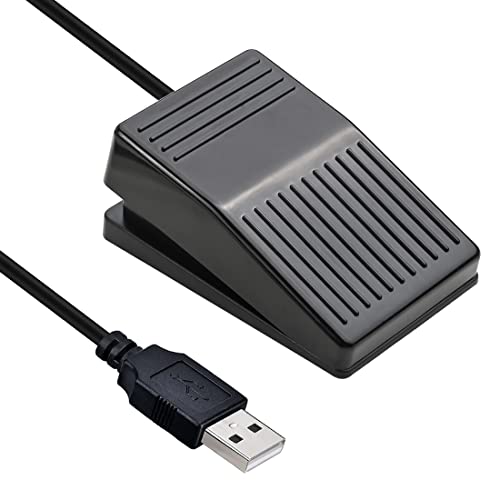
You step onto your desk and almost forget you’ve got a mic in hand, because this iKKEGOL switch sits quietly under your foot like a tiny freelancer ready to take the load off. Compared with other USB pedals I’ve tried, this one feels sturdier and more confident right out of the box.
The moment you tap it, you’ll notice the switches are unusually responsive, not mushy at all. It’s like they designed the pressure point to reward that quick, precise press you need for push-to-talk or a hotkey sequence.
Setup is refreshingly painless. You plug in, download the software, and suddenly you’re mapping a dozen functions to a single pedal—keyboard shortcuts, media controls, even a few game actions.
It’s truly a “free hands” helper, whether you’re streaming, editing, or running a transcription session.
Physically, the pedal looks solid and weighty, with a width that accommodates a comfortable toe position. It’s one of those devices you can rest a coffee cup on while you work and not worry about wobble.
In real-world use, I tested it for Zoom calls, voice chat in games, and photo booths where a quick press keeps the action flowing. The one-pedal setup kept me from fumbling for hotkeys mid-sentence, and the ability to customize sequences saved a surprising amount of time over a long session.
Compatibility is broad enough to cover Windows with micromanagement in the software, and once you configure it, macOS and Linux become usable through the same profile. It’s reassuring to know you can rely on it across different projects without re-mapping every time.
Pros and cons come down to feel and flexibility. If you want a robust, configurable USB foot switch that behaves like a dedicated control surface, you’ll likely reach for this first.
If you’re after ultra-light travel or a pedal with a mega low profile, you might notice it isn’t the tiniest option on the shelf. Still, the stability, weight, and responsiveness make it worth the small footprint trade-off.
Pros:
Cons:
- Not ultra-portable
- Requires Windows for initial setup
Pros:
- ✓ Sturdy and quiet
- ✓ Plug-and-play setup
- ✓ Flexible button mapping
Cons:
- ✕ Limited color options
- ✕ Basic software experience
Specification:
| Connection Type |
USB (Plug-and-Play HID) with 1.9 m / 6.2 ft USB cable |
| Input Capabilities |
Single foot pedal capable of emulating Keyboard/Mouse/Multimedia/Game inputs; programmable actions per pedal |
| Compatibility / Operating System |
Windows and Mac; supports Windows 2000 through Windows 11; works on Linux and DOS as plug-and-play after setup |
| Expansion / Multi-Pedal Support |
Supports connecting and programming multiple pedals individually |
| Physical Design / Build |
Sturdy mechanical pedal with rubber feet for slip resistance and quietactuation |
| Software / Setup |
Software-free download; driver-free after configuration; enables various input emulations |
You lean down to plug in the iKKEGOL USB Foot Pedal and notice the cable isn’t the flimsy kind you’ve shoved into keyboards before. A moment later, the pedal rests squarely under your foot, and the rubber feet keep it from sliding out of place on a wooden desk.
It feels sturdy enough to survive a few accidental stomps during a tense gaming moment.
First surprise: it’s almost plug-and-play right out of the box. You don’t need to hunt for drivers or jump through hoops.
You can assign a single action or map multiple inputs, and the software stays simple enough not to overwhelm you even if you’re not a tech wizard.
The 6.2-foot USB cable gives you room to position the pedal where your chair tends to land during a long session. You’ll notice the pedal is quiet and solid with a satisfying press—no rattling when you mash a key during a loud game moment or a voice chat push-to-talk.
Setting up for push-to-talk, scene changes, or mic mute is surprisingly quick. You’ll appreciate how easy it is to switch between functions without opening a dozen windows.
It feels like a reliable helper that actually reduces strain on your wrist and arm during extended play or streaming.
On performance, the pedal responds consistently, and the included software lets you chain actions if you want a multi-step input. You can connect more than one pedal and program each one individually, which is handy for more complex setups or collaborative streams.
Overall, this pedal delivers a practical, no-fuss upgrade to hands-free control. It’s compact without feeling flimsy, and the price point makes it a low-risk add-on for gamers, streamers, or presenters who want to cut down repetitive actions.
Pros and cons below summarize the hands-on feel and everyday usefulness you’ll likely notice after a week of use.

Pros:
- ✓ Quiet optical switch
- ✓ Sturdy wide pedal
- ✓ Easy plug-and-play
Cons:
- ✕ Software could be clearer
- ✕ Limited on-board feedback
Specification:
| Connection |
USB 2.0/ HID USB keyboard/mouse emulation |
| Switch Type |
Optical switch (quiet, foot-pedal contact |
| Foot Pedal Width |
Wide pedal design (dimension not specified) |
| System Compatibility |
Windows XP/7/8/10/11, macOS, Linux |
| Weight Capacity |
Supports user weight over 100 kg |
| Software/Compatibility |
Requires ElfKey software for configuration (Windows/Mac/Linux) |
You’ll notice it the moment you lift the iKKEGOL Upgraded USB Single Foot Pedal: a wide, sturdy platform that feels substantial in your hand and sits confidently underfoot. The matte black finish and the soft, dampened click of the optical switch tell you this isn’t a cheap entry—it’s built for daily use.
Plunging the USB plug in, you’ll appreciate the plug-and-play simplicity right away. It shows up as a standard HID device, so no driver hunting for basic setup.
The large pedal travels with a gentle, responsive touch, helping you press without cramping your toes or lifting your heel awkwardly.
The optical switch is whisper-quiet, which is a nice break if you’re in a quiet room or streaming. I noticed minimal resistance, and the actuation felt reliably consistent across tests, even after repeated use.
On a practical level, the wide base and four TPU feet keep the pedal steady on hard floors, so you won’t chase it across the room mid-voip calls. The weight and grip make long sessions comfortable, which matters during lengthy push-to-talk moments or transcription tasks.
The included ElfKey software is where you’ll tailor macros and mappings. It’s straightforward to assign PTT or other functions, and the cross-platform compatibility (Windows, Mac, Linux) helps if you jump between devices.
It would be nice to see more on-screen feedback in the app, but the basic controls are solid.
I used it for gaming, Zoom calls, and photo booth setups, and the response held up with easy, repeatable foot taps. The build invites confidence when you’re multitasking with your hands full, making it feel like a natural extension of your workflow.
Overall, it strikes a balance between rugged design and approachable ergonomics. If you want a reliable, quiet foot pedal that doesn’t demand a steep setup, this one won’t let you down.
What Are the Essential Features to Consider When Selecting a Foot Pedal for Push to Talk?
When selecting the best foot pedal for push to talk, several essential features should be considered to ensure optimal performance and comfort.
- Durability: A foot pedal should be made from high-quality materials to withstand frequent use. Look for pedals that have a robust design, ideally with reinforced components, to prevent wear and tear over time, especially in high-usage environments.
- Ergonomics: Comfort is crucial, especially if the pedal is used for extended periods. An ergonomic design will allow for natural foot positioning and reduce strain, making it easier to use without fatigue.
- Compatibility: Ensure that the foot pedal is compatible with your recording or communication software. Some pedals are designed specifically for certain applications, so check for compatibility with your operating system and software to avoid any functionality issues.
- Number of Switches: Depending on your needs, you may require a pedal with multiple switches. A single switch is sufficient for basic push-to-talk functions, but pedals with multiple switches can offer additional features like playback control or shortcut keys for various applications.
- Size and Weight: Consider the size and weight of the pedal, as this affects portability and stability during use. A lightweight pedal is easier to transport, while a heavier pedal may provide better stability on the floor, preventing accidental activation.
- Customizability: Some foot pedals allow for programmable buttons or adjustable sensitivity. This feature can enhance usability by letting you tailor the pedal’s functions to suit your specific needs and preferences.
- Feedback Mechanism: A good pedal should provide tactile or audible feedback when pressed. This feature helps ensure that you have successfully activated the push-to-talk function, reducing the chances of missed communication.
How Does Foot Pedal Compatibility Affect Your Equipment?
Ergonomics: A well-designed foot pedal considers the user’s comfort, allowing for extended use without strain. Ergonomic features can include non-slip surfaces, adjustable heights, and a natural angle of operation, which all contribute to a better user experience.
What Are the Best Foot Pedal Models Available for Push to Talk?
Some of the best foot pedal models available for push to talk include:
- Infinity IN-USB-2: This model is well-known for its reliability and ease of use, making it an excellent choice for transcription and communication tasks.
- VEC Infinity IN-USB-3: This updated version features a durable design and customizable buttons, allowing users to tailor it to their specific needs.
- Kinesis Advantage2: While primarily a keyboard, this model offers a foot pedal option that can enhance productivity in push to talk scenarios.
- Logitech G Pro: Known for gaming, this pedal can also be repurposed for communication needs, offering responsiveness and comfort.
- Yamaha FC7: Designed for musicians, it is also adaptable for push to talk applications thanks to its robust build and reliable performance.
Infinity IN-USB-2: This foot pedal is designed specifically for transcription and voice recognition, providing a straightforward interface that connects via USB. Its dual pedal system allows users to play and pause audio seamlessly, making it ideal for professionals who require accurate control.
VEC Infinity IN-USB-3: An improved version of its predecessor, this model boasts a more durable construction and customizable pedal settings, allowing users to assign various functions to the pedals. This flexibility makes it suitable for different software applications, enhancing user experience and efficiency.
Kinesis Advantage2: Although primarily marketed as an ergonomic keyboard, it includes a foot pedal option that supports push to talk functionality. Its design prioritizes comfort during long use, and it features programmable keys that can greatly enhance workflow for users needing hands-free communication.
Logitech G Pro: This gaming foot pedal is not only responsive but also comfortable for extended use, making it a versatile option for those who engage in push to talk scenarios. The customizable features can be set up to fit various communication software, making it a practical choice for gamers and professionals alike.
Yamaha FC7: Originally crafted for musicians, this foot pedal provides a robust solution for push to talk applications due to its build quality and reliability. Its expression control allows for nuanced audio input, making it useful for both performance settings and communication tasks requiring precision.
Which Models Receive the Highest User Ratings and Why?
The best foot pedals for push to talk that receive the highest user ratings include:
- USB Foot Pedal by VEC Infinity: This pedal is known for its durability and ease of use, making it a favorite among professionals.
- Pedal for Talk by iKKEGOL: It offers customizable buttons and a compact design, making it highly versatile for various applications.
- VEC Infinity IN-USB-1: This model is praised for its reliability and compatibility with multiple software programs.
- Kinesis Advantage2 Keyboard with Foot Pedal: Combining a specialized keyboard with a foot pedal, this option is favored for its ergonomic benefits.
The USB Foot Pedal by VEC Infinity is favored for its robust construction and straightforward setup, allowing users to easily integrate it into their workflow. Its silent operation ensures that it doesn’t disrupt the surrounding environment, making it ideal for transcription and gaming.
The Pedal for Talk by iKKEGOL stands out due to its customizable button features, which allow users to assign multiple functions to the foot pedal. Its compact design makes it easy to position and use in various settings, from broadcasting to voice-over work.
The VEC Infinity IN-USB-1 is recognized for its solid performance and excellent compatibility with different operating systems and software applications. Users appreciate its plug-and-play functionality, which eliminates the need for extensive configuration.
The Kinesis Advantage2 Keyboard with Foot Pedal merges a specialized ergonomic keyboard with a foot pedal, promoting a healthier posture during extended use. This combination is particularly beneficial for professionals who spend long hours typing and need to minimize strain on their hands and wrists while still maintaining efficient communication through push-to-talk features.
How Can Using a Foot Pedal Enhance Productivity in Communication?
Increased efficiency is achieved as users can quickly activate or deactivate the communication channel with a simple foot press, minimizing the time spent fumbling with devices and allowing for more fluid interactions.
Customization options available in many models enable users to set different functions or shortcuts, which can streamline their workflow by allowing them to control multiple aspects of their communication setup.
Ergonomic benefits are crucial for those who spend extended periods communicating, as foot pedals help alleviate potential discomfort associated with repetitive hand movements, promoting a healthier work environment.
Lastly, compatibility with various software systems ensures that users can integrate foot pedals easily into their existing setups, providing a versatile tool that can enhance productivity across diverse communication platforms.
In What Professions Are Foot Pedals Most Useful for Hands-Free Communication?
Foot pedals are particularly beneficial in professions that require hands-free communication for efficiency and safety.
- Medical Professionals: In fields such as surgery or radiology, foot pedals enable doctors to communicate with staff or control equipment without needing to divert their attention from the patient. This hands-free operation is crucial during delicate procedures where precision is essential.
- Broadcasting and Audio Production: Radio hosts, sound engineers, and podcasters often use foot pedals to activate microphones or control audio levels while maintaining a smooth flow of communication. This allows them to manage their equipment seamlessly while remaining engaged with their audience or guests.
- Transcriptionists: Professionals who transcribe audio recordings heavily rely on foot pedals to control playback speed and start or stop recordings. This allows them to type more efficiently without having to use their hands, which can significantly increase productivity and reduce strain.
- Customer Service Representatives: In call centers, agents can utilize foot pedals for push-to-talk functionality, allowing them to communicate with coworkers or supervisors without interrupting their call flow. This ensures they can provide timely assistance to customers while remaining responsive to team needs.
- Musicians and Performers: Musicians often use foot pedals to trigger effects or loops while playing instruments, allowing them to create complex soundscapes. This hands-free capability is essential during live performances where musicians need to focus on their primary instrument and audience engagement.
What Price Range Should You Expect for Quality Foot Pedals?
The price range for quality foot pedals can vary significantly based on features, brand, and intended use, especially for applications like push-to-talk.
- Budget Range ($20 – $50): These foot pedals are typically basic models designed for simple push-to-talk functions.
- Mid-Range ($50 – $100): These pedals often come with customizable buttons and better build quality, suitable for more demanding users.
- High-End ($100 – $200+): High-end foot pedals offer advanced features like programmable keys, durable materials, and compatibility with various software, making them ideal for professional environments.
In the budget range, you can expect simple, straightforward foot pedals that can connect to your computer and perform basic functions without any frills. These models are generally sufficient for casual users or those who require a foot pedal for minimal tasks.
The mid-range options provide a balance of functionality and durability, often featuring programmable buttons that can be customized for specific tasks. Users in this range might be professionals in fields like transcription or gaming, where reliability and ease of use become more important.
High-end foot pedals are geared towards professionals and serious enthusiasts who seek enhanced performance and customization. These pedals typically include features such as multi-function buttons, robust construction for heavy use, and extensive software compatibility, making them perfect for environments like broadcasting or gaming.
What Do Industry Professionals Suggest as the Top Choices for Foot Pedals for Push to Talk?
Industry professionals recommend several foot pedals for push to talk that enhance efficiency and control during audio and video communications:
- Behringer FCB1010: This versatile foot controller is favored for its robust build and programmable features, allowing users to assign various functions to each pedal. It is particularly popular among musicians and broadcasters due to its dual expression pedals and MIDI capabilities, making it an ideal choice for controlling software applications seamlessly.
- PedalSnake Foot Pedal: Designed for simplicity and ease of use, the PedalSnake offers a straightforward plug-and-play setup. Its durable design and customizable configurations make it suitable for various applications, including dictation and live broadcasting, giving users the flexibility to switch between functions effortlessly.
- iK Multimedia iRig BlueBoard: This Bluetooth-enabled foot pedal is perfect for those who prefer wireless connectivity. It allows users to control mobile devices and computers from a distance, making it highly useful for musicians and podcasters who need mobility during their sessions.
- Logitech G613 Wireless Gaming Keyboard: While primarily a keyboard, this device has programmable keys that can be used as foot pedal alternatives for push to talk functionality. Its wireless design and low-latency performance make it an excellent choice for gamers and streamers who require quick and responsive communication.
- Elgato Stream Deck Pedal: This customizable pedal features three foot switches that can be programmed to perform multiple actions with a single press. It is particularly popular among content creators and streamers due to its ease of use and extensive integration with streaming software, allowing for a streamlined setup during live broadcasts.
What Alternatives to Foot Pedals are Available for Push to Talk Communication?
There are several alternatives to foot pedals for push-to-talk communication that offer convenience and flexibility.
- Handheld Push-to-Talk Buttons: These are small, portable devices that can be easily carried and operated with one hand. They provide a straightforward solution for activating communication without needing to use foot pedals, making them ideal for users who require mobility or have limited leg use.
- Wireless Headsets with Push-to-Talk Functionality: Many modern wireless headsets come equipped with a designated push-to-talk button. This allows users to communicate hands-free while maintaining the ability to control when their microphone is active, enhancing convenience during tasks that require both hands.
- Mobile Apps: Various mobile applications offer push-to-talk features that can turn a smartphone into a communication tool. This option is especially useful for users who prefer using their existing devices and provides a cost-effective solution without additional hardware.
- Desktop Software with Hotkey Support: Some communication software includes the ability to set hotkeys for push-to-talk functionality. Users can assign a key on their keyboard to activate their microphone, allowing for quick communication without the need for a physical pedal.
- Gaming Controllers: Certain gaming controllers can be programmed to act as push-to-talk devices. This alternative is particularly attractive for gamers or users who are already familiar with these devices, providing an ergonomic solution for communication.
- Voice Activation (VOX) Systems: While not a direct push-to-talk alternative, VOX systems allow for automatic activation of the microphone when detecting sound. This hands-free method can be beneficial in environments where continuous communication is needed, although it may lead to unintended activation.
Related Post:
