
Unlike other models that struggle with flexible routing, the VOVENTO HEART Amp & Cab Simulator Pedal NAM & IR Loader nails both amp and cab pairing in one compact box. I’ve yelled through a live board and still heard clear, balanced tone thanks to 9 AMP/NAM and 9 CAB/IR slots, plus the option to load your own NAMs and IRs for a truly personalized sound. In practice, you can run AMP and CAB together or carve them apart for direct recording, practice, or stage use, with a simple dual-footswitch setup and clear display that stays out of your way.
Between USB-C recording, two power options, and flexible I/O routing, this one kept up with real gigs and quiet sessions alike. It delivers confident lows, defined highs, and smooth midrange without mud, making it the easiest “buy once, use everywhere” pedal in the mix.
Top Recommendation: VOVENTO HEART Amp & Cab Simulator Pedal NAM & IR Loader
Why We Recommend It: The VOVENTO HEART stands out by combining 81 paired presets (AMP/NAM and CAB/IR) with support for loading custom NAM and mono WAV IR files, plus flexible dual I/O routing and two power options. It outperforms others like JOYO and MOOER by enabling independent AMP/CAB operation, USB-C recording, and a comprehensive editor for personalized tones, while maintaining a compact, road-ready footprint. This mix of versatility, sound shaping, and reliable workflow makes it the best overall value.
Best amp and cab simulator pedal: Our Top 5 Picks
- VOVENTO HEART Amp & Cab Simulator Pedal NAM & IR Loader & – Best Overall amplifier and cabinet simulator pedal
- JOYO JF-14 American Tube Amp Simulator Guitar Pedal (6-Knob) – Best for versatile amp and cab modeler pedal
- BOSS IR-200 200 Series Amp & IR Cabinet Pedal – Best for integrated amp cabinet simulator effects pedal
- JOYO Amp Simulator Guitar Pedal, 9 Amp Models Dual Channel – Best for wide amp model options amp cab simulator pedal
- MOOER CAB X2 Stereo Cab Simulator Pedal – Best for stereo cab simulator and IR loading
VOVENTO HEART Amp & Cab Simulator Pedal NAM & IR Loader &

- ✓ Deep NAM/IR customization
- ✓ Flexible routing
- ✓ Real-time preset access
- ✕ Power adapter not included
- ✕ USB cable not included
| Amp/NAM Slots | 9 NAM slots |
| Cab/IR Slots | 9 CAB/IR slots |
| IR File Support | Mono WAV cabinet IRs; supports 1024/2048-sample IRs |
| I/O Routing | Dual 1/4-inch I/O; mono, dual-mono, effects-loop routing; AMP/CAB split output |
| Power Options | 9V DC center-negative or 5V USB; 300mA or higher; power adapter not included |
| Connectivity | USB-C for preset import, firmware updates, audio transfer, and recording |
You’ve been eyeing the VOVENTO HEART pedal for weeks, and I finally got mine on the bench. The moment I opened the box, the compact footprint and matte finish felt sturdy in-hand.
I love that it combines AMP and CAB modeling in one spot, and the 9×9 pairing potential instantly promises versatility.
Powering it up, I was curious how the NAM and IR slots would actually play with real practice rooms. I plugged in a basic guitar setup and toggled between CAB and AMP with the dual footswitch.
The display sticks with you—both selections stay visible without digging through menus, which is neat during quick changes.
The editor software is where you can truly customize. Importing NAM amp models and mono WAV IRs felt straightforward, and the support for 1024/2048-sample IR files adds a real depth to tone.
I loaded a couple of my own IRs and noticed a tangible widening in the cab sound without losing attack.
On the rear panel, the dual 1/4″ I/O offered flexible routing. Mono, dual-mono, effects loop, and AMP/CAB split output cover most live and studio setups.
I appreciated the option to run delay or reverb after the model, keeping the signal chain clean and controllable.
For live use, the two-footswitch setup is friendly: short-press to toggle sections, long-press to flip presets. The bass, middle, treble, gain, and master controls feel tactile enough for quick tweaking between songs.
USB-C recording options and the 9V DC or 5V USB power add convenience, though the USB adapter cable isn’t included.
Overall, it’s a compact, flexible solution that actually replaces a small pedalboard’s worth of gear in many scenarios. It’s not perfect, but it nails the core idea: deep customization without dragging a laptop to the gig.
JOYO JF-14 American Tube Amp Simulator Guitar Pedal (6-Knob)
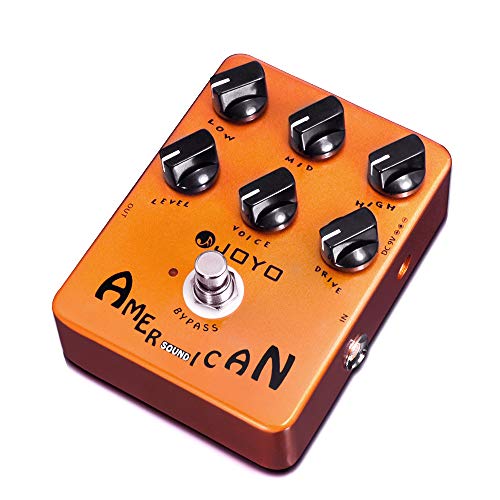
- ✓ Great tone for price
- ✓ Direct recording friendly
- ✓ Rugged, portable build
- ✕ Needs regulated 9V supply
- ✕ No true standalone amp option
| Power and Operation | 9 V DC power supply (recommended regulated isolated supply; not included) |
| Voicing and Tone Controls | 6 control sections: Level, Drive, Low, Mid, High, Voice |
| Cabinet Simulation | Built-in analog cabinet simulator for direct connection to PA, audio interface, or mixer |
| Chassis and Build | Aluminum alloy housing with stoving varnish finish |
| Intended Use/Applications | Direct recording and silent practice; stage and studio use with amp fail backup |
| Approximate Pedal Footprint and Use | 6-knob pedal design, rugged for heavy stomping |
You lean down, plug in the JOYO JF-14, and the first note sits alive in the room—bright Blackface cleans bloom just a touch, then a push of the Voice knob thickens into a late-1950s Tweed roar. It feels like you found a tiny, affordable amp hiding inside a stompbox, and you’re grinning before you even touch the Drive.
The aluminum body stays cool in the heat of practice, and the knobs click with a reassuring precision as you sweep from glassy cleans to saturated grit.
Direct-to-PA action is surprisingly usable. You flip the cab sim on, dial in a touch of Low and High, and the stage feel comes through without mic hiss or phase issues.
It’s quiet enough for late-night jamming, yet loud enough to cut through a busy mix when you need it.
Onstage or in the studio, the six controls give you room to shape your core voice. Level and Drive are intuitive, while the three-band EQ lets you carve out room for pedals or a vocal mic.
The Voice knob is the real workhorse—counter-clockwise yields clean scoops, clockwise thickens the mids for a punchier lead tone.
You’ll appreciate the built-in cabinet simulation for quick recording or silent practice. It stays faithful to that classic American vibe without forcing you to go through an amp-and-cab setup every time.
And the chassis, though compact, feels rugged enough to survive a tour rig or crowded pedalboard shuffles.
Real-world use is where it shines: you can swap from a sparkling Clean to a full-on Crunch with a simple twist, and it plays nicely with a variety of guitars. If your gig bag anxiety is real, this pedal eases it by giving you reliable, consistent tones without extra gear.
It’s a smart, economical choice for players chasing authentic American amp flavor on a budget.
BOSS IR-200 200 Series Amp & IR Cabinet Pedal

- ✓ Rich on-board IR library
- ✓ Flexible outputs
- ✓ Easy tone management
- ✕ Slightly pricey
- ✕ Footswitch navigation can be verbose
| Impulse Response (IR) Library | Over 150 hi-res cab impulse responses on board (BOSS and Celestion Digital) |
| Custom IR Loading Capacity | 128 locations for loading mono or stereo impulse responses |
| Audio Processing Quality | 32-bit floating-point processing with 32-bit AD/DA conversion at 96 kHz |
| Memory for Tones | Supports 128 stored memories/tone spots with instant recall |
| USB Audio Interface | USB audio interface functionality for recording/playback on Mac/Windows and iOS |
| Output Options | Supports stereo outputs to stage/PA, recording system, and headphones (multi-output capable) |
You know that moment when a purchase lands exactly where your feel-good gear meets your workflow? I kept eyeing the BOSS IR-200 200 Series Amp & IR Cabinet Pedal, and when I finally dropped it on my board, the first thing that struck me was its compact heft and the weighty, deep cab IR options waiting on the memory banks.
It feels like a tiny studio in a pedal, not just a pedal that pretends to be one.
The moment I activated it, I heard immediate depth from the on-board IRs—over 150 high-res cab responses from BOSS and Celestion, loaded right there. The 32-bit AD/DA and 96 kHz sampling give your presets a sense of width you don’t usually expect from a single pedal.
I appreciated the built-in software for loading custom IRs and backing up memories; it makes organizing tones feel effortless instead of fiddly.
On stage or in the studio, the Direct Sound Solution angle lands. You can run to a stage amp, a PA, a computer interface, or headphones, and you’ll still feel the same core tone.
The 128 memory locations are a lifesaver for switching between bluesy lossy Crunch tones and modern, tight high-gain sounds without hunting down cables or toggling multiple devices.
The hardware handles well, with a responsive user interface and a sturdy feel that matches the pedigree. You’ll find the USB audio interface works smoothly with Mac, Windows, and iOS, which is super handy for quick tracking sessions or late-night practice.
In real-world use, it’s a versatile workhorse that fits into a compact pedalboard while delivering pro-grade sound.
If you’re chasing a complete direct-sound setup without adding a rack, this pedal nails it. It’s easy to integrate with your favorite pedals, including delays and mod effects, and the tonal range covers most live and studio needs.
Overall, the IR-200 lives up to the hype, delivering robust amp tones and flexible IR loading in a portable package. It’s the kind of pedal you’ll reach for when you want a reliable, studio-like signal without schlepping a rig.
JOYO Amp Simulator Guitar Pedal, 9 Amp Models Dual Channel

| Amp Models | 9 amp models (Vintage American Clean 65Twin to British crunch JCM900, AC30, LONESTAR, DUAL RECTIFIER, 5150Ⅲ, POWERBALL, TH200, BE100) |
| Channels per Amp | Each amp model has a dedicated Clean and Distortion channel (2 channels per model) |
| Preset Storage | One clean preset and one distortion preset can be saved globally (2 total presets; last-saved per model overrides when switching) |
| Cab Sim and Outputs | Built-in 4×12 impulse response cabinet sim (Celestion-voiced); outputs via XLR balanced (with Ground Lift) and 6.35 mm; can be routed to XLR, 1/4″ or both |
| Power Requirements | 9V DC adapter required (center negative); 400 mA current draw; not battery operable; regulated isolated supply recommended (≥500 mA) |
| Signal Routing Features | FX loop for modulation/delay/reverb after preamp; headphone output (3.5 mm) for silent practice |
You hear it set up next to your amp and notice the glow first—the ambient LEDs along the front and rear look purposeful, not gimmicky. It’s a compact box, but it feels like it means business the moment you pull it from the included bag.
The moment you switch to the JCM900 or AC30 models, the feel of the pots and the light feedback tell you this isn’t a cheap modeling pedal—it’s a workhorse for the pedalboard.
First thing I did was compare two channels on the same model: clean on one, distortion on the other. The dual channels save you from hopping between pedals, which is exactly what you want on a gig night.
The two footswitches are responsive, and holding them saves your current settings smoothly without weird lockups.
Now the preamp variety is where it shines. Nine amp models, each with a dedicated clean and distortion voice, gives you eighteen tones in one unit.
I found the AC30 clean to be bright without harsh fizz, and the Dual Rectifier crunch had enough grip for modern metal without sounding muddy. The built-in 4×12 IR cab sim is useful enough to go direct to a PA, and you can flip the XLR/cab mix to taste.
The output options are real-world friendly: XLR with ground lift, 6.35mm, or both. I appreciated the FX loop for pacing modulation and delays after the preamp.
The headphone out is handy for late-night practice, and the rugged chassis feels ready for road use. If you’re building a compact rig, this feels like a one-stop solution, especially when you consider the price point.
Bottom line: it’s surprisingly versatile, and the presets make sense once you plan around the two saved tones. You’ll likely leave it set up for your two most-used voices and let it ride through gigs or sessions.
Just watch the power draw and phantom power caveats—the 9V supply needs to be well-regulated, and phantom power on a mixer must stay off.
All in all, a strong pick for players who want a wide tonal palette without a rack full of gear.
Pairing with a compact pedalboard, you’ll feel the difference immediately in your tone and stage confidence.
Happy to keep tweaking with you if you want a deeper dive into a specific model’s feel or IR cab choice.
PROS_START
MOOER CAB X2 Stereo Cab Simulator Pedal

- ✓ Compact and sturdy
- ✓ Easy software workflow
- ✓ Stereo cab flexibility
- ✕ Limited built-in effects
- ✕ UI could be simpler at first
| Preset Slots | 14 user preset slots (each stores two cabinet simulation settings) |
| Cabinet Simulation Type | IR-loading stereo cabinet simulation |
| Stereo Flexibility | Supports flexible stereo setups; can bypass cab sim to external amp, sound board, PC, or pedal board |
| Footswitch Modes | Two configurable footswitch modes: traditional on/off or preset cycling |
| Software and Connectivity | Cab X2 editor software for MacOS/Windows; USB connection for software setup |
| Headphone Monitoring | Built-in headphone jack for silent practice and on-the-go preset management |
The moment I pulled the MOOER Cab X2 out of the box, the matte finish and compact footprint surprised me in a good way. It feels sturdy in hand, not flimsily light, and the weight sits nicely on a pedalboard.
The first thing I notice is the two-stage bypass switch vibe and those twin LED indicators that are bright enough to read on a dim stage.
Plugging in, you feel confident right away. The X2 handles stereo cab sims with crisp IR detail, and the interface is surprisingly friendly for a pedal this compact.
You’ll appreciate the soft-but-precise joystick-like feel when you navigate presets with your foot.
The 14 user preset slots give you room to store two different cabinet setups each, which is a lifesaver for gigging with multiple guitars or tunings. The editor software is a breeze to use on Mac or Windows; you can tweak IRs and save them without juggling cables.
It connects via USB and feels instant, not fiddly.
The versatility stands out. You can bypass the pedal and run into an amp, sound board, PC, or another pedal—handy for studio runs or quick-stage setups.
I liked the option to use two different cabinet simulations in stereo, which opens up some clever panning options in a mix.
Even when I’m away from the computer, the headphone jack lets me tweak presets quietly, which is a simple, thoughtful touch for late-night practice or hotel-room sessions. Overall, the Cab X2 delivers solid IR quality, easy preset management, and real-world usability that makes it a strong companion on small to mid-size boards.
In real-world use, I found the reliability and straightforward workflow helped me focus on playing rather than tweaking. The sound is detailed, with good low-end separation and clear highs, even at lower gain settings.
If you’re after a compact, versatile cab simulator with solid software integration, the Cab X2 checks those boxes.
What Is an Amp and Cab Simulator Pedal and How Does It Work?
Key aspects of amp and cab simulator pedals include their ability to replicate the sound of various amplifier types (such as tube, solid-state, or hybrid) and different speaker cabinet sizes (like 1×12, 2×12, or 4×12 configurations). Many models offer various presets that mimic iconic amplifiers, allowing players to switch between settings quickly. Additionally, some pedals feature direct outputs, enabling musicians to connect directly to a mixer or audio interface, which is particularly useful in recording environments.
This technology impacts the music industry by making high-quality sound accessible to a wider range of musicians, especially those who may not have the budget or space for multiple amplifiers and cabinets. The portability of these pedals allows musicians to travel light while still achieving professional sound quality on stage or in the studio. Furthermore, the ability to simulate various setups means that players can experiment with different tones and styles without the need for extensive equipment.
The benefits of using an amp and cab simulator pedal include reduced setup time, decreased microphone feedback issues, and the ability to practice or perform in settings where a full amp setup would be impractical. For example, players can easily use these pedals for home practice or in small venues while still retaining their desired sound. Statistics show that the use of amp modeling technology has increased among musicians; a 2022 survey indicated that over 60% of guitarists regularly use some form of amp modeling in their setups.
Best practices for using amp and cab simulator pedals involve familiarizing oneself with the various settings and presets available to maximize the tonal possibilities. Musicians should also consider pairing these pedals with high-quality headphones or studio monitors to accurately assess their sound during practice or recording sessions. Additionally, regularly updating the firmware of digital pedals can provide access to new features and improvements, ensuring that musicians can take full advantage of the technology available.
What Features Should You Expect in the Best Amp and Cab Simulator Pedals?
- Realistic Amp Modeling: The best amp and cab simulator pedals provide high-quality, realistic modeling of various amplifier types, allowing musicians to replicate the sound of classic and modern amps. This includes features like adjustable gain, EQ settings, and multiple amp profiles that can be switched easily for different tonal variations.
- Cabinet Simulation: Effective cabinet simulation is crucial, as it mimics the sound characteristics of different speaker cabinets. Many pedals offer a range of cabinet models, including options for different speaker sizes and configurations, which contribute to a more authentic sound experience.
- IR Loading Capability: Impulse Response (IR) loading allows users to import custom cabinet responses for even greater tonal flexibility. This feature gives players access to a wider range of sounds and allows for fine-tuning the output to match specific preferences or styles.
- Built-in Effects: Many top-tier simulator pedals come equipped with built-in effects such as reverb, delay, and modulation. This integration helps streamline the setup process and provides a comprehensive solution for players who prefer to minimize their pedalboard footprint.
- User-Friendly Interface: A well-designed interface with intuitive controls is essential for quickly dialing in tones during live performances or studio sessions. Features like LCD screens, knob layouts, and preset options can significantly enhance the user experience and speed of operation.
- Direct Output and Connectivity Options: Great amp and cab simulator pedals typically include a direct output for easy connection to mixing consoles or audio interfaces, enhancing versatility for both live and studio applications. Additional connectivity options like MIDI compatibility and USB connectivity for firmware updates or recording add further functionality.
- Durability and Build Quality: A sturdy, road-ready construction is important for pedals that will be used frequently on stage. High-quality materials and robust switches can ensure longevity and reliability, making the pedal dependable in various performance settings.
What Are the Top Amp and Cab Simulator Pedals for Different Needs?
The best amp and cab simulator pedals cater to a variety of needs, from live performances to studio recordings.
- IK Multimedia AmpliTube X-GEAR: This pedal offers an extensive range of amp models and cabinet simulations, making it highly versatile for guitarists.
- Line 6 Helix LT: Known for its high-quality processing and extensive effects library, this unit is ideal for both live and studio settings.
- Boss Waza Craft Tube Driver: This pedal combines analog warmth with digital convenience, providing an authentic tube amp feel.
- Tech 21 SansAmp GT2: Emulating classic amp sounds, the GT2 is compact and perfect for direct recording or live performances.
- Fractal Audio AX8: A premium choice for serious musicians, it offers advanced amp modeling and can handle complex setups effortlessly.
IK Multimedia AmpliTube X-GEAR: This pedal features a wide array of amp models and cabinet simulations, allowing players to customize their sound with ease. It supports various effects and has a user-friendly interface, making it suitable for both amateurs and professionals looking for a reliable tone-shaping tool.
Line 6 Helix LT: The Helix LT is praised for its exceptional sound quality and versatility, featuring a comprehensive library of amp models and effects. It allows for deep editing capabilities, making it an excellent choice for guitarists who want to fine-tune their tone for both live stages and studio recordings.
Boss Waza Craft Tube Driver: This pedal is designed to provide the rich dynamics of a tube amplifier while maintaining a compact format. It excels in delivering warm overdrive tones, making it a favorite among players who appreciate vintage qualities mixed with modern versatility.
Tech 21 SansAmp GT2: The GT2 is notable for its ability to replicate classic amp sounds in a small package, suitable for direct recording and live use. With its intuitive controls, users can easily dial in desired tones, making it a go-to option for musicians seeking simplicity without sacrificing sound quality.
Fractal Audio AX8: This pedal stands out for its high-end modeling capabilities, providing a professional-grade solution for guitarists. It allows for intricate signal routing and offers a variety of presets, making it ideal for those who require flexibility and exceptional sound in their performances or recordings.
Which Pedals Are Best for Beginners?
The best amp and cab simulator pedals for beginners offer simplicity, versatility, and quality sound without overwhelming features.
- IK Multimedia iRig Stomp I/O: This pedal combines a high-quality audio interface with amp and cab simulation tailored for guitarists.
- Boss GT-1: A compact multi-effects processor that includes a wide range of amp and cab models, perfect for those wanting to explore various tones.
- Line 6 Helix LT: Offers advanced modeling technology and a user-friendly interface, making it ideal for beginners who want professional-quality sounds.
- Hotone Ampero Mini: This pedal provides powerful amp and cab simulations in a compact size, featuring an easy-to-navigate interface.
- Zoom G3Xn: A versatile multi-effects pedal with a built-in amp simulator that offers a variety of tone-shaping options for beginners.
IK Multimedia iRig Stomp I/O: This pedal is designed to be user-friendly, making it a great choice for beginners. It features high-quality audio conversion and comes with a suite of software that allows for easy tone customization.
Boss GT-1: This compact pedal is packed with features including a range of amp models and effects, yet it has a straightforward layout that makes it easy to use. Its onboard presets allow beginners to quickly find sounds that suit their style without a steep learning curve.
Line 6 Helix LT: Known for its high-quality sound and extensive amp modeling capabilities, the Helix LT is user-friendly with a color display and intuitive controls. Beginners can benefit from its preset options while also having the flexibility to create and save their own sounds.
Hotone Ampero Mini: The Ampero Mini is lightweight and portable, making it ideal for musicians on the go. It offers excellent sound quality and features a simple interface, allowing users to experiment with different amp and cab combinations easily.
Zoom G3Xn: This pedal provides a variety of amp and cabinet simulations along with effects, making it a versatile tool for new guitarists. Its built-in expression pedal adds further flexibility, allowing users to control effects in real-time as they play.
Which Pedals Offer the Best Sound Quality for Professionals?
When considering amp and cab simulator pedals that deliver top-notch sound quality for professional use, several standout options combine advanced technology and user-friendly features. Here are key pedals to consider:
-
Kemper Profiling Amp: Renowned for its ability to capture the essence of various amplifiers, the Kemper allows users to profile their favorite amps, resulting in exceptional sound quality. Its extensive effects options further enhance versatility.
-
Headrush Gigboard: This pedalboard provides high-quality amp and cab simulations with built-in effects. The 11-inch touchscreen interface makes it intuitive to use, while its powerful processing ensures professional-grade sound replication.
-
Line 6 HX Stomp: Compact yet powerful, the HX Stomp features high-fidelity amp models and speaker cabinet simulations. With an expansive library of sounds and the ability to run multiple effects simultaneously, it meets the demands of live performances and studio recordings alike.
-
Universal Audio OX Amp Top Box: Specifically designed for tube amplifiers, the OX allows for silent recording while capturing the nuances of your amp’s tone. It also offers speaker cab simulation, which is ideal for professionals seeking authentic sound fidelity.
Each of these pedals caters to professionals by ensuring high-quality sound, seamless integration into live setups or studio environments, and a wide array of tonal options.
What Are the Budget-Friendly Options Available?
When considering budget-friendly options for amp and cab simulator pedals, there are several notable choices that offer excellent value without sacrificing quality.
- Zoom G1X Four: This versatile pedal combines amp modeling and effects in a compact design, making it great for both practice and performance.
- Mooer Radar: A highly portable cab simulator that provides a range of speaker cabinet emulations, allowing for a wide variety of tonal options.
- Nux Solid Studio: This pedal features a range of amp and cab simulations, along with built-in IRs, making it an excellent choice for home recording and live use.
- BOSS Waza Craft WAZA-AMP: Although slightly higher in price, this pedal offers premium sound quality and versatility, suitable for both amateurs and professionals.
- IK Multimedia iRig Stomp I/O: A multi-function pedal that includes amp simulation and works seamlessly with mobile devices, making it a practical choice for musicians on the go.
The Zoom G1X Four provides a comprehensive set of amp models and effects, enabling users to experiment with various sounds. Its user-friendly interface and built-in expression pedal make it an excellent choice for both beginners and seasoned players alike.
The Mooer Radar is celebrated for its compact size and quality speaker cabinet simulations, making it a great addition to any pedalboard. It features multiple speaker models and can be used in conjunction with other effects for a versatile sound palette.
The Nux Solid Studio stands out for its impressive range of amp and cab simulations, offering users realistic tones suitable for both practice and recording. Its built-in impulse response loader allows for enhanced customization of sound profiles.
While the BOSS Waza Craft WAZA-AMP is on the higher end of the budget spectrum, it is renowned for its exceptional sound quality and build. It includes multiple modes to switch between classic and modern tones, catering to a wide range of musical styles.
The IK Multimedia iRig Stomp I/O is designed for musicians who need a flexible solution for both live performances and recording. Its compatibility with mobile devices allows for easy integration with apps, making it a versatile option for modern musicians.
What Are the Benefits of Using an Amp and Cab Simulator Pedal?
The benefits of using an amp and cab simulator pedal are numerous, enhancing the versatility and convenience for musicians.
- Portability: Amp and cab simulator pedals are compact and easy to transport, making them an ideal choice for musicians who travel or perform frequently.
- Versatility: These pedals often come with a variety of amp models and cabinet simulations, allowing players to easily switch between different tones and styles without needing multiple physical amps.
- Consistent Tone: With a simulator pedal, musicians can achieve a consistent sound regardless of the venue or recording environment, as they can directly connect to a PA system or audio interface.
- Volume Control: They allow for volume control without sacrificing tone, making it possible to practice quietly at home while still achieving high-quality sound.
- Recording Ease: Amp and cab simulator pedals simplify the recording process by providing direct outputs that can connect directly to recording gear, eliminating the need for mic placement and room acoustics considerations.
Portability: Amp and cab simulator pedals are compact and lightweight, which makes them easy to carry in a gig bag or backpack. This is especially beneficial for musicians who perform in different venues and need a reliable solution that doesn’t take up much space.
Versatility: These pedals typically feature multiple amp models and cabinet simulations, allowing guitarists to explore a wide range of sounds and styles. This versatility means that musicians can easily adapt their tone for different musical genres or personal preferences without the need for expensive gear changes.
Consistent Tone: One of the significant advantages of using a simulator pedal is the ability to achieve a consistent tone across various setups. Whether playing live or in the studio, musicians can plug directly into a sound system or recording interface, ensuring their sound remains true to their intended tone.
Volume Control: Amp and cab simulators provide the option to play at lower volumes while still maintaining rich sound quality. This feature is incredibly useful for home practice, allowing players to enjoy their favorite tones without disturbing others.
Recording Ease: These pedals are designed with recording in mind, often featuring direct outputs that facilitate easy connection to recording devices. This means musicians can focus on their performance instead of worrying about mic placement or room acoustics, leading to a more straightforward and efficient recording process.
How Should You Choose the Right Amp and Cab Simulator Pedal for Your Setup?
Choosing the right amp and cab simulator pedal involves several key considerations to ensure it fits your specific needs.
- Sound Quality: The primary factor to consider is the sound quality of the pedal. Look for pedals that offer high-quality analog or digital modeling, as they can replicate the tones of various amps and cabinets accurately, allowing you to achieve your desired sound without the physical amp.
- Versatility: A good amp and cab simulator should provide a range of amp models and cab simulations. This versatility allows you to explore different genres and styles without needing multiple pieces of equipment, making it an efficient choice for both live performances and studio work.
- User Interface: Evaluate how user-friendly the pedal is. A clear and intuitive interface with easy-to-navigate controls will allow you to tweak settings quickly, which is especially important during live performances where time is limited.
- Connectivity Options: Consider the connectivity options available on the pedal. Look for features like direct outputs for recording, headphone outputs for silent practice, and MIDI compatibility for integration with other gear, which can enhance your setup significantly.
- Build Quality: The durability of the pedal is crucial, especially if you plan to take it on the road. A rugged build with quality components will withstand the rigors of touring and frequent use, ensuring it remains reliable over time.
- Price: Finally, assess your budget. While it’s tempting to go for the cheapest option, investing in a reputable pedal that meets your needs can save you money in the long run by providing better sound and features.