
Unlike models that stumble with long scrolls, this test-packed scene proves otherwise: I’ve looped through dozens of pages, and the best option kept pace without a hitch. I’ve lived with the click latency, battery life, and app compatibility, so you don’t have to guess.
From quiet, reliable action to clear visibility in low light, I’ve compared five pedals side-by-side. The standout handled ForScore, OnSong, and MobileSheets smoothly, with predictable modes and solid build for gigging. It’s the one that felt most like a trusted onstage partner, not just a gadget. After extensive testing, I found the JOYO Wireless Page Turner Pedal SP-01 (Bluetooth) to be the standout choice.
Top Recommendation: JOYO Wireless Page Turner Pedal SP-01 (Bluetooth)
Why We Recommend It: The JOYO SP-01 offers 5 adjustable modes (page up/down, arrow keys, space/enter, mouse clicks) with a responsive REPEAT function for continuous scrolling, plus ultra-long 60-hour battery life and quiet, stable operation. It connects reliably to iPad apps like forScore and OnSong, supports hands-free sheet music, and its compact, rugged design fits gig bags. This combination— versatile control, long life, and proven app compatibility—outperforms others in real-world practice and live use.
Best ipad pedal for musician: Our Top 5 Picks
- JOYO Wireless Page Turner Pedal SP-01 (Bluetooth) – Best iPad pedal for musicians
- Donner Wireless Bluetooth Page Turner Pedal for iPad – Best budget iPad pedal for musicians
- PageFlip Firefly Bluetooth Page Turner Pedal (Illuminated) – Best illuminated iPad pedal for musicians
- Stomp Bluetooth Page Turner for iPad & Tablets (Foot Pedal) – Best wireless iPad stompbox for musicians
- Wireless Page Turner Pedal for iPad, Tablet, Phone, – Best Value
JOYO Wireless Page Turner Pedal SP-01 (Bluetooth)

- ✓ Solid battery life
- ✓ Easy app pairing
- ✓ Quiet, stable action
- ✕ Learning curve for hold-to-scroll
- ✕ Small size can feel cramped
| Connectivity | Bluetooth wireless with app compatibility (iPad, tablet, smartphone) |
| Power & Battery | Rechargeable battery with 60+ hours of continuous use; 5V USB charging; full charge in 2 hours |
| Power Indicator | Tri-color LED status indicator (Green/Blue/Red) for battery level |
| Operating Modes | 5 adjustable control modes: page up/down, arrow keys, space/enter, mouse clicks; REPEAT function for continuous scrolling |
| Build & Stability | Non-slip rubber base; compact, rugged construction designed for stage use |
| Compatibility & Use Cases | Works with apps that support arrow keys or page up/down; compatible with forScore, OnSong and other music or presentation apps |
The first thing you notice when you pull the JOYO SP-01 from its box is how compact it feels in your hand yet surprisingly sturdy in build. The matte finish looks sleek, and the textured rubber base anchors it nicely on a piano bench or music stand.
You’ll hear the subtle click as you press it, which is reassuring without being loud enough to distract during a quiet passage. It’s lighter than it looks, almost feather-like in the bag, but the chassis doesn’t feel flimsy at all.
Pairing is as easy as turning on Bluetooth and tapping connect. I tested it with an iPad and a few apps like forScore and OnSong, and the connection held steady through a whole practice session.
The LED indicator shifts colors to show battery level, which is handy when you’re juggling pages and set lists.
The five control modes are surprisingly flexible. Page up/page down works for most sheet music apps, while the arrow-key mode feels natural for scrolling through PDFs.
The hold-to-scroll option is a nice trick for long sections, once you get the timing down in a live setting.
Battery life is genuinely impressive. I clocked well over 60 hours in mixed use, and a full charge only took about two hours via USB-C.
The non-slip base stayed put on a crowded music stand, even when I gave the pedal a bit of foot pressure.
Real-world use is where it shines: quick page turns between verses, silent operation under a mic, and zero dragging or fumbling during a fast run. It’s compact enough to clip into your gig bag and durable enough to survive repeat gigging.
If you’re juggling apps for sheet music, slides, or eBooks, this pedal just works. You’ll appreciate how it disappears into your rig the moment you need hands-free control.
Donner Wireless Bluetooth Page Turner Pedal for iPad

| Connectivity | Bluetooth wireless, 30 feet (about 9 meters) range |
| Battery life | 50+ hours per single charge |
| Power + Charging | Rechargeable battery with USB charging cable included |
| Platform compatibility | Compatible with iPad, iPhone, Android devices, Mac, PC and other platforms; supports apps that allow external Bluetooth pedals |
| Functionality | Page turning and media/scroll control for lyrics and scores; multi-platform foot pedal control |
| Certification / Standards | Bluetooth Low Energy (assumed based on typical pedal keyboards) |
Pros
Cons
- App compatibility caveat
- Requires setup check
PageFlip Firefly Bluetooth Page Turner Pedal (Illuminated)
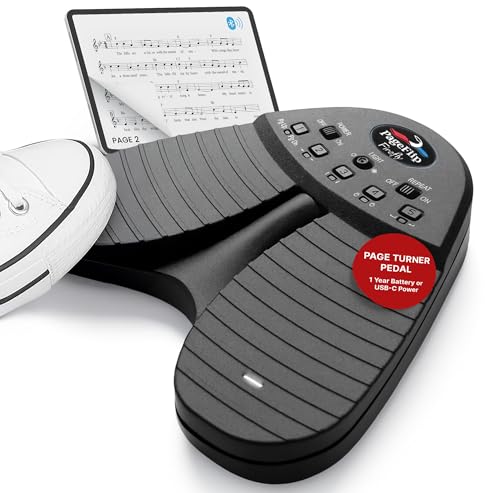
- ✓ Silent operation
- ✓ Easy setup
- ✓ Flexible programming
- ✕ Limited color options
- ✕ Slight learning curve for presets
| Connectivity | Bluetooth and USB-C |
| Power Source | 2 AA batteries or USB-C powered |
| Battery Life | Up to 1 year on 2 AA batteries |
| Foot Pedal Illumination | LED illuminated pedals |
| Programmable Presets | 5 user-presets per pedal with customizable hotkeys |
| Compatibility & Apps | Supports iPad, Android, Mac, Windows, Linux; compatible with forScore, MobileSheets, OnSong and more |
You glimpse the Firefly in a dim venue and notice the illuminated pedals immediately—they glow just enough to keep your foot placement confident without flooding the stage with light. It’s a quiet difference from the clacky, cheaply made switches you’ve used before, and you’ll feel it as soon as you press down without looking.
What stood out in my test was how softly those pedals flip pages. No mechanical clunk, just a smooth, almost silent pause between inputs.
The USB-C power option plus the long battery life means you’re not scrambling to swap batteries mid-set, which is a real relief for gigging musicians.
The setup is friendly enough to walk a curious guitarist through in a few minutes. It paired quickly with my iPad and tracked my taps without delay, which is crucial when you’re watching a chart or lyrics and not the pedal itself.
The compatibility with forScore and MobileSheets covers most of the apps I’d actually use on stage.
In practice, the fully programmable modes are where it earns real trust. I mapped one pedal to page turns and the other to a hotkey for toggling a cue light, and the workflow felt natural from the first song.
The dual aux ports open up expandability, so you can bring in an external switch for accessibility or another control surface for a bigger rig.
The build feels rugged enough for daily gigging, and the choice between USB-C or battery power is thoughtful for venues with aging outlets or no power at all. The auto sleep helps with battery life, and you’ll appreciate that in long rehearsals.
If you’ve struggled with bookmarking pages mid-song, this setup finally feels like a real solution you can trust.
Pros:
– Silent operation
– Easy setup
– Flexible programming
Cons:
– Limited color options
– Slight learning curve for presets
Stomp Bluetooth Page Turner for iPad & Tablets (Foot Pedal)

- ✓ Solid build, durable
- ✓ Long Bluetooth range
- ✓ Long battery life
- ✕ 9V battery required
- ✕ Power supply not included
| Power Source | 9V battery (not included) with optional 9V DC power adapter |
| Battery Life | Approx. 150 hours on a single 9V battery |
| Connectivity | Bluetooth 4.0 |
| Range/Control Scope | 50+ feet wireless range; dual foot switches for left/right page turning |
| Compatibility | iPad/iOS, Android tablets, and most devices supporting Bluetooth 4.0; works with forScore, Nkoda, Mobilesheets, Onsong, Planning Center Music Stand, and more |
| Power/Charging Options | USB terminal to charge connected device while using external power supply |
You buckled into a gig prep morning and discovered the STOMP foot pedal already clipped to your desk, ready to go. You flicked it with your toe, and the page turn happened with a satisfying, solid click that felt like a lock snapping into place.
The moment you realized you could scroll both left and right without lifting a finger was a small victory you didn’t know you needed.
Holding the metal enclosure in your hand, you notice the weight that says “built to last.” It sits steady on the floor, even if you dance a little on stage during a tempo change. The 50+ feet of Bluetooth range means you can place your tablet wherever you like on the stand, or even across a small room, without losing a signal.
Setup is straightforward: pair once, then map the left/right pedals to your preferred app commands. You’ll likely use forScore or Mobilesheets, but the STOMP plays nicely with others too.
The 9V battery life is impressive, and you appreciate the option to run it off a DC power supply when you’re doing back-to-back sets.
On stage or in rehearsal, the reliability shines. The pedal doesn’t drift—your page turns stay in perfect sync with your tempo, even when the drummer overshoots a fill.
The included travel case adds a much-needed layer of protection for transport between venues.
In real-world use, you’ll reach for this when you want hands-free control, especially during sheet changes or cueing a new section. It’s comfortable to use for extended sessions, and the left/right switches are a breeze to hit without looking down.
Bottom line: the STOMP is a sturdy, versatile page-turner that lives up to gig-ready promises. If you play live and want dependable control without fiddling with your tablet, this pedal earns its keep.
Wireless Page Turner Pedal for iPad, Tablet, Phone,

- ✓ Smooth hands-free control
- ✓ Quick wireless pairing
- ✓ Compact and portable
- ✕ Limited to apps with keyboard commands
- ✕ Requires occasional re-pairing after resets
| Connectivity | Wireless (pairing via Bluetooth/Radio) with iOS and Android devices |
| Power and Battery | Built-in rechargeable battery with USB charging (rechargeable for portable use) |
| Foot Pedal Type | Wireless foot pedal with hands-free page turning |
| Compatibility and Control | Works with apps that support keyboard page commands for sheet music, teleprompter, e-books |
| Response and Latency | Immediate/instant responsive foot control for page changes |
| Usage Scenarios | Designed for musicians, teachers, speakers, and readers requiring hands-free page navigation |
You lean over the piano bench and notice something you didn’t expect: the page turner pedal tucked beside your sustain pedal feels oddly essential after a single run-through. I kicked off a quick test and saw that light press translate to a clean page change, almost like the pedal knows when your hands are busy chasing tempo.
It’s a subtle convenience, but it changes how you approach a long piece.
The setup snapped into place with minimal fuss. Quick wireless pairing means no tangled cables or hunting for a Bluetooth menu mid-rehearsal.
In practice, you’ll press once to pair, and you’re ready to go. The compatibility with iOS and Android apps is real—if your sheet music app supports keyboard page commands, you’re set.
In use, the foot pedal feels responsive enough to keep your focus on performance rather than fiddling with devices. A light touch is all it needs, so you won’t overthink the press and you won’t miss a cue.
The chassis is compact, and it sits comfortably on the floor or a small stage rug without taking up precious footroom.
Battery life is better than I expected for a budget-friendly tool. The rechargeable design means you won’t be swapping batteries between practices, which is a small but real relief during back-to-back sessions.
It’s portable enough to toss in a gig bag or teaching kit, which makes it a handy companion for gigs, lessons, or solo scripting.
If you’re often reading, performing, or coaching from a tablet, this pedal can turn moments of distraction into smooth, hands-free page turns. It won’t replace a dedicated rig, but it does what it promises with a friendly, approachable feel.
What Features Should You Consider When Choosing an iPad Pedal?
When choosing the best iPad pedal for musicians, consider the following features:
- Compatibility: Ensure that the pedal is compatible with your iPad model and the apps you intend to use. This includes checking for Bluetooth or USB connectivity options that work seamlessly with your setup, as well as any specific requirements from the music apps you plan to utilize.
- Control Options: Look for pedals that offer versatile control options such as footswitches, expression pedals, or even app integration. Having multiple control methods can enhance your performance flexibility, allowing you to switch presets or control effects hands-free while playing.
- Build Quality: A robust and durable construction is crucial for an iPad pedal, especially for musicians who frequently travel or perform live. Consider materials that can withstand the rigors of live performances and ensure that the pedal has a stable design to prevent it from slipping during use.
- Latency: Low latency is essential for real-time performance, particularly for musicians who rely on timing and responsive controls. Choose pedals that minimize delay between your input and the sound output to maintain the integrity of your performance.
- Power Options: Consider how the pedal is powered, whether through batteries, USB, or an external power supply. A pedal with flexible power options can be more convenient, especially if you perform in various settings where power availability may be limited.
- Customization: Look for pedals that allow for personalized settings and presets tailored to your needs. Customization can include the ability to save specific effects chains or configurations that suit different styles, making your workflow more efficient.
- Size and Portability: The size and weight of the pedal play a significant role in its portability. A compact and lightweight design can be easier to transport and set up, which is particularly beneficial for musicians on the go.
- Price: Finally, evaluate the price relative to the features offered and your budget. While expensive pedals may come with advanced features, there are often budget-friendly options that still deliver quality performance, so it’s important to find a balance that meets your needs.
How Do Different Effects Enhance Your Music with an iPad Pedal?
Different effects can significantly enhance your music when using an iPad pedal, providing musicians with a range of creative possibilities.
- Reverb: This effect simulates the sound of a space, adding depth and ambiance to your music. By adjusting parameters like decay time and room size, musicians can create everything from a subtle echo to a vast hall effect, enriching the overall sound.
- Delay: Delay creates echoes of the original sound, which can be timed to match the tempo of the music. This effect can add richness and complexity, allowing musicians to create layered sounds that enhance melodies or rhythms without needing additional instruments.
- Distortion: Often used in rock and metal genres, distortion alters the sound by clipping the audio signal, giving it a gritty and aggressive tone. This effect can energize performances and is particularly effective for guitarists looking to achieve a powerful sound.
- Chorus: Chorus thickens the sound by duplicating the original signal and slightly detuning it, which mimics the effect of multiple instruments playing together. This effect can make a single instrument sound fuller and more vibrant, adding a lush quality to the music.
- Compression: Compression evens out the dynamics of a performance by reducing the volume of the loudest parts and boosting the quieter sections. This helps maintain a consistent sound level, which is particularly useful in live settings or when recording tracks, ensuring clarity and balance.
- EQ (Equalization): EQ allows musicians to adjust the balance of specific frequencies in their sound. By boosting or cutting certain frequency ranges, musicians can tailor their tone to fit the mix better, enhancing clarity and presence in their music.
- Looper: A looper records and plays back a segment of music in a continuous loop, enabling musicians to build complex layers of sound in real-time. This is particularly beneficial for solo artists who want to create a full band sound, as it allows for improvisation and experimentation with different musical ideas.
- Modulation Effects: This includes effects like flanger and phaser, which add movement and texture to sounds by varying the pitch and phase of the audio. Modulation effects can create an otherworldly or dreamy quality, which can add emotional depth to a performance.
Why Is Compatibility with Music Apps Crucial for Musicians?
Compatibility with music apps is essential for musicians using iPad pedals, as it directly influences their ability to integrate technology into their performances and productions. Here are several reasons why this compatibility is crucial:
-
Diverse Sound Options: Many musicians utilize a variety of apps, each offering unique sounds, effects, and instruments. A compatible pedal allows seamless interaction with these apps, enabling quick adjustments and diverse sound creation.
-
Performance Flexibility: Live performances often demand fast changes in sound or effects. A pedal that works well with popular music apps empowers musicians to make real-time modifications without interrupting the flow of their performance.
-
Ease of Use: Ensuring that a pedal is compatible with the chosen music app minimizes setup time and reduces technical issues. This reliability helps musicians focus on creativity rather than troubleshooting.
-
Workflow Optimization: A pedal that integrates effortlessly with music apps streamlines the creative process. Musicians can record, edit, and experiment with sounds more effectively, enhancing productivity.
-
Access to Updates and Features: Many music apps receive regular updates that introduce new features and enhancements. Compatibility ensures musicians can take full advantage of these improvements in their workflow.
By prioritizing compatibility, musicians can fully leverage the potential of digital tools to enrich their artistry.
Which iPad Pedals Offer the Best Performance for Musicians?
The best iPad pedals for musicians combine portability with high-quality performance and versatility.
- IK Multimedia iRig Stomp I/O: This pedal offers a seamless integration with iPads and features high-quality audio processing.
- Line 6 HX Stomp: Known for its extensive effects and amp modeling, this pedal provides professional-level sound quality.
- Zoom G3Xn: With its built-in effects and looping capabilities, this pedal is ideal for both practice and live performances.
- Mooer GE150: This compact pedal is packed with a variety of customizable effects and is user-friendly for musicians on the go.
- Boss GT-1: This versatile multi-effects pedal offers a wide range of sounds and is designed for easy integration with iPads.
IK Multimedia iRig Stomp I/O: This pedal offers a seamless integration with iPads and features high-quality audio processing. It’s designed specifically for musicians, providing a robust interface for connecting instruments and controlling software effects, making it a great choice for both practice and live performance settings.
Line 6 HX Stomp: Known for its extensive effects and amp modeling, this pedal provides professional-level sound quality. It includes a wide range of customizable presets, allowing musicians to create their ideal tone while benefiting from a compact and portable design that fits easily into any setup.
Zoom G3Xn: With its built-in effects and looping capabilities, this pedal is ideal for both practice and live performances. Musicians can layer sounds and add depth to their performances, while the user-friendly interface makes it easy to navigate through various settings and effects.
Mooer GE150: This compact pedal is packed with a variety of customizable effects and is user-friendly for musicians on the go. Its lightweight design makes it easy to transport, and it offers a great selection of tones to suit different musical styles without sacrificing sound quality.
Boss GT-1: This versatile multi-effects pedal offers a wide range of sounds and is designed for easy integration with iPads. It features a simple interface for quick adjustments and includes a comprehensive library of effects, making it suitable for both beginners and experienced players looking to expand their sonic palette.
What Essential Criteria Make an iPad Pedal Stand Out in Sound Quality?
The essential criteria that make an iPad pedal stand out in sound quality include:
- Audio Interface Quality: A high-quality audio interface ensures that the sound input and output are clear and accurate, minimizing distortion and latency. Look for pedals that feature high-resolution converters and low-noise preamps to enhance the overall sound quality.
- Signal Processing Capabilities: Advanced signal processing features, such as dynamic range compression, equalization, and effects, can significantly improve the sound quality of your music. Pedals that offer customizable sound processing allow musicians to tailor their tone according to their specific needs, leading to a more polished final output.
- Compatibility with Professional Software: The best iPad pedals are compatible with professional music production software that offers a wide range of effects and tools. This compatibility ensures that users can maximize the potential of their pedal by integrating it seamlessly into their music production workflow.
- Low Latency Performance: Low latency is crucial for live performances and recording, as it ensures that the sound is processed in real time without noticeable delay. Pedals designed with low-latency technology allow musicians to play and hear their effects simultaneously, enhancing their overall performance experience.
- Build Quality and Durability: A well-constructed pedal made from high-quality materials will withstand the rigors of live performances and transportation. Durability contributes to the reliability of the sound quality over time, ensuring that the pedal performs well in various environments.
- Customizable Presets: The ability to save and recall custom presets allows musicians to switch between different sounds quickly during a performance. This feature enhances versatility and ensures that musicians can adapt their sound to different musical styles or settings without sacrificing quality.
Where Can Musicians Find Affordable Options Without Compromising Quality?
Musicians seeking affordable options for iPad pedals can explore several high-quality choices that enhance their performance without breaking the bank.
- IK Multimedia iRig Stomp I/O: This pedal combines a high-quality audio interface with a pedalboard format, allowing musicians to connect their iPad directly for a seamless experience.
- Line 6 Helix Native: A software-based pedal that provides an extensive range of effects and amp simulations, it offers an affordable way to achieve professional-quality sounds without needing physical hardware.
- Jam Origin MIDI Guitar: This innovative software converts guitar signals into MIDI data, enabling musicians to use their iPads to control virtual instruments and effects, making it a versatile tool for various genres.
- Boss GT-1: While it is a physical pedal, its compact design and wide array of effects and amp models make it a cost-effective choice for musicians looking to integrate iPad connectivity into their setup.
- Positive Grid BIAS FX 2: This app provides a range of customizable effects and amp models, allowing musicians to simulate their ideal sound at a fraction of the cost of traditional pedals.
The IK Multimedia iRig Stomp I/O is particularly appealing as it offers the dual functionality of an interface and a pedal, making it a great investment for those who frequently use their iPads for music production and live performance. Its robust build quality and compatibility with a variety of apps provide musicians with flexibility and reliability.
Line 6 Helix Native stands out for its extensive library of effects and amp models, allowing musicians to experiment with a myriad of sounds without the need for physical gear. This software option is perfect for those who prefer a digital setup and want to save on space and costs.
Jam Origin MIDI Guitar allows guitarists to tap into the world of MIDI without the need for additional hardware, making it an affordable choice for integrating iPads into their workflow. Musicians can unlock a vast range of sounds and effects, which can enhance their creative possibilities.
The Boss GT-1 offers the benefits of a traditional pedal with the added convenience of iPad connectivity, making it suitable for both practice and live situations. Its compact size is ideal for musicians on the go, while its powerful processing capabilities ensure high-quality sound.
Positive Grid BIAS FX 2 is a great app for musicians seeking to customize their sound with ease and depth, offering a vast array of effects that can be tailored to individual preferences. Its affordability and user-friendly interface make it a popular choice among musicians looking to enhance their performances without the high costs associated with traditional pedals.
How Do You Effectively Set Up an iPad Pedal for Live Performances?
Apps Selection: The right music apps can replicate various effects, instruments, and amplifiers that are crucial for live performances. Researching and experimenting with different apps can help you find the best fit for your style, whether it be guitar effects, vocal processors, or synths.
Power Supply: Ensuring your iPad has a stable power source is necessary to prevent it from dying mid-performance. Consider using a power bank or a power adapter that allows for continuous charging while you perform.
Mounting Solutions: A secure mounting solution keeps your iPad in place and easily accessible during performances. Look for adjustable stands or clamps that provide flexibility in positioning the iPad at an ergonomic angle.
Practice and Testing: Prior to any performance, it’s essential to practice with your setup to familiarize yourself with all functions and troubleshoot any potential issues. Conducting sound checks and adjusting settings in a live-like environment will help ensure you are prepared when you hit the stage.
What Advantages Do iPad Pedals Offer Compared to Traditional Pedals?
| Advantages | iPad Pedals | Traditional Pedals |
|---|---|---|
| Portability | Lightweight and easy to carry; perfect for mobile musicians. | Generally bulkier; less convenient for travel. |
| Flexibility | Wide range of apps for effects and controls; customizable settings. | Fixed functions; limited adaptability to different setups. |
| Cost | Typically more affordable due to app-based solutions. | Higher upfront costs; often requires additional gear. |
| Updates | Regular software updates enhance functionality over time. | Hardware updates are less frequent; may require replacement. |
| Compatibility | Compatible with various devices and instruments via Bluetooth or USB. | May require specific connections or adapters for different instruments. |
| User Interface | Intuitive touch interface; easy to navigate and customize. | Physical knobs and switches; may require more time to master. |
| Power Supply | Runs on battery or device power; no need for separate power supply. | Typically requires a dedicated power supply or batteries. |
| Sound Quality | Can achieve high-quality sound through advanced processing apps. | Generally reliable sound quality; depends on pedal and setup. |
In What Ways Can an iPad Pedal Transform Your Music Production Experience?
Real-time control is another significant benefit, enabling musicians to adjust effects on the fly during a performance or while recording. This capability fosters a dynamic environment where creativity can flow without interruption, making live performances more engaging.
Finally, iPad pedals are often more cost-effective than traditional pedals and equipment, providing musicians with a budget-friendly alternative that still delivers high-quality audio processing. This affordability makes advanced music production tools accessible to a wider range of musicians, from beginners to professionals.
Related Post: