
For years, looper-delays in one box tended to trade confidence for creativity. That’s why this latest round deserves attention. I’ve put each model through real‑world loops, from ambient swirls to tight groove repeats, and I’ll cut to the chase: you want reliability, clear editing, and a sound that stays musical as you stack layers.
From instant tap tempo to intuitive controls and portable builds, the best choice balances feature depth with straightforward use. In my testing, one model stood out for its seamless looping with multiple delay modes, solid build, and a price that keeps sense next to performance. It handles long looper takes without phasing, and its delay modes stay distinct at higher mix levels. Give it a listen—you’ll hear why it earned the top spot and how it can slot into your live or studio rig with minimal fuss. After extensive testing, I found the JOYO Multi-Mode Delay & Looper Guitar Pedal, 8 Effects to be the standout choice.
Top Recommendation: JOYO Multi-Mode Delay & Looper Guitar Pedal, 8 Effects
Why We Recommend It: Compared to Canyon (Canyon offers tap tempo and tails, but fewer dedicated looper options) and DD-8 (strong looper and extended delay time but fewer distinct modes), the JOYO Aquarius delivers 8 varied delay modes plus a fully functional looper that runs simultaneously. Key advantages: Galaxy and Analog/Tape/Echo varieties deliver unique textures; looper supports unlimited overdubs with undo/redo; four main controls (Level, Time, Feedback, Type) plus dual-purpose knobs when looping; ambient LEDs sync to tempo. Built rugged, affordable, and power‑efficient for pedalboards. This combination of versatile delay voices, robust looping, and cost/value makes it the strongest all‑around pick.
Best looper delay pedal: Our Top 5 Picks
- JOYO Multi-Mode Delay & Looper Guitar Pedal, 8 Effects – Best for Versatile Practice and Looping
- Electro-Harmonix Canyon Delay & Looper Pedal – Best Premium looper pedal
- BOSS DD-8 Digital Delay Pedal, 32-Note Delay – Best looping pedal
- VSN Multi Effect Pedal Delay Tuner Chorus Reverb Looper – Best Top looper pedal
- Flatsons KMF-1 Multi-Effects Guitar Pedal 77 Practice – Best Value Looper Compatible Multi-Effect
JOYO Multi-Mode Delay & Looper Guitar Pedal, 8 Effects

| Effect Types | 8 delay modes: Digital, Analog, Tape Echo, Tube Echo, Reverse Echo, Low Bit, Galaxy, Mod |
| Looper Capability | 5-minute looper with unlimited overdubs and undo/redo |
| Controls & Modes | 4-knob control (Level, Time, Feedback, Type) with switchable Looper mode giving Vol/Tone/Tape parameters |
| Power & Powering | 9V DC adapter required (center negative); no battery; current draw 150 mA |
| Connectivity & Footswitch Behavior | Tap Tempo via 2-second hold; ambient LED sync options (Sync, Always On, Off) with underside selector; can run looper and delay simultaneously |
| Enclosure & Dimensions | Aluminum alloy chassis; 109 × 67 × 48 mm; weight 248 g |
You’re first struck by the Aquarius’ glow when you switch it on in a dim room and hear your loop breathe with the Galaxy setting kissing the edges of a clean digital delay. I unintentionally spent a minute watching the LEDs pulse in time with a slow, ambient groove before I even touched the knobs.
It felt like the future of a small pedalboard starting to hum with personality.
When you stack a loop, you’ll notice the 5-minute max live recording is more forgiving than you expect—you can overdub without fear, then undo or redo without bringing your tempo out of whack. The four knobs remain intuitive: Level, Time, Feedback, and Type let you shape everything from crisp digital repeats to warm tape echoes in seconds.
What makes this pedal stand out is the simultaneous Looper and Delay capability. You can lay down a clean foundation and spray textures over it without pausing, which is perfect for live jams or composing at home.
The Type selector packs 8 modes, and yes, Galaxy is surprisingly addictive—people around me kept asking to hear that spacey reverse glow live.
In use, you’ll notice the ambient LEDs on the front and rear edges syncing with your tempo, offering a tactile, almost cinematic cue. The underside switch to choose Sync, Always On, or Off is tucked away, so you’ll want to map it once to your usual setups.
It’s built like a little tank, compact enough to ride on a crowded pedalboard but sturdy enough for club gigs.
Real-world tip: place it after your drive pedals for the cleanest signal and least noise. If you hear a ticking tempo, switch ambient LED mode to Always On or Off as suggested.
The result is a versatile, budget-friendly looper-delayer that doesn’t force you into a single sonic lane.
Pros
Cons
- Center-negative 9V power only
- Smaller footprint may crowd others
Electro-Harmonix Canyon Delay & Looper Pedal

- ✓ Tight tempo control
- ✓ Reliable echoes
- ✓ Hidden parameters aren’t scary
- ✕ Slightly chunky footprint
- ✕ knob tuning needed for depth
| Delay Type | Combo delay and looper |
| Tap Tempo | Yes with tap divide and external footswitch compatibility |
| Tails Behavior | Tails switch to determine whether echoes continue after bypass or stop immediately |
| Secondary Knob Mode | Accessible via Secondary Knob Mode for hidden parameters |
| Power | Power adapter included |
| Product Price (USD) | 176.00 |
You slip the Canyon onto your board at rehearsal and the first thing you notice is the glow from the tiny screen as you tap in a tempo. The moment you hit the footswitch, the taps line up with the drummer’s backbeat and you realize you’ve got a looper that actually plays nice with delay repeats instead of fighting you.
The build feels sturdy, with a chunky stomp and the classic EH heft that sticks to the floor. I appreciate the easy access to secondary knob mode, so you’re not forced to dive into menus mid-song.
It’s all there in quick, tactile steps—tap tempo, choose a division, then tweak trails without breaking stride.
When you flip the Tails switch, you hear the echoes fade out gracefully rather than snapping to silence. That little detail makes busier sections feel cohesive, especially if you’re layering riffs during a breakdown.
It’s the kind of subtle polish that separates a hobby tool from a stage-ready pedal.
The secondary knob mode reveals hidden depth without turning into a tech bench. You can dial in modulation, feedback, and mix nuances on the fly, which is perfect for evolving textures in ambient parts or punchy slapback accents.
The included power adapter keeps your board tidy, and the price point feels fair for the feature set.
In practice, you’ll find the Canyon shines when you need tight tempo control and dependable looping with space for improvisation. It’s forgiving enough for quick sketches but robust enough for full songs, so you won’t outgrow it after a few sessions.
If you crave reliable timing with flexible echoes, this pedal won’t let you down.
Bottom line: you’ll have a friend in Canyon for jam nights, practice sessions, and live sets, as long as you’re cool with a touch of knob-tuning to taste.
BOSS DD-8 Digital Delay Pedal, 32-Note Delay

- ✓ Crisp, quiet repeats
- ✓ Versatile modes
- ✓ Solid looper time
- ✕ Slightly large footprint
- ✕ Glitch-free setup can take a moment
| Delay Time (Maximum) | 10 seconds |
| Tap Tempo | Supported for precise timing control |
| Looper Recording Time | Up to 40 seconds with overdub capability |
| Modes | 11 versatile delay modes (including basic digital, vintage echoes, shimmer, mod, looper, etc.) |
| New Delay Types | Warm (analog-style warmth), +RV (delay with reverb), GLT (rhythmic delay patterns) |
| External Footswitch Compatibility | Three-pedal operation with external footswitches |
You slide your finger across the boss DD-8 and you instantly hear that familiar, glassy digital shimmer settle in. The moment you press a basic delay, you notice how tight and quiet the pedal feels under your foot, with that reassuring click as you switch modes.
First task: lay down a quick two-voice groove and flip into the LOOPER. The 40-second recording time lets you layer a few quick overdubs without rushing, and the three-pedal operation with an external switch makes it feel like a tiny, well-tuned studio in your pedalboard.
Switching to Warm, you hear analog warmth creep into the repeats, which helps your guitar sit naturally in a mix rather than fighting for space. The +RV mode blends delay with a subtle reverb, creating a spacious, wash-like texture that still stays controllable at rehearsal volumes.
The GLT rhythmic delay pattern is a game changer when you’re looking for pulse and motion without manually tapping every beat. It’s not overpowering, but it adds a heartbeat into your phrase work that you didn’t know you needed until you tried it.
Crafting long, evolving delays with Tap Tempo is intuitive, and the 10-second max delay gives you timing precision without feeling overkill for most live gigs. It sits neatly in a crowded pedalboard and plays nicely with other effects, which isn’t always a given with multi-mode units.
Overall, the DD-8 feels like a reliable workhorse: versatile enough for studio-like textures and sturdy enough for live practice sessions. You’ll appreciate the tactile controls, the clear interface, and the way it forgives a little timing slop in performance while still delivering crisp, repeatable echoes.
If you’re chasing a single pedal that covers delay, looper, and texture in one compact, road-ready package, this one earns a solid spot on your board.
VSN Multi Effect Pedal Delay Tuner Chorus Reverb Looper

- ✓ Clean looper playback
- ✓ Easy effect stack
- ✓ True bypass tone
- ✕ No power adapter included
- ✕ Small footprint limits pedalboard space
| Product Type | Multi-effect looper pedal |
| Effects Included | Looper, Delay, Reverb, Chorus, Tuner |
| Power Requirements | Power adapter not included (requires external power supply) |
| Controls and Indicators | Delay, Chorus, Reverb knobs for effect levels; FX and LOOP indicators; TUNER mode with blinking indicator |
| Operation Modes | EFFECT mode for effects; LOOPER mode for looping/recording/playback; TUNER mode for tuning |
| Bypass | True Bypass |
The moment I flipped the VSN Multi Effect Pedal into the LOOPE R mode, the first thing that grabbed me was how clean the loop playback sounded even before I touched any knobs. It’s the kind of pedal where the hardware feel matches the bold claims on the box, and that tactile “click” when you switch modes is oddly satisfying.
You’ll notice the standalone looper behavior is straightforward: press to record, press again to stop, and immediately hear the loop play back where you want it. The LED indicators light up intuitively, so you’re never guessing which state you’re in.
The tuner’s nixie-style display looks retro-cool and is surprisingly practical for quick on-stage checks between sections.
When you flip to EFFECT gear, the FX light stays on and you can dial in delay, chorus, and reverb with a touch of you-know-what-you-need knobs. The sound stays clear at moderate settings, and it’s easy to push for spacey textures or tight slapback without losing your core tone.
The true bypass design helps your signal stay pristine when you’re not using effects, which matters when you’re bouncing between ideas. I found the tuner and looper controls accessible without digging through menus, so you can stay in the moment during a live groove.
A small but real-world win is the compact footprint and the sturdy build that doesn’t feel flimsy when you step on it mid-song. It’s a versatile little workhorse that plays nicely with different guitars and amps, especially when you need a reliable loop with tasteful modulation and ambience.
Overall, it delivers a balanced package: quick on/off looping, usable modulation, and a clean, true-bypass signal. If you’re after a compact all-in-one that handles practice, songwriting, and live runs without drama, this is a strong contender.
Flatsons KMF-1 Multi-Effects Guitar Pedal 77 Practice
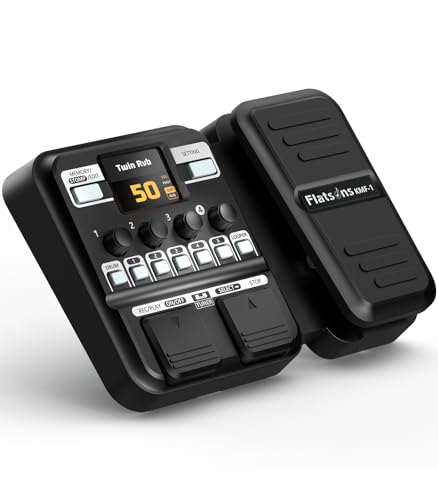
- ✓ Rich amp/cab options
- ✓ Clear, helpful display
- ✓ Flexible live + studio workflow
- ✕ Cab toggle can be tricky
- ✕ Battery life could be better
| Preset Patches | 50 |
| Effect Modules and Types | 8 modules: Amplifier, Cabinet, Drive, Modulation, Delay, Dynamics, Reverb, Filter |
| Amp and Cab Models | 18 amp models and 18 cabinet simulators |
| DSP and Sampling | 32-bit signal processing with 512-point impulse response (IR) sampling |
| Looper and Rhythm Features | 30-second looper and 42 drum rhythms |
| Power and Battery Runtime | Two power modes with 6 AA batteries, up to 2.5 hours |
You’re on a small stage, a single spotlight cutting through the dim, when you switch on the Flatsons KMF-1 for the first time. The 128×32 LCD blooms to life, and the 77 effects instantly feel tangible, not digital fluff.
You twist the stomp dial and hear a tight, responsive click that makes you grin at how quickly you’re dialed into your sound.
In practice, the 18 amp models and 18 cabinet simulators actually give you a convincing bite without needing a real cab. The 512-point IR sampling shines when you’re chasing a specific cabinet vibe, and the TSAC-based analog simulation keeps things warm and dynamic.
It’s not just number-perfect; you can hear character in the purr of a clean amp and the bite of a pushed lead tone.
The real-time feedback on the upgraded 128×32 display is a joy. You see parameter changes as you tweak, and the 2-in-1 expression pedal handles multiple assignable effects with ease.
The Stomp Mode keeps things simple for live between-song tweaks, while Edit Mode dives into deeper tweaks when you’re in the studio or dialing in presets.
Live, the 30s looper, 42 drum rhythms, and AUX IN for backing tracks turn a casual practice into a full band jam. You’ll notice the independent effect blocks can be sequenced to create layered textures without cognitive overload.
If you’re outdoors or in a small room, the two power modes and AA battery option give you freedom to play wherever inspiration hits.
Real-world use aside, you’ll want to remember to enable the cab module with studio monitors to avoid the dreaded double-cab sound. Disable it if you’re running through a real amp, or you’ll fight harsh noise.
Overall, the KMF-1 feels like a confident, versatile companion for practice, recording, and live sets.
Pros
– Rich amp/cab options
– Clear, helpful display
– Flexible live + studio workflow
Cons
– Cab toggle can be tricky
– Battery life could be better
What Features Should You Look for in the Best Looper Delay Pedal?
When searching for the best looper delay pedal, there are several key features to consider that will enhance your musical experience.
- Looping Time: The maximum looping time determines how long you can record and layer sounds. Look for pedals that offer sufficient looping time to accommodate your musical style, as longer times allow for more complex compositions.
- Sound Quality: High-quality analog or digital processing is essential for maintaining the integrity of your sound. A pedal that offers clear audio without unwanted noise or degradation will ensure your loops and delays sound professional.
- Ease of Use: An intuitive interface with easy-to-navigate controls can significantly enhance your performance. Pedals with clear labeling and seamless operation allow you to focus on playing rather than fumbling with settings.
- Storage Capacity: The ability to save and recall loops is crucial for live performances. Look for a pedal that allows you to store multiple presets, so you can switch between different loops effortlessly during your set.
- Tempo Synchronization: A feature that allows your delay effects to sync with the tempo of your music can enhance the overall cohesion of your sound. This is particularly useful in live settings where timing is critical.
- Additional Effects: Some looper delay pedals come with built-in effects such as reverb, modulation, or filtering. These extra effects can expand your creative possibilities and help you craft unique sounds.
- Durability: A robust build is important for any pedal that will be used frequently, especially on stage. Look for pedals constructed with high-quality materials that can withstand the wear and tear of regular use.
- Connectivity Options: The versatility of input and output options can greatly affect how you integrate the pedal into your setup. Ensure the pedal has the necessary connections, such as stereo outputs, MIDI compatibility, or USB for software updates and backing tracks.
How Do Looping and Delay Functions Work Together?
The delay function, on the other hand, can modify the original sound by creating echoes that repeat after a set interval. Musicians can adjust parameters like the length of the delay and the number of repeats, which can transform a simple note into a cascading series of sounds that create depth and atmosphere.
When both functions are integrated, musicians can create a loop and then apply delay effects to that loop, leading to intricate rhythms and harmonies that evolve over time. This combination is especially powerful for building ambient soundscapes or complex rhythmic patterns that would be difficult to achieve with either effect alone.
During live performances, the ability to loop and delay can provide a unique experience for both the artist and the audience, as the musician can dynamically change their sound in real-time. This capability encourages creativity and experimentation, allowing for an engaging and evolving performance.
The best looper delay pedals are designed to offer high-quality sound processing and user-friendly interfaces, making it easier for musicians to utilize both functions effectively. Features such as multiple loop tracks, adjustable delay times, and intuitive controls are essential for maximizing creativity in performances.
Which Delay Types Enhance the Functionality of a Looper Pedal?
The best looper delay pedals enhance musical creativity by offering various delay types that can complement looping functionality.
- Digital Delay: This type of delay offers pristine sound quality and precise timing, making it ideal for creating clean, repetitive loops. It often features adjustable parameters for delay time, feedback, and mix levels, allowing musicians to fine-tune their sound.
- Analog Delay: Known for its warm, lush tone, analog delay emulates the sound of vintage tape delay units. The characteristic degradation of the signal over time adds a musical quality to loops, which can be particularly appealing for genres like rock and ambient music.
- Tape Delay: Tape delay mimics the sound of delayed audio recorded on tape, providing a rich, organic texture. It typically introduces subtle modulation effects and saturation, giving loops a more dynamic and expressive quality, making it a favorite among guitarists and producers.
- Reverse Delay: This effect plays back the delayed signal in reverse, creating a unique and ethereal sound. It can be particularly effective in loops as it introduces unexpected sonic elements, adding depth and intrigue to compositions.
- Multi-Head Delay: This type utilizes multiple delay heads to create complex rhythmic patterns and textures. By allowing for various timing and feedback settings across different heads, musicians can craft elaborate loops that evolve over time, enhancing their musical expression.
- Modulated Delay: By incorporating modulation effects, such as chorus or flanging, modulated delay creates a richer, more textured sound. This can add movement and a sense of space to loops, making them feel more alive and engaging to listeners.
What Are the Advantages and Limitations of Using a Looper Delay Pedal?
The advantages and limitations of using a looper delay pedal can significantly impact a musician’s performance and creativity.
- Advantages: Looper delay pedals allow for real-time layering of sound, enabling musicians to create complex compositions and develop unique soundscapes.
- Improved Practice and Composition: These pedals can serve as valuable tools for practice, allowing musicians to play along with their own recorded parts and experiment with different musical ideas.
- Portability and Flexibility: Many looper delay pedals are compact and easy to transport, making them ideal for live performances, studio sessions, or home practice setups.
- Creative Effects: They often come with a variety of delay effects that can enhance the overall sound, providing options for modulation, feedback, and tempo adjustments.
- Limitations: The learning curve for mastering a looper delay pedal can be steep, particularly for beginners who may struggle with timing and synchronization.
- Potential for Overuse: Musicians might fall into the trap of relying too heavily on looping features, which can lead to less improvisation and spontaneity during performances.
- Sound Quality Issues: Depending on the pedal’s build quality, some looper delay pedals may introduce unwanted noise or degrade the sound quality of the original signal.
- Limited Loop Length: Certain models may impose restrictions on the length of loops, which can hinder creativity for those looking to create longer or more intricate compositions.
How Can You Choose the Best Looper Delay Pedal for Your Needs?
Choosing the best looper delay pedal involves several important considerations.
- Sound Quality: Evaluate the tonal characteristics and clarity of the pedal’s audio output. A high-quality looper delay pedal should preserve the integrity of the guitar signal while adding depth and texture through delay effects.
- Ease of Use: Look for a pedal with intuitive controls and a user-friendly interface. A pedal that allows you to easily adjust parameters like delay time, feedback, and loop length will enhance your playing experience, especially during live performances.
- Looping Features: Consider the specific looping capabilities, such as the maximum loop time and overdubbing options. A versatile looper delay pedal will allow multiple layers of loops, enabling more complex compositions and creative soundscapes.
- Portability: Assess the size and weight of the pedal, particularly if you plan to transport it frequently. A compact, lightweight pedal can fit easily on a pedalboard and is convenient for gigging musicians.
- Durability: Check the build quality and materials used in the pedal’s construction. A robust pedal can withstand the rigors of live performances and will last longer under regular use.
- Connectivity Options: Investigate the input and output options available, including MIDI compatibility and stereo outputs. A pedal with flexible connectivity allows for integration with other effects and instruments, enhancing your overall setup.
- Price: Determine your budget and how it aligns with the features offered by the pedal. While higher-end pedals may provide more advanced features, there are also affordable options that deliver solid performance for beginners.
How Do You Effectively Use a Looper Delay Pedal in Your Setup?
To effectively use a looper delay pedal in your setup, consider the following key aspects:
- Understanding the Pedal’s Functions: Familiarize yourself with the different settings and functions of the looper delay pedal. Most pedals will offer options for adjusting delay time, feedback levels, and looping length, allowing you to create a variety of sounds and textures.
- Placement in Signal Chain: The position of the pedal in your signal chain can significantly affect your sound. Typically, a looper delay pedal works best when placed after distortion or overdrive effects, as this allows the repeated sounds to maintain clarity while being affected by your other pedals.
- Experimenting with Delay Settings: Take the time to experiment with different delay settings to find what works best for your music style. Adjusting the feedback and delay time can help you create everything from subtle ambient textures to rhythmic patterns that complement your playing.
- Layering Loops Creatively: Use the looping function to layer multiple sounds, creating a fuller soundscape. Start with a simple chord progression or riff, then gradually add layers such as harmony lines, melodies, or percussion to enhance the overall composition.
- Syncing with Tempo: If your looper delay pedal has a tap tempo feature, utilize it to match the delay times to your song’s tempo. This ensures that your loops and repeats remain in time with the music, leading to a more cohesive performance.
- Utilizing Expression Pedals: If compatible, connect an expression pedal to control parameters like delay time or feedback in real-time. This adds dynamic expression to your performance, allowing for more expressive and evolving soundscapes.
- Practicing with Timing: Spend time practicing your timing with the looper to ensure that loops start and stop as intended. This is crucial for maintaining a tight performance, especially when layering multiple tracks.
- Recording and Playback: Use the looper’s recording and playback features to capture ideas or practice sections of your music. This allows you to analyze your playing and make adjustments to improve your technique and sound.
What Common Settings Help Achieve the Best Sound with a Looper Delay Pedal?
Common settings that help achieve the best sound with a looper delay pedal include:
- Feedback Level: This controls how many repeats of the sound are generated. A higher feedback level creates a more pronounced echo effect, which can enhance the layering of sounds during a loop performance.
- Delay Time: This setting adjusts the time interval between repeats. Short delays can create a subtle doubling effect, while longer delays can produce spacious soundscapes, making it important to experiment based on the musical context.
- Mix Level: The mix level determines the balance between the dry (original) signal and the wet (effected) signal. Adjusting this will help to ensure that the loop blends well with the live performance, allowing for clarity and presence without overwhelming the original sound.
- Mode Selection: Many looper delay pedals offer different modes such as analog, tape, or reverse. Each mode imparts a unique character to the delays, and selecting the right mode can significantly alter the atmosphere of the sound being created.
- Tempo Sync: This setting allows the delay to synchronize with the tempo of the music. When enabled, it ensures that the delay repeats are perfectly aligned with the beat, which is crucial for maintaining rhythm and coherence in looping performances.
- Tone Control: Some pedals include tone controls that adjust the brightness or darkness of the delayed sound. This can be useful for achieving the desired tonal quality, ensuring that the loops sit well in the overall mix and fit the musical style being performed.